Accounts and invitations
Postulo is multi-user, and closed by default.
Who a person is
Every account has three things, all obligatory:
- A username — 3 to 32 lowercase letters, digits, dots, underscores or hyphens. It is what you sign in with, and what other people on a shared instance see. Chosen at signup; changed under Settings → Account.
- A full name — first and last. Every document starts from it, so Postulo asks for it up front rather than printing a CV with a blank at the top.
- An email address — unique across the instance, and verified: a link is sent to it, and the account cannot sign in until the link has been followed. The address works for signing in too, interchangeably with the username.
An account may hold up to five addresses (Settings → Account → Email addresses), each of them verified by its own link. One is primary: it receives Postulo's mail and is the one an export records. An address cannot be made primary until it has been verified.
Accounts that existed before verification was required were marked verified when the instance was upgraded: they had been signing in by those addresses all along.
Your picture
In Postulo itself: the question mark on the Your picture card of Your details opens the short of this, in the language you read Postulo in — or, with scripts off, the page
/help/your-picture/on your instance, in a new tab.
The header shows your initials on a coloured tile until you give it a picture, under Your details → Your picture. Two ways, in this order of precedence:
- Upload one. PNG, JPEG, WebP or GIF up to 5 MB. Postulo decodes it, straightens it, cuts it to a square and re-encodes it, which also strips everything the file knew about where and when it was taken — a phone photograph carries the place. It is stored under private media and served only to you (and to administrators), never by the web server.
- Use my Gravatar. Tick the box and Postulo fetches the picture for your primary address from gravatar.com once, from the server, keeps a copy and shows that. Pages never point your browser at Gravatar: an image loaded from there would tell them your address and a hash of your email on every page view. It is fetched again when your primary address changes, or when you press Fetch my Gravatar again. Untick the box and the copy is deleted. If Gravatar has no picture for your address, the initials stay and the page says so.
Nothing above appears on a CV. Whether a photograph belongs on one depends on the country, so a CV photo is a second picture of its own.
Your CV photo is under Your picture on the same page, with its own upload and its own Remove. It is not the avatar and not the Gravatar copy: changing one leaves the other, and the photo is never shown by the interface. It is decoded, straightened and written out again, which drops where it was taken, but it is not cropped: your own framing is kept, within the same size limit. A CV prints it only where its own page says so (Print your CV photo, off by default; see CVs), and it goes with your account when you delete it.
Two-factor authentication
Optional, per person, under Settings → Account → Two-factor authentication. Once it is on, signing in asks for a six-digit code from an authenticator app after the password, so a leaked password alone is not enough.
- Setting up: scan the QR code with any authenticator app (Aegis, 2FAS, Ente Auth, Google Authenticator, the one built into your password manager), or type the key, then confirm with one code. Postulo asks for your password again first.
- Recovery codes: ten single-use codes, shown when you set up and available again from the same page. Keep them somewhere that is not your phone; each signs you in once when the phone is not to hand.
- Trust this browser: after a code, Postulo offers to skip the question on that browser for thirty days. Decline on a shared computer.
- Lost the phone and the codes? Whoever has a shell on the server can remove the second factor from an account:
A password alone signs in again; set it up afresh afterwards.
API tokens are their own credential and do not go through the second factor: a browser extension has no code to type. See The capture API.
Passkeys
A passkey is held by your device or your password manager and released by a fingerprint, your face or a device PIN. It is the best way in Postulo has:
- There is no shared secret. Nothing to leak in a breach, nothing to reuse on another site, and no code to read out to somebody who has phoned you pretending to be support.
- It is already two factors — the device you have, unlocked by something you are or know — so it stands on its own rather than being a step after a password.
- It cannot be used on the wrong site. The browser will only offer a passkey to the address it was made at, which is what makes it proof against a convincing copy of your sign-in page.
Add one under Settings → Account → Passkeys. Give it a name you will recognise later, and leave Let this passkey sign me in on its own ticked unless you want it only as a second step after your password. Then Sign in with a passkey on the sign-in page is all it takes.
Two things are worth knowing before you rely on one.
It is tied to the address you made it at. A passkey made at postulo.example.org will
not work at jobs.example.org, and moving your instance to a new name makes every existing
passkey unusable there. That is the standard, not a limitation of Postulo, and there is no
migrating them: add new ones at the new address and remove the old. The account page names
the address you are currently on, so you can see what you are committing to.
Your browser needs HTTPS. Over plain HTTP browsers refuse the whole mechanism, with
localhost the only exception. An instance reached at a bare address over a mesh VPN cannot
offer passkeys at all, and no server setting changes that; the account page says so instead
of showing a button that would fail.
Make recovery codes. Once a passkey is your only way in, losing the device means losing the account. Recovery codes are the answer, they live under Two-factor authentication, and the account page nags you until you have some. Keep them somewhere that is not the device.
Single sign-on
An instance can sign people in through an OpenID Connect identity provider — Authentik, Keycloak, Pocket ID, Zitadel, Kanidm, Google, or anything else that speaks it. It is native: nothing to install, four variables in the environment (see Configuration), and a button on the sign-in page named after the provider.
- Existing accounts link, they are not duplicated, when
POSTULO_OIDC_LINK_BY_EMAILis on (it is off by default since 0.6.0). An address the provider has verified then signs in the account that holds it, and the provider is connected to that account from then on. People can see and disconnect it under Settings → Account → Sign-in methods. Only a verified address ever matches, on both sides: the provider must have verified it, and the local account must have verified it too. An address only listed on an account, never confirmed, links to nothing, and the person arriving through the provider is treated as new. That does mean the instance takes your provider's word for what verified means, so if you do not run the provider, read the note on Hardening and keepPOSTULO_OIDC_LINK_BY_EMAIL=false(the default since 0.6.0), which makes each person connect the provider from their own account page instead. - By default, existing accounts only. The identity provider is not an invitation:
someone it knows but Postulo does not is turned away, unless they followed an
invitation link or registration is open. Set
POSTULO_OIDC_AUTO_SIGNUP=trueto let the provider create accounts — right for a household or a small team where it already gates everything. - The username and name come from the provider's claims —
preferred_username,given_name,family_name— bent to Postulo's rules, with the address's local part as the fallback for the username. An address the provider says it verified needs no further click. - Two-factor still applies after a single sign-on, if the person has it on.
- The callback address the provider must be told is shown under Server settings → Sign-in, exactly as the browser reaches it: scheme, host and port must match.
Sign-in tokens from the provider are not stored; Postulo has no use for them.
Administrators
An administrator runs the instance: invites people, sees the list of accounts, and changes the instance's policy under Server settings, reached from the account menu (top right). Administrators see accounts — never anyone's notes, applications or documents; those stay private to the person who owns them. A superuser can also open, change, give away or delete any company, contact or listing, including private ones, since somebody has to be able to settle what a departed member left behind — but never anybody's notes on them, decisions about them or applications to them.
That is what Server settings shows, and it is not the whole of the role. An administrator
is trusted with the instance: they can install plugins, and a plugin is code running
with the whole database. Appoint only people you would trust with it. Appointing someone
makes them an administrator and nothing more; it does not make them a superuser. That flag
belongs to the first account and to createsuperuser, and in Django's admin (below) it
reaches every account, passwords and flags included.
The first account is the administrator. On an empty instance the sign-up form is
offered to whoever reaches it, and the account it creates administers the instance; its
address is trusted, since nobody else exists yet to send a verification link. After that
the door closes again. createsuperuser on the command line still works, and does the
same thing.
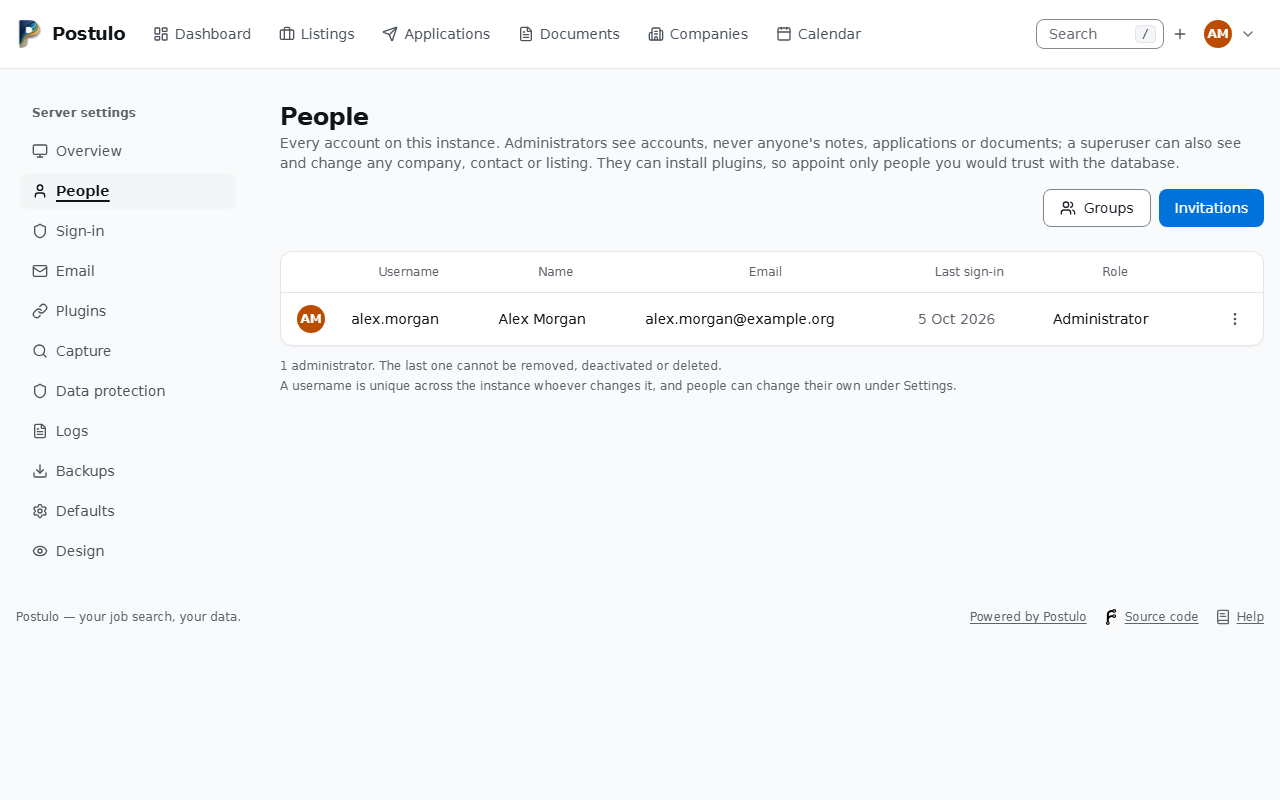
Server settings → People lists every account and lets an administrator make or unmake other administrators, deactivate accounts (nothing deleted, no sign-in), delete an account outright (see Deleting your account) and change a person's username on their behalf. The last administrator cannot be removed, deactivated or deleted — by anyone, including themselves — and nobody can deactivate or delete the account they are signed in with from that page. A username is unique across the instance whoever changes it: a name already in use, in any capitalisation, is refused before anything is saved.
Groups (the button beside Invitations) are named sets of accounts, with no powers of their own: they exist so that an access rule on a plugin or a module can point at several people at once.
Each row's menu also holds Plugins for this account — the exceptions to what the instance decides for everybody. An administrator may make a plugin available, unavailable, always on or always off for one person, and whatever they decide is shown to that person on their own settings page with the administrator's name against it. Switching a plugin off stops it being used and deletes nothing: connections and their settings stay exactly as they are, and turning it back on brings them back unchanged.
Each row starts with the person's picture — or their initials, until they have one — and its actions live behind the ⋮ button at its end, in a menu that opens over the page, so the last row's is as whole as the first's. They used to sit across the row with their names spelled out, which made that one column a third of the table and pushed the whole thing off the side of the page at every window size. On a phone the rows stop being rows at all and become a card each, headed by the picture and the username, with every value labelled by the column it came from.
Who can sign up
Registration is closed by default: the sign-up form is not offered, and the only way in is an invitation. An instance holding somebody's employment history has no reason to accept strangers.
An administrator opens it under Server settings → Sign-in. The operator may also pin it
with POSTULO_REGISTRATION_OPEN in the environment, in which case the environment wins
and the page says so. Open it only if you genuinely want anyone who finds the URL to be
able to create an account.
Invitations
Server settings → People → Invitations.
An invitation is:
- single use — it is spent the moment somebody signs up with it;
- self-expiring — fourteen days by default;
- optionally bound to one email address — and that binding is enforced at signup, not merely suggested, so an invitation addressed to one person cannot be redeemed by whoever else ends up holding the link. The invitation is not that address's verification: Postulo does not send it, so following the link proves nothing about the mailbox. The invited person confirms the address with the usual link, mailed to it.
Create one, copy the link from the page that confirms it, and send it however you like. The link is shown once, there. Postulo keeps only a fingerprint of it, as it does for a recovery link and an API token, so the list of invitations cannot show it again and a copy of the database is not a set of working invitations. Lost the link before sending it? Revoke the invitation and make another. Pending invitations can be revoked. Accepted ones cannot be deleted, because they are part of the record of who was let in.
Only administrators can issue invitations. To make someone an administrator, use Server settings → People.
Deleting your account
Settings → Your data → Delete my account. The page says exactly what goes — applications, listings, companies and contacts, documents and the files behind them on the disk (uploads, sent documents, pictures, logos, export archives, kept pages), reminders, interviews, tokens, connections and their secrets, the invitations you issued that nobody accepted, the account itself — and offers the export first, prominently. Confirming takes your password again (or your second factor) and your address typed out. Then it is done, at once: there is no grace period, because a "pending deletion" state is a second thing to get wrong, and the export is the safety net.
The one account that cannot be deleted is the last administrator's, by anyone, including themselves: make somebody else an administrator first. An administrator can delete another person's account from Server settings → People (the same service, the same file cleanup), and an operator from the command line:
Separation between accounts
No one sees another person's data unless that person granted it — explicitly, for a stated scope, revocably, and visibly to them at any time. Superusers can see and change any company, contact or listing, including private ones, but never anyone's notes, applications or documents.
Applications, tags, CVs, letters, files and everything else belong to exactly one person and are never shared. A company, a contact or a listing belongs to one person or to one group (below), and its owner can share it.
Asking for a record nobody granted you returns not found rather than forbidden — confirming that a record exists would itself disclose something.
Groups and sharing
An administrator puts accounts in groups under Server settings → People → Groups. A company, a contact or a listing can belong to a group: every member can see it, change it, share it and delete it.
Sharing. On a record's page, Share gives it to a person — typed by their username or
email address, since the instance's accounts are not a list to pick from — or to one of your
groups, either read-only or read/write. Read/write is its details: nobody it is
shared with can delete it, share it on or give it to somebody else. The record's page lists
who has it, and Stop sharing takes it back at once. A listing points at its company, a
contact at theirs and a company at the one it is part of; sharing one the other side could
not follow offers to share what it points at too, read-only, or shares nothing. Each person
you look up counts against an hourly allowance (POSTULO_SHARE_LOOKUP_RATE); choosing one
of your groups is free. The page names a person as you typed them, so an address never
shows you the username that goes with it.
What stays yours. Your note on a company or a contact, where you stand with a listing — new, shortlisted, discarded, and why —, the listing's history as you keep it, your applications, the contacts you add at a company and your appointments there are yours, whoever else has the record. Two people applying for one shared listing each keep their own application, and neither sees the other's. What a deletion lists, what a merge would move and what your account archive carries count only your own rows, and a company shown as part of another is named only to people who can see both.
Who changed what. A record's page lists its last changes and who made them, by the names of what changed, never its old contents.
Changing the owner. Owner on the page gives a record of yours to one of your groups, or takes a group's record as yours — saying first what that does to everybody else.
Who is in a group. Your groups lists every member by username, and the log names who an administrator added or removed. Changing members needs a recent sign-in. A deactivated account may stay in a group (nothing is deleted) and is marked as such; none is added.
Leaving. Your groups, in the account menu, lists your groups and leaves one. You stop seeing what the group owns or was shared, and keep a copy of each record your own applications, notes and other records point at, marked Copied from …. The same happens when an administrator takes you out of a group, when something shared with you is taken back, when a group's record is given to one member, and when the owner deletes a record or their account. The last member of a group that still owns records cannot leave it, and such a group cannot be deleted.
Conflicts. The same company, person or advert held by two owners — your own Acme and your group's — is listed under Conflicts (on the companies and listings pages), to merge into one, keep both or give one to another owner. A merge is refused while somebody who sees one of the two could not see the other.
Showing. A person in a group, or with things shared with them, can narrow the companies and listings to their own, their groups', or those shared with them; a superuser can also ask for everybody's.
Importing a file, a spreadsheet or cards asks whose the companies, contacts and listings become — yours, or one of your groups' — and matches what is already there among that owner's records only.
The administration interface
Everything an administrator needs day to day is under Server settings: an overview of what is running and where the data is, the accounts, the sign-in policy, a test of the email settings, the installed plugins, capture policy, and the instance's name and the defaults new accounts start with.
Django's own admin is the escape hatch for anything Server settings does not cover, and it is off unless you ask for it. It holds accounts, invitations and the metadata of API tokens, and no person's records: nobody's applications, documents, contacts or career record are in it, because a page there would skip the checks and the timeline the rest of Postulo keeps. Before 0.5.0 they were, and every superuser could read and edit them. Give it a path and it appears there:
The path is not a security control on its own; it keeps the noise down. The admin has no login of its own: you sign in to Postulo as usual, second factor included, and are taken there. See Hardening for why it is off by default.
Only a superuser has anything in it. Administrators appointed from People are not
superusers, so they find it empty. To give somebody the admin on purpose, run
uv run manage.py shell and set is_superuser on their account; to take it away from
administrators appointed before 0.5.0, who kept the flag, name your own account and clear
everyone else's:
uv run manage.py shell -c "from django.contrib.auth import get_user_model as g; g().objects.filter(is_superuser=True).exclude(username='alex.morgan').update(is_superuser=False)"
Passwords
A new password must be at least twelve characters, not all digits, not on the list of commonly used passwords, and not too close to your own name or address. Wherever you choose one — sign-up, an invitation, Change password, Set password for an account that came in through single sign-on, a reset link — a meter under the field says how strong it is as you type: very weak to strong, with a hint when it is low. The estimate is made in your browser (by zxcvbn, which knows about dictionary words, keyboard walks, dates and repeats, and about the name and address you typed above) and the password never leaves your browser until you submit the form. The rules listed under the field are what the server checks; the meter cannot contradict them. Nothing appears on the sign-in form.
Password resets are sent by email, so they need working email settings — see Configuration. Without them, reset a password from the command line:
Getting somebody back in without email
Until now the only way back into an account was a password-reset email, which made mail something every instance had to keep working for ever. An administrator can now issue a recovery link instead: Server settings → People → ⋯ → Recovery link.
It needs no third party, no gateway and no cost. You make a link, and you hand it over yourself — in person, on the telephone, through whatever channel you would already use to prove it was you. Postulo does not send it anywhere, and that is the point: sending it over the channel this exists to replace would be absurd.
An administrator can only make so many an hour (ten by default, POSTULO_RECOVERY_RATE;
see the rate table in Configuration), and has to have signed in
a few minutes ago to make one at all.
The link is shown once. Nothing stores it — the row keeps only a fingerprint — so leaving the page is the last chance to copy it. If you lose it, make another; the old one stops working the moment you do.
It sets a password. It does not sign anybody in. They still sign in afterwards, and still give their second factor if they have one. A link that goes astray is a password change on an account whose other factors are untouched, not a session.
It lasts an hour and works once. Opening it does not spend it — a link-preview bot in the chat you sent it through would otherwise burn it — but choosing a password does.
Every one is recorded, and the record survives the link: who issued it, for whom, when, and whether it was used, revoked or left to expire. Taking somebody's account back is not something anybody should be able to do without a trace.
You cannot issue one for yourself in any useful sense. Making a link needs signing in, and the person who has forgotten their password cannot. So an administrator is covered by whatever else covers them: a passkey, or a second administrator. On an instance with one administrator and no passkey, that administrator is the one account this route does not reach — and Postulo says so on the page and keeps the mail lock shut accordingly.
What this changes about switching mail off
With a route that reaches everybody, Server settings → Email stops refusing to let the mail transport go. That covers getting existing people back in, and nothing else. A new account still has to verify an address before it exists, so an instance with mail switched off can recover the people it has and cannot admit new ones. The Email page says so where you would act on it, rather than leaving you to find out when the first sign-up fails.
Signing in with a code sent by email
Server settings → Sign-in can offer a fourth way in: somebody who has forgotten their password asks for a code at their primary address and types it back.
A code, not a link, and the reason is practical rather than theoretical. A link is a bearer credential that works from anywhere, and corporate mail scanners follow links — Defender, Proofpoint and their kind fetch every URL in a message, which spends a single-use link before the recipient has read the mail. Postulo's people correspond with recruiters, so some of them have exactly that kind of mail. A code typed back into the browser that asked for it cannot be burned by a scanner, cannot be usefully forwarded, and cannot be used from a device that is not the one signing in.
It is never a second factor. Somebody with an authenticator app is still asked for it after the code. There is no setting to change that, and that is where this deliberately parts company with single sign-on counts as the second factor: that setting exists because an identity provider may itself have checked identity carefully and Postulo cannot see how. A code out of an inbox has no provider behind it to trust, so there is nothing for an operator to decide and no switch to leave in the wrong position.
It is only offered while mail actually works. Not while it is configured — while it is delivering. Offering sign-in by email on an instance whose relay is broken is a page promising something it cannot do, to somebody who may have no other way in.
It goes to the primary address, so changing which address is primary moves it. Settings → Account says so beside the addresses rather than leaving you to find out.
The code lasts three minutes, three wrong guesses end the attempt, and three resends are the
most one request will send — each resend is an email somebody may not have asked for.
POSTULO_EMAIL_CODE_TIMEOUT, POSTULO_EMAIL_CODE_ATTEMPTS and POSTULO_EMAIL_CODE_RESENDS
change those. The browser is never remembered: a one-off code must not become a standing
credential on a machine that may not be yours next week.
It makes the mailbox more load-bearing, and that is worth saying plainly. Anybody who holds the mailbox holds the account, without needing to complete a password reset. That was nearly true already — a reset goes to the same place — but with this it is one step shorter.