Tracking applications
An application begins as a listing — a posting you noticed — and becomes an application the moment you apply to it. That first stage has its own page: Listings. This one is about what happens from the application onwards.
Statuses
| Status | What it means |
|---|---|
| Draft | You are considering it. Nothing has been sent. |
| Applied | You sent something. The clock starts here. |
| Acknowledged | They confirmed receipt — a human or an autoresponder. |
| Screening | An initial call or a recruiter conversation. |
| Interviewing | Interviews proper. |
| Assessment | A take-home task, a test, or a technical exercise. |
| Offer | An offer is on the table. |
| Accepted | You took it. |
| Rejected | They said no. |
| Withdrawn | You pulled out. |
| Ghosted | They stopped replying. |
The first seven count as still live. The last four are settled.
Ghosted is deliberately not the same as rejected. An employer that stops replying has not made a decision you were told about, and recording it as a rejection would misstate both their behaviour and your own response rate. It is by far the most common ending, and it deserves its own name.
Nothing is ever deleted by changing a status. Rejections and withdrawals are exactly the records that make the interesting questions answerable.
Why it ended
When you move an application to Rejected, Withdrawn or Ghosted you can say why: the pay, the location, not a match, filled internally, my own choice, or other. The note beside the status is where anything longer goes, and it is what explains other. The reason is never required, and most endings come with none: an employer that says why is the exception.
The box is on the form whatever status is chosen, because showing it only beside the three that are endings would need a script and the form works without one. A reason chosen beside any other status is not kept, and Postulo says so.
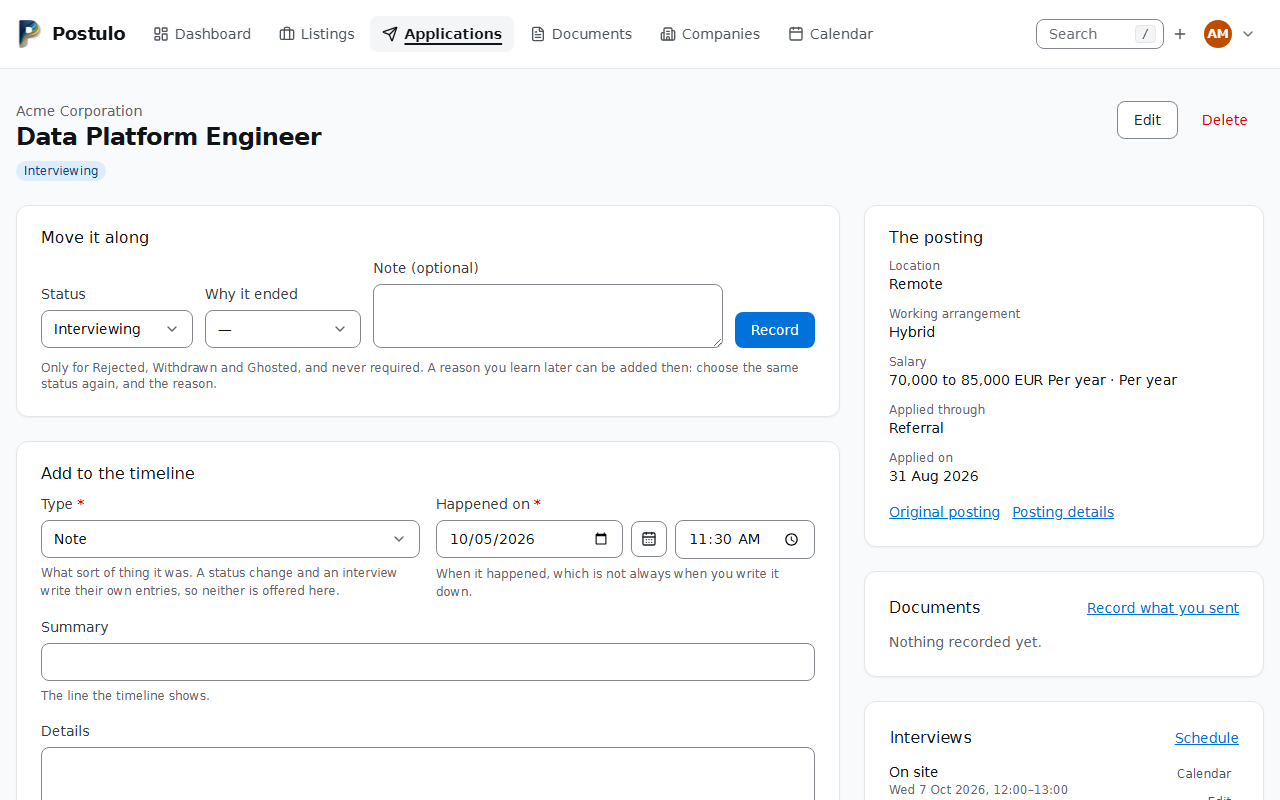
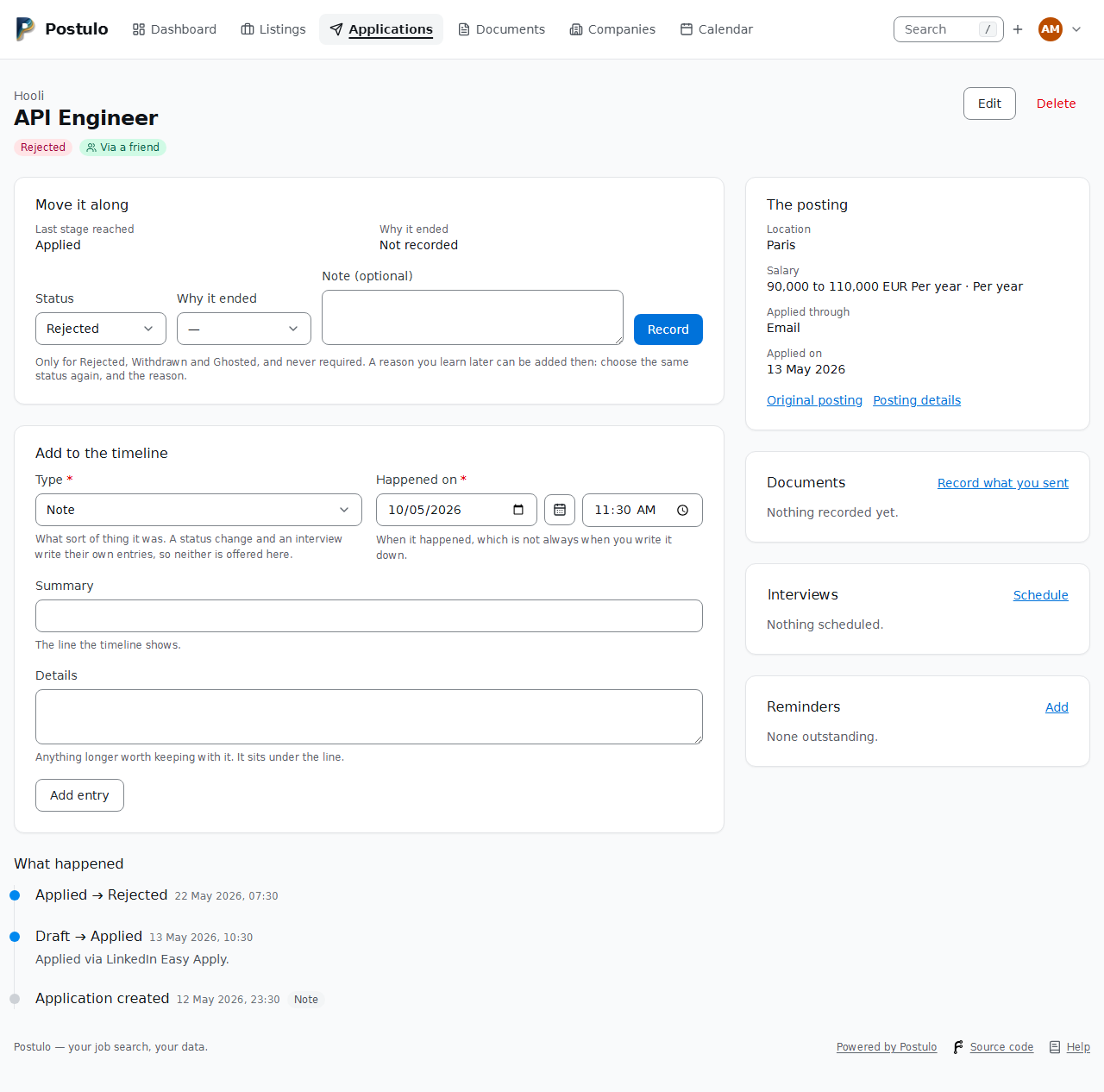
A reason you learn later can be added later. Choose the status the application already has, choose the reason, and press Record. That writes a second entry on the timeline rather than changing the first: the timeline is appended to and never rewritten, so it still shows that the rejection came on the 3rd and the reason on the 10th. The latest reason given since the application ended is the one that stands. If it is reopened and ends again, the new ending has its own reason and the old one stays on the timeline where it was written. A reason cannot be taken back, only replaced by another.
The last stage reached is never typed. It is read from the timeline: the status the application was moved from when it ended. One recorded straight to Rejected or Ghosted (a reply you already had) is counted as having ended at Applied, because it was sent; only one withdrawn while still a Draft ended as a draft.
Both are shown on the application's page, in the Move it along card, and on the timeline entry itself. The board, the table's Move to status and the Ghosted button on the dashboard still move an application in one step and ask nothing; open the application afterwards to say why.
Company logos
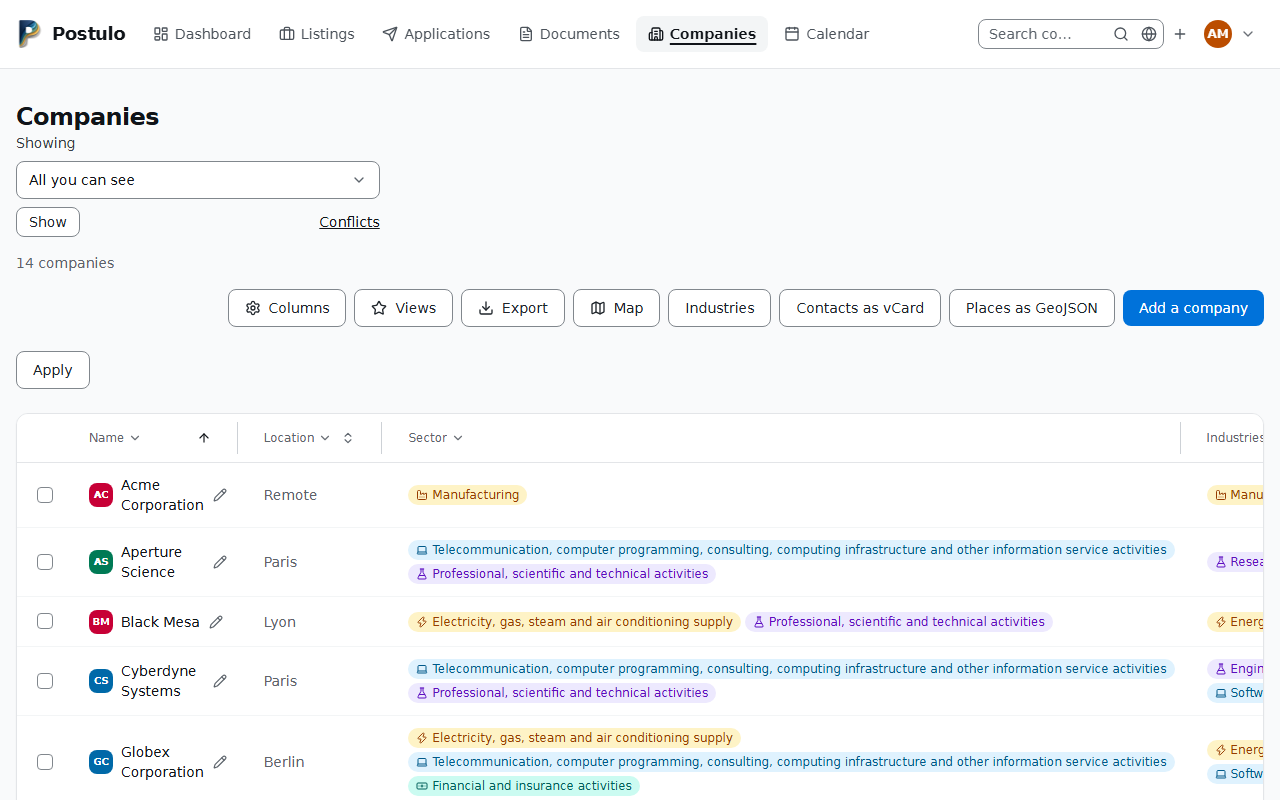
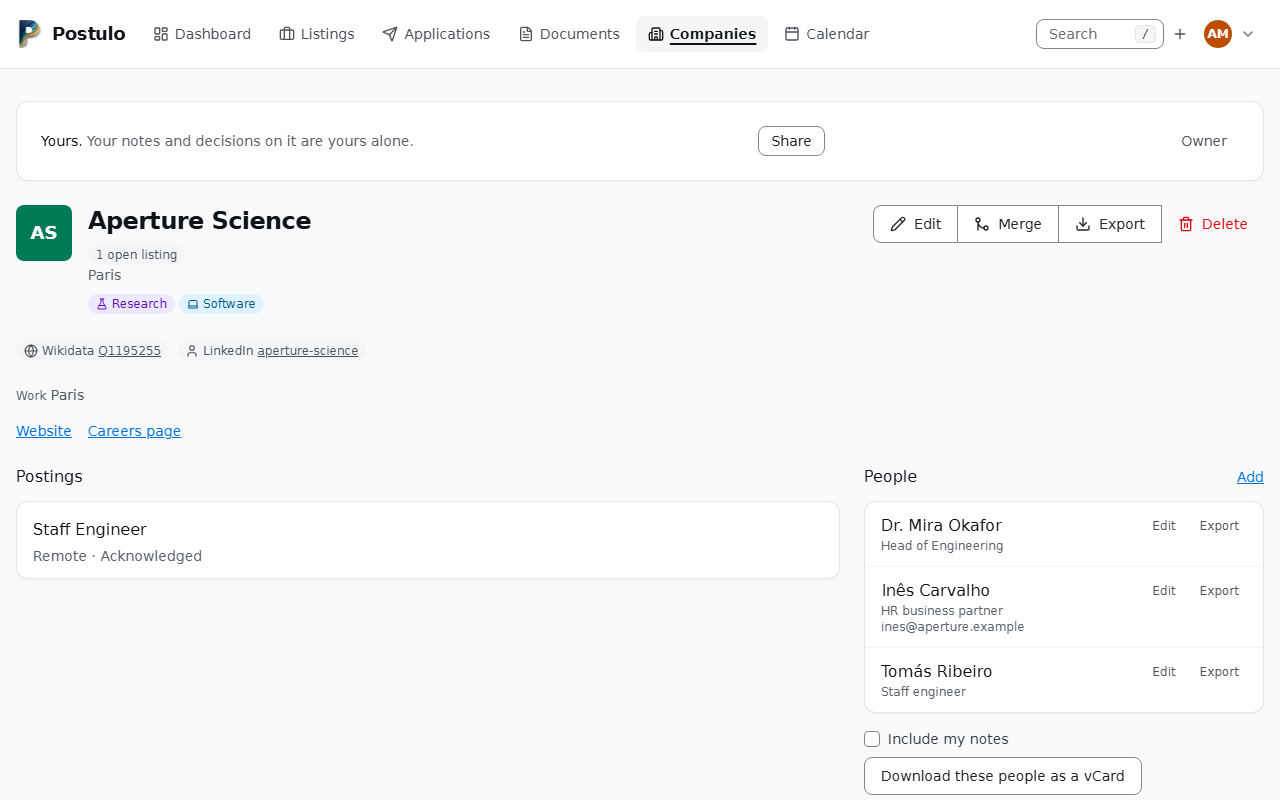
A company can have a logo, and it makes a long list of applications much faster to read. There are three ways to give it one, all from the logo on the company's edit page: pressing it opens a dialog with the three, and Remove the logo when there is one. The address and the upload are their own form, so changing a logo saves nothing else on the page (#853):
- paste an address. Postulo fetches the image once, from the server, and keeps a copy. It does not put the address in the page: that would ask the company's own server for the picture on every view, telling them which companies you are looking at and when.
- Find logo, which reads the company's own website — the one public place every
company maintains — for the icon it declares: an apple-touch-icon, a declared icon, the
logo in its schema.org details, and last the conventional
/favicon.ico. It opens a dialog on the company's page that says which site will be read; a second press, inside the dialog, does it. The answer comes in the dialog, and you can close it meanwhile: the work carries on, and the page shows the logo when it is done. When nothing could be used it says why, and points to the other two ways. Refresh logo, on a company whose logo came from an address, works the same way. - upload one yourself.
PNG, JPEG, GIF, WebP and SVG. An SVG can carry scripts and references to other files, so it is sanitised down to its drawing and kept as a vector; a bitmap is decoded and re-encoded at its own size, which drops anything else the file was carrying (#264). Either is served from your instance like every other file. The most recent action wins, so there is no precedence to remember, and Remove takes it away.
A company with no logo shows its initials, coloured from the name.
Postulo never fetches a logo on its own: an address is fetched when you save it, and a website is read when you press the button. Nothing happens on a page view.
Telephone numbers
In Postulo itself: the question mark on the Telephone numbers card of Your details opens the short of this, in the language you read Postulo in — or, with scripts off, the page
/help/telephone-numbers/on your instance, in a new tab.
A number written down the way it is said locally — 06 12 34 56 78 — cannot be dialled
from anywhere else, and six months later nothing in the record says which country it
belonged to. So a phone field asks which country the number is for, starting at the one
your own language suggests, and keeps what you type in the international form:
+33612345678.
The country and the number are one control in one frame: the flag, the chooser and the box.
The flag sits at the front, so you can see which country a number belongs to without
opening the list. The list itself gives the dialling code and the name — +351 Portugal —
and no flag, because a dropdown entry can hold text and nothing else in any browser. With
JavaScript turned off the flag still shows the country the page loaded with; it simply
stops following the chooser until you save. Where there is no room for both on one line —
on a phone — the box drops to a line of its own under the chooser, inside the same frame.
Type the number the way you would say it, or paste it as you found it. What happens to its
first digits is the country's own rule: France's 06 12 34 56 78 and 6 12 34 56 78 are
both +33 6 12 34 56 78, Portugal has no zero to take off, and Italy's zero is part of the
number and stays. A number that already begins with + or 00 says which country it is
for, and the chooser beside the box is ignored. What a number was copied with is put aside
before it is read: the narrow spaces of French typography, a dot, an apostrophe or a comma
between the groups, a tel: in front, the marks nobody can see that a contact app wraps a
number in.
What is refused, and what is kept
Postulo reads every number against its country's numbering plan: the lengths the country uses and the ranges it has handed out.
A number that cannot exist is refused, and the page says why — too short for France, too long for France, not a number Portugal uses — while whoever gave you the number can still be asked. Four more things are refused because you can put them right and Postulo cannot:
- a national number with no country chosen beside it: choose the country, or write the
number starting with
+; - a number without its area code: That number has no area code;
- an extension, which the international form has no room for;
- words beside the number —
(mobile),poste 12,or 06 98 76 54 32— which are never read as more digits. A number spelt in letters,1-800-FLOWERS, is still a number.
On a contact's form the sentence says to put the extension or the words in the notes. On Your details, which has no notes, it says to leave them out.
Where a country has territories with dialling codes of their own, a refusal says which
one uses the number. 06 92 12 34 56 beside France is not a number France uses; it is
one Réunion uses, and the page says to choose Réunion beside the number. The same holds for
the Netherlands and for Denmark. Nothing is guessed and stored: it is still a refusal, and
where two territories would read the number differently neither is named.
A number the plan cannot place is kept, with a warning under it: a dialling code no
country has, one of a country's short numbers (3949 works from inside France and has no
international form), or words with no number among them. It is kept exactly as you typed
it, takes part in no comparison, and the warning stays until you change the number.
A number recorded before any of this is left alone. If the plan calls it impossible, or
it was kept without a country, or it is written with digits the plan would not use — a zero
left after the dialling code, as in +33 06 12 34 56 78 — its row says so: Not a possible
number, Not checked, or Not as it is dialled with the spelling that can be dialled
beside it. Nothing else happens: saving the page neither refuses it nor rewrites it. It is
checked the day you change it. A number kept without a country shows no country in the
chooser, rather than a guess; choosing one is the change that puts it in the international
form.
Postulo still does not tell you a number is somebody's. The plan knows which ranges a country uses, not who answers.
How a number is shown
Grouped the way its own country writes it, wherever it appears — in the box you edit it in,
on a contact, on a CV and a letter, in the dialog that asks before removing it: +33 6 12
34 56 78, +351 912 345 678, +44 20 7946 0958, +1 415-555-2671. The grouping is drawn
from the stored number each time and never kept, so what you typed and what is kept are the
same number. A number is written left to right in every language: on a page or a CV read
from right to left its groups stay in their order, and in the box it keeps to the side
every other box starts at. The archive and the API hold the plain international form; the
API gives the grouped one beside it as formatted. A number is also a link, so a phone can
ring it.
The row
A row says what it is before the number: the type, then a name — only when the type is Other — then the country and the number, then the star, the choice of the number that gets you back in, and the bin. On a wide screen the kind sits on one line with the country and the number. A row that shows its name has the kind and the name on that line and the country and the number on the next; on a phone each has a line of its own. The name box appears as you choose Other, with scripts on or off, and a name left behind when you choose another kind is cleared when you save.
The number that gets you back in is offered on Your details only, where the instance can confirm a number at all, and never on a contact: a contact's number is one you recorded, not a way into your account.
A row nobody typed a number into is not saved: the country the chooser starts at is not something you did.
More than one number
Several telephone numbers is a plugin, and it ships switched on. With it on, you and each of your contacts can have as many numbers as are worth keeping — a mobile, a desk line, a switchboard — with one of them marked primary. The primary is the number a CV and a cover letter print, so nothing downstream has to know there are several.
The kind is yours to leave blank. A number carried over from before this existed has none, because nobody was ever asked, and Postulo would rather show the number alone than call it a mobile because that is the commonest answer.
Switching it off does not delete anything. Postulo shows and uses the primary number only — exactly what it did before the plugin existed — and the page tells you how many others are being kept back. Switch it on again and they are all there, in the order you left them. An export carries every number either way, because an export is what you leave with and a switch is not a decision about your records.
More than one link
In Postulo itself: the question mark on the Social profiles card of Your details opens the short of this, in the language you read Postulo in — or, with scripts off, the page
/help/links/on your instance, in a new tab.
The same shape again for a person's addresses on the web, and this time it is three plugins: Several social profiles, Several code repositories and Several websites, each shipped switched on. Your details used to hold one website, one LinkedIn and one code repository, and a contact one LinkedIn; each of those is a row now, and you can add as many of each kind as are worth showing — a Mastodon beside the LinkedIn, a Codeberg beside the GitHub, a blog beside the site — with one of each kind marked primary. The primary of each kind is what a CV prints, so a header never grows a list.
The kind says what sort of thing a link is — a social profile, a code repository, a website. Within a kind a link is on a service, which is the first thing in its row: LinkedIn, Mastodon, Bluesky, X, Xing, Facebook, Instagram, Threads or YouTube for a social profile; GitHub, GitLab, Codeberg, a Forgejo or Gitea instance, Bitbucket or SourceHut for a code repository. The chosen service's icon sits beside the choice. A website has no services: it is its own thing, and its row is a name and an address.
An address has to be one of its service's. A link filed under LinkedIn that is not a
LinkedIn address is refused when you save, beside the address, with what one looks like.
The check is on the shape and never on the network: www., a country's subdomain
(pt.linkedin.com), a trailing slash, a tracking parameter and a name with an accent all
pass, and so do a profile, a company page, an organisation and a single project. Mastodon,
GitLab and Forgejo are accepted on any host, because anybody can run one. Two things are
never a named service's, whatever the host: an address with a name to sign in with before
the host (https://name@host/…) or a backslash in that part, because a browser may take it
somewhere other than where it reads; and one whose path decodes to a control character
(%00). Pasted with nothing chosen, each is Other; under a service you chose, it is
refused.
There is always Other. It takes any web address, and a name of your choosing; left blank, the name is the address's host. Nobody is refused an address because the list does not know it: somebody's own forge, a forum, the next network. Name is asked for only under Other. On a named service the link is called by the service and the handle — GitHub alex/thing.
You do not have to choose. Paste an address into a new row and leave the service alone: where the address is a profile, a page or a project on a host a service answers on, saving files it under that service. With scripts on, the row shows the service its host suggests as soon as the address is in it. That is shown and not sent: saving decides, the same way with scripts on and off, so an address on a service's host that is not a profile there — LinkedIn's front page, a single video, a page of settings — is saved as Other and never refused. Choose a service yourself and it is kept to: an address that is not one of its addresses is then refused. A host nothing recognises is Other. A server of your own is not recognised from its address, because a shape alone says too little; choose Mastodon, GitLab or Forgejo or Gitea for it yourself.
Links you had before services existed were read the same way when Postulo was upgraded: a LinkedIn address became LinkedIn, and a link you had given a name of its own stayed Other with its name. No address was changed and none was refused.
One address may be a link of two kinds. A GitHub profile can be listed under Code repositories and under Websites; within one kind an address is listed once.
The list of services is a plugin, Services for web links, and another plugin can add to it (Writing a plugin). A link on a service whose plugin has since been removed is shown as Other and keeps what it was.
Postulo never opens a link on its own. Not to check that it answers, not for an icon, not for a picture. What is recorded is what you typed.
They are three switches because they are three decisions. An administrator content to let people list every forge they publish on may still want one LinkedIn and nothing else on a CV header. Switching one off shows and uses the primary of that kind only — exactly the one box Postulo had before — and the page tells you when others of that kind are being kept back. Nothing is deleted; switch it on again and they are all there. An export carries every link either way, each with its service, and an archive from before this reads back in with its columns as rows. An archive written before links had services has each one worked out from its address, and one that names a service this instance does not know restores the link as Other.
One number, one person
A number of your own, on Your details, is kept once across the whole instance. Type one that somebody here already holds as their own and Postulo says so rather than taking it from them.
A number you recorded is different: a contact's line, a company's switchboard. It is somebody you deal with, never somebody you are, so it is unique only within the contact or the company that has it. Two people registered with one employment office both record its line, a recruiter's direct line can be the company's too, and recording a stranger's mobile on a contact never keeps that stranger from adding it to their own profile here. Nothing is asked about such a number and nothing is counted against you for it (#329).
That message tells you something about somebody else: that an account on this server holds that number. There is no way to enforce the rule without saying so, and a vaguer message would disclose exactly as much while leaving you guessing, so it says it plainly. Nothing else is disclosed — not whose, not where, not when.
Two things sit outside the rule. A number the numbering plan could not place — a short number, one kept with no country in front, words — has no comparable form, so it is kept as you typed it and collides with nothing. And a number that was already recorded twice before the rule arrived is left alone; the first time you edit one, Postulo tells you.
A number carries a verified state, and on this release nothing is ever verified. Proving a number means sending a code to it, and Postulo cannot yet send to a number at all — so every number here is a claim nobody checked, and the first account to type one holds it.
That is written down rather than left implied, because the state exists for what comes next: a number that could get you back into your account has to be one you proved you hold. When that lands, no number recorded before it will be promoted. Numbers have been first-come first-served since they arrived; granting them verification retroactively would hand a way into an account to whoever typed a stranger's number a month ago. Verification will start empty and be earned, whatever churn that causes.
Two more things about that state, decided now so they are not decided under pressure later. A proof will lapse after a year — people give up numbers and carriers reissue them, which is a failure mode an email address does not have. And only numbers on your own profile will ever count: a recruiter's switchboard is a number you recorded, never a number you are.
Being told a number is already recorded here is now rate-limited. The disclosure itself is unavoidable and deliberate; the same honest sentence asked five hundred times is a list of which numbers have accounts here, so after a score of them in an hour Postulo says when the answer will be available again instead. You will not meet this while recording your own numbers: only the informative answer is counted.
A company's mailbox, numbers and offices
A company has its own email address — its general mailbox, jobs@ or info@; a person's
address goes on a contact — its telephone numbers and its postal addresses, on its form
and on its page, in the same rows a contact has. They travel in the API, an export and a
merge. An address is unique within the company or contact that lists it, so a company and the
recruiter who works in its building can both have it (#329).
A company's Location is the town and country of its primary address (#702). There is no location box any more: type a town and a country as an address, with nothing else if that is all you know. Each company's old location became such an address when Postulo was upgraded, keeping its place on the map. The API, a spreadsheet and the companies file still take a location line, which becomes that address.
A company has social profiles too: its LinkedIn page, its Mastodon or Bluesky account, its YouTube channel. They are the same rows a contact's are, with a service for each, one marked as the one to show, and a single box while Several social profiles is off. The company's page lists them under its website and careers page, each with its service's mark. They travel in the API, an export and a merge. The website stays the company's one website, so a document still prints one (#906).
The same for a company, a contact and you
Telephone numbers, postal addresses and social profiles are the same rows for a company, a
contact and Your details, and they behave the same everywhere: on each form a row has the
star that marks the primary, a bin that asks and takes the row off at once without saving
the rest, and the question mark; a contact's card on its company's page lists its addresses
as the company's own page does; a company's card (vCard) carries its mailbox, every number and
address, its website and its social profiles, and importing one reads them back; and through the
API a contact takes and returns phone_numbers, postal_addresses and web_links lists as a
company does. A contact's single phone, phone_country and linkedin_url are deprecated:
they still work, and join the lists as the primary when none of them is (#934).
What differs, on purpose — and nothing else does:
- Telephone numbers are unique across the instance only on Your details. A person's number identifies them, so a second account cannot take it; a company's or a contact's number is one you wrote down and collides with nothing.
- The number that gets you back in is chosen on Your details alone, and only where a text gateway is installed.
- A browser fills a telephone box and the address boxes only on Your details. Those are your own; a company's and a contact's belong to somebody else.
- A company is offered social profiles only. Its website is a column of the company (and a document prints that one), and a code repository is not the company's own; a contact and you are offered social profiles, code repositories and websites.
- A company's addresses are always drawn on the map (#702). A contact's and your own are drawn only when you tick Show on the map.
- Your own vCard and CV print the primary number only, the one your default CV shows: that is a choice about a document, not about what you have recorded. A company's or a contact's card carries every number.
A company's name in other languages
Universidade de Aveiro is University of Aveiro in English and Université d'Aveiro in
French. A company keeps its names in other languages (#673). They are read from the
company's page: a languages icon beside its name, drawn only when there are some, opens a
list of them. They are changed under Edit (#917): press Fetch from Wikidata where
the company has its Wikidata identifier, look at what came back, and keep it; or type a
name for a language Wikidata has none for. A name from Wikidata is changed
only by fetching again, or taken off. Lists, tables and searches keep the name you typed;
a letter in one of those languages prints that one, in its recipient and its
{company}. Searching finds a company by any of its names.
The fetch is one request to www.wikidata.org for that one item, made only when you press,
and it tells Wikidata which organisation you are looking at. An administrator can switch it
off (the Wikidata feature).
The same answer can say where the company is, usually its building (#701). Kept, that point places the company's primary address on the map, and changing the address's words does not move it; a point you put there by hand is never replaced, and Take Wikidata's point off, on the address's place page, puts it back at its postcode or town.
On the map
The companies' map draws every company's addresses, each at its postcode where the instance downloaded the postal codes, else at its town. Nothing is looked up anywhere; the tables are on the instance. Under a saved address the form says where it sits and offers Place it by hand: a page with a small map where you drop the pin, or type its two numbers, for when the town is the wrong Springfield or you want the building. A point placed by hand stays when you change the address, until you take it off.
A contact's address and your own are not drawn unless you tick Show on the map on it, because a home is somewhere somebody can be found. The map's list says whose an address is and what kind, and never its street.
Every address is a marker of its own, so a company with offices in three cities is in all three (#703). Markers close together are gathered into a cluster whose number is how many companies are there, not how many addresses: two offices of one company in one town are one company. A place is where its addresses resolve to, so Lisboa and Lisbon are the same dot. The list under a place names each company with the kind of address it is, marks the primary of a company that has several, and says so when a company is counted at more than one place, because the counts then add up to more than the companies there are.
Places as GeoJSON, from the companies page or the map's list, downloads every company
address on the map as a .geojson file other mapping tools read, each point saying how
precise it is; a contact's address and your own are never in it. The same page reads such a
file back: each point is matched to one of your companies by name, or by a wikidata
property, and shown with nothing ticked; a ticked one places that company's primary address
by hand. A point that matches nothing is listed and never made into a company. It is the
GeoJSON format under Server settings → Plugins, and it needs Maps (#880).
The number that gets you back in
A confirmed number of your own can be nominated as the way back into your account, joining email and a passkey. Two things about it are deliberate.
It is not the primary. The primary is what your CV and letters print — a recruiter dials it. If the same row were also your way back in, changing the number on your CV would silently change how you prove you are you. They are separate choices, and changing one never touches the other.
It cannot be removed while it is your way in. On Your details its bin refuses and says why; choose another number first.
Switching off several telephone numbers never takes it away. That plugin decides what Postulo shows and uses; it does not decide whether you can get back into your account. An administrator turning a feature off for somebody must not quietly remove their way in, so recovery reads a confirmed number regardless of it.
The choice only appears if this instance can confirm a number at all, which needs a text gateway the operator installed — Postulo ships none. Until then no number is nominated anywhere, and the interlock that keeps mail switched on stays shut for everybody.
Acting on several at once
Tick rows in the table and the bar underneath applies one thing to all of them: add a tag, or move them to a status. The companies table does the same for a field of activity.
Only additive things, and that is deliberate rather than unfinished. Deleting forty applications is a different act from deleting one, and deleting a company takes every posting under it with it — a confirmation naming an unseen number is a confirmation nobody reads. If bulk deletion arrives it will arrive with a design of its own.
Ticks last as long as the page. Change a filter and you get a fresh page with nothing ticked. Every other answer surprises somebody: acting on twelve rows when four are shown is the surprise with consequences, so this is the one that stays.
Select all means this page, and it is a button rather than a checkbox in the header — a header checkbox does nothing without JavaScript, and a control that does nothing is worse than one that is not there. Ticking rows works with scripts off; the button and the running count are what the script adds.
Postulo says how many rows changed, which is not always how many you ticked: an application already in the status you chose has not changed, and nothing outside your own account is ever touched.
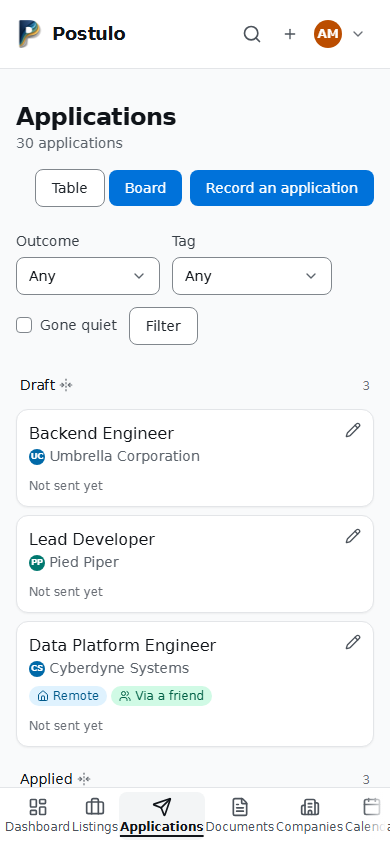
One page, two shapes
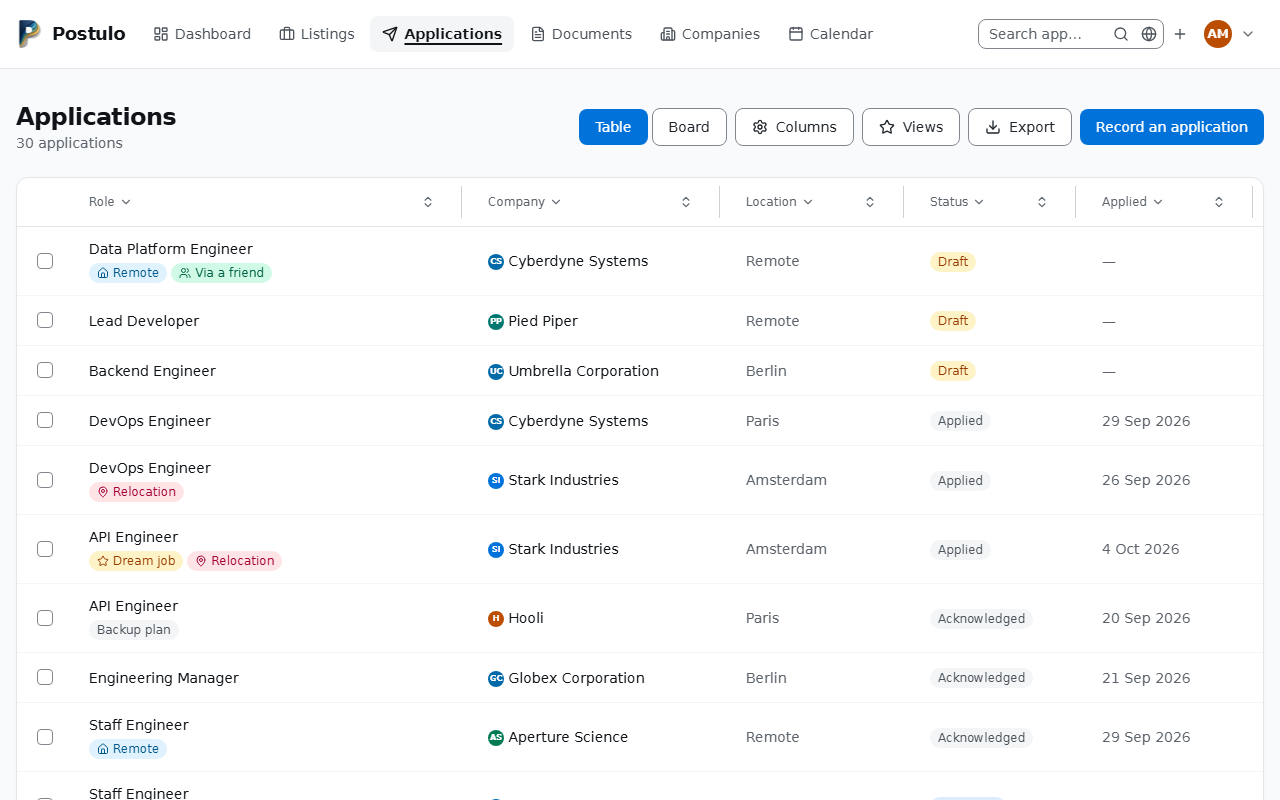
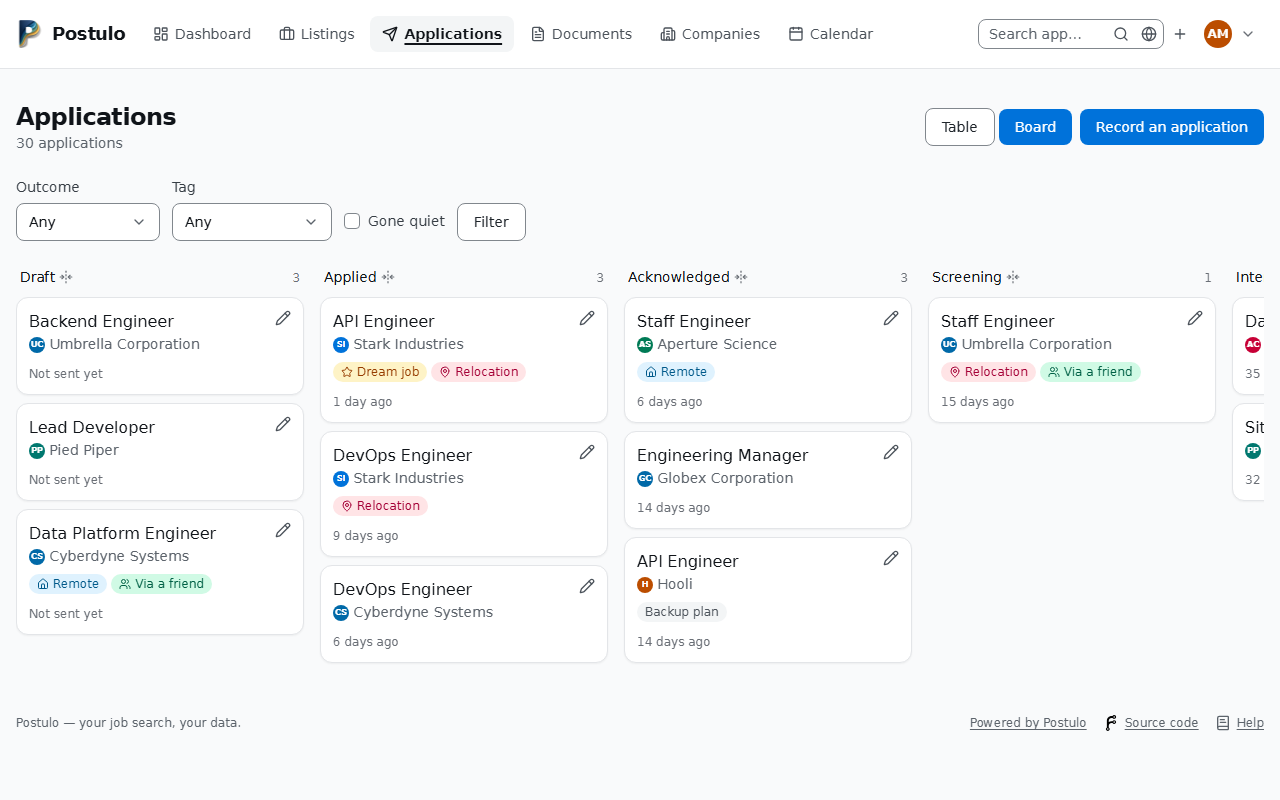
Applications is one page with two shapes, and a switch beside the Columns control — Table or Board — changes the shape of what is below it and nothing else:
- the table is everything, settled applications included, sortable and narrowable from its headers;
- the board is only what is still live, in columns by status. Move one along with the dropdown on its card — it saves immediately.
The search, the filters and the sort survive the switch, because they are one set: narrow
the table to quiet applications at Acme and press Board, and that is what the board
shows. The shape you choose is remembered with your other table preferences, so the page
opens the way you left it; a link can ask for one shape with ?view=board without changing
that. The old address /applications/board/ still works and lands on the board.
The filters: status; outcome (live or settled); tag; and gone quiet — and the search box in the header, which on this page matches job title, company and location (see Finding things). The table has them in its column headers. The board has no headers, so outcome, tag and gone quiet are a row above it, and the status is its columns.
A status means the same thing in both shapes. In the table it narrows the rows to that status. On the board it folds the columns: press a column's name — Applied, say — and that column stays open while every other folds to a narrow strip that still says its name and how many cards it holds. Press a strip and its column opens beside the one that is open, so you can have Applied and Interviewing side by side; press the name of one of several open columns and that one folds, the others staying open. All columns, above the board whenever it is folded, opens them all again, and so does the name of the one column left open. The count under the page's title is of what the address asks for, so it is the same number in either shape.
The board sits in the middle of the screen while it fits, and after a fold the open columns are brought to the middle of it; when they do not all fit, the column you pressed is. A column opens and folds in motion, its neighbours sliding along, unless your system is set to reduce motion, in which case the board is simply drawn the new way.
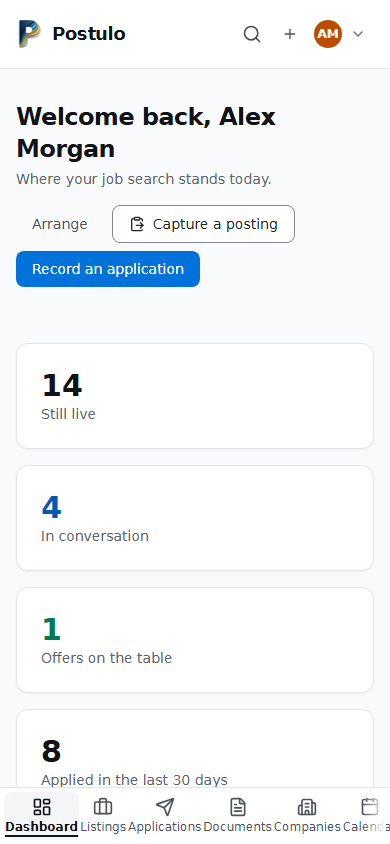
On a phone the columns are stacked — below 640 pixels wide, one under another down the page, each as wide as the screen, in the same order. The page scrolls, not a box inside it, and a column's name stays at the top of the screen, under the header, while you scroll down its cards. A folded column is a single line with its name and count; press it and it opens where it is, the name staying under your finger while the columns above it open or fold. A card moved there brings you back to the same place on the page. Dragging a card with a mouse in a narrow window scrolls the page when you hold it near the top or the bottom.
The fold is in the address — ?status=applied, or ?status=applied,interviewing for two —
so Back unfolds, a reload keeps it, and a bookmark opens folded. Switch to the table with
two columns open and the table shows both statuses, its status filter saying Applied,
Interviewing. With scripts off each name is a link to that address; with them on
the board folds where it is, and a name pressed with Ctrl or Shift still opens that address
in a new tab or window, as any link does. From the keyboard, Tab reaches each name and
Enter or Space presses it — once, however long the key is held — and the focus stays on the
name you pressed. A screen reader hears each name with how many cards its column holds. A
filter chosen above a folded board narrows what is in the open column and in every strip's
count, and leaves it folded; a filter chosen while a fold is still on its way keeps that
fold.
If you keep a default view that folds the board — Applied, say — All columns still unfolds it: it goes to the plain board, not to the bare address, which would open your default view again.
A strip is still a column: you can drag a card onto it, and choosing its status from a card's menu moves the card into it and out of the column you are looking at. A card moved between two open columns stays on the screen and in the count.
Because the board shows only what is still live, a filter that matches settled applications — Settled, or a status that has no column, such as Rejected — is said on the board, with a link to the same filter in the table, rather than shown as an empty board. A status with no column leaves every column folded, and the board says so even when nothing matches it; All columns is the way back. An address that asks for a status Postulo does not have is told so, with the same way back.
Moving a card on the board
Drag a card to another column and it moves, and the timeline records the change exactly as it would have if you had used the menu — there is no separate path for dragging. The card moves at once and the counts follow; if the server refuses, the page it sends back is the truth. A folded column takes a card too: drop it on the strip, and the strip's count goes up by one. Under gone quiet a card you move is no longer quiet, so it leaves the board.
The page then says where the card went — Moved to Offer. — since on a folded board it is no longer on the screen, and the board comes back scrolled where you left it, so a column you reached by scrolling is still in view. The same is true of a card moved with its menu.
The board scrolls while you hold a card near its edge. A column off the side of the screen is reached by holding the card near that side: the board scrolls towards it, faster the nearer the pointer is to the edge, and stops when you move away, let go, press Escape or take the pointer out of the window. Only while a card is held — a board that moved whenever the pointer passed its edge would move under somebody reading it — and not at all if your system asks for reduced motion: the board then scrolls by hand, and the menu on the card moves it. On a narrow screen the band that scrolls is narrower too, a fifth of the board at most. (Some browsers scroll a box by themselves in the last few pixels of its edge while anything is dragged. That is the browser's doing, on every page, and Postulo leaves it alone and does not add to it: in those last pixels the board scrolls at the browser's speed, not at both at once.)
While a card is held the board is not redrawn under it: a filter changed a moment before waits until you let go, and if you moved the card, the page that comes back has the filter as well.
Each card has a menu at its corner. Dragging fires on neither a touch screen nor a keyboard, so the menu is the way that works everywhere, and dragging is an addition to it. It is a pencil at the card's top corner, named by its own application — the role and the employer — because a board is a page of them and Change status thirty times over is thirty controls you cannot tell apart. It opens without a script too.
A status is saved when you choose it, with the pointer or the keyboard: open the menu, move to the status with the arrow keys, and Enter or Space saves it and moves the card. Escape closes it having changed nothing. There is a row for each status with its icon beside it, the status the card is in is ticked and not offered, and advancing a card is still two presses.
The table
The table is yours to arrange, and the same is true of the Companies table.
- Sort with the arrows at the end of a column's header — clicking the column's name opens its filter instead. Click the arrows again for the other direction, and a third time to stop sorting by it and go back to the table's own order. Dates sort newest first on the first click. The arrow shows which column is in charge, and every one also says in words what clicking it would do — including that it would stop.
- Narrow from the headers. Click a column's name and its filter opens beneath it; click it again and it folds away. Text columns match anything containing what you type, dates take a from and a to, counts take a least and a most, and choices such as priority are a list. A header can hold more than one filter: on Applications, Status holds the status, the outcome and Gone quiet, and Role holds the tag beside its own box. The table updates as you type or choose. A column that is narrowing keeps its header open and carries a funnel beside its name, so a short list always says why it is short; a header you opened stays open while you work in the others; and one you put back to Any stays open with the cursor in it, ready for the next try. Header filters combine with each other and with the search box in the header, which on this page narrows the table: whichever you changed last, the table shows the answer to all of them together. Clear filters, beside the count, takes everything off, the search included, and keeps the sort. When nothing matches, the headers stay where they are over an empty table, so the filter that emptied it can be loosened where it is.
- By keyboard. Tab reaches each column's name, Enter opens or folds its filter, Tab goes into it, the arrow keys choose from a list and Space ticks a box. The focus stays in the control you are using while the table changes under it.
- Without scripts the same headers open, and nothing is sent until you say so. On Applications each open header ends in a Filter button; on Companies and Listings the Apply button above the table does the same, and on a phone, where that button is not drawn, each open header ends in an Apply of its own. Any of them sends every header's filter at once, and so does Enter in a header's box. Narrow is a separate form with its own button: each of the two keeps what the other has already applied, and neither sends what you changed in the other and have not applied yet — so apply one before you change the other. The page says so under Narrow's button.
- A filter whose column you have hidden is not lost. Take the Status column off the applications table and its three filters move under Narrow, a button that then appears above the table; so does the tag, with both Tags and Role off. A filter that is narrowing a table while its column is hidden — from a bookmark, or a saved view — is shown there too, open, so it can be seen and cleared. Narrow has a button of its own and applies when you press it; until you do, what you set there stays as you left it, with Narrow still open, while the headers and the search box go on narrowing the table. At this width the figure beside the word counts only the filters no header holds; the rest are marked in their own headers.
- On a phone the headers are a sideways scroll away, so Narrow above the table holds every filter in one column with its button underneath — the only Apply (on Applications, Filter) on the page. It applies when you press that button, not as you type. Until you press it, what you have entered stays where it is and Narrow stays open, even while the search box or a sort changes the table underneath; a field is replaced only if you changed that same filter from its column header in the meantime. Folded, the word says whether anything under it is narrowing the table: Narrow · 2, with the funnel a narrowed column carries, means two of its filters are in use (a screen reader hears "Narrow, 2 filters in use"), and pressing it shows which.
- Choose and order columns with the Columns control. Tick what you want to see, move columns up and down, pick 25, 50 or 100 rows a page, and Apply. The applications table offers, beyond the usual five: deadline, priority, applied through, salary, tags, last activity, next reminder, next interview and the date recorded. Companies offer people, website, careers page, notes, one column per identifier scheme, last activity and the date added; every one of them narrows, and all but notes, sectors and industries sort — notes because an alphabetical order of your own notes means nothing, sectors and industries because a company has several. Reset restores the usual layout.
- Drag a column wider or narrower by its end edge. The handle is a button as well as a drag: give it focus and the arrow keys widen and narrow it, and Home lets the column size itself again. It reports the width it is at, and says the new one after each press, so the keyboard is not the silent way of doing it. Widths are saved as you go. With scripts switched off there is no handle at all and the columns size themselves, exactly as they always did.
- Export the table with Export, beside Columns and Views. It takes the table as it is at that moment — your columns in your order, its filters and its sort, a saved view's columns if one is open — and every row it answers with, not the page on screen. The page it opens says what the export will hold: how many rows, which columns, what narrows it and the order. Choose the theme, the language and the paper — on its side unless you choose otherwise, because a list is wide — and press Download PDF, or press Download CSV for the same rows in a spreadsheet, every cell guarded as the report's are. Both are downloads and are not kept in Postulo. A PDF holds at most 1,000 rows and a CSV 10,000; the page says so before you press anything when a table holds more, and the PDF says how many it left out. The theme you last downloaded a PDF in is offered first next time. Companies and Listings export the same way, the listings of the tab you are on.
Sort and filters live in the address, so a view you have set up can be bookmarked or sent to someone, and the back button works. Which columns show, how wide they are, and how many rows a page holds are a preference: they are saved to your account and follow you to every device.
The timeline
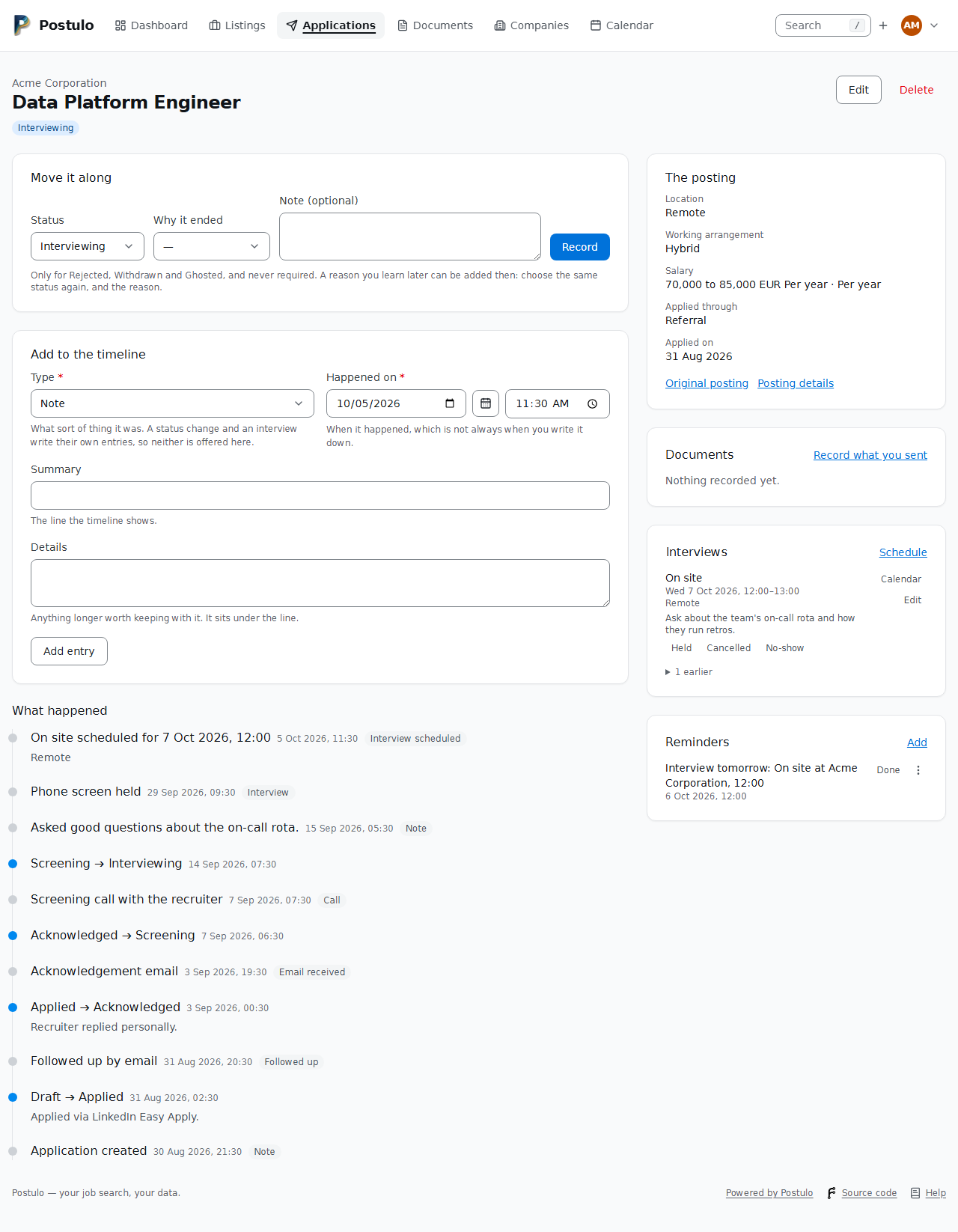
Every application has an append-only log of what happened. Status changes are recorded automatically, including when you change the status from the edit form — there is no way to move an application without the log noticing.
You can add entries yourself: a call, an email sent or received, an interview, an assessment, a follow-up, or a plain note. Each carries the date it happened, which may be different from the date you got round to recording it.
What arrived about the listing comes first. The counsellor's message, the description somebody forwarded, the advert captured again from another board — anything recorded before or beside the application belongs to the listing, and the application's page shows it at the top of What happened, under The listing, with the application's own entries under This application. It is read from the listing rather than copied when you applied, so an entry added to the listing later appears here as well. Add to it on the listing's page is where to add one; see Listings.
The status field is what the board and filters read. The log is what actually happened. When they disagree, believe the log.
Interviews
A timeline entry says an interview happened. An interview in the diary says one will: it has a start and an end, a place or a link to the call, the people you are meeting, a kind — phone screen, video call, on site, panel, assessment — and notes to prepare with.
Schedule one from the Interviews card on the application page. Three things follow:
- the timeline records that it was scheduled, and later how it went;
- a reminder falls due the day before (untick it if you do not want one), so whatever tells you about reminders tells you about interviews too;
- it appears under Coming up on the dashboard, on the board card, and in the table.
Once its time has passed, the diary asks how it went. Held writes an interview entry on the timeline dated when it took place and moves the status forward if it had not kept up — a phone screen to Screening, an assessment to Assessment, anything else to Interviewing — through the same path as any status change, so the log says so. It never moves a settled application: an interview you remember after a rejection reopens nothing. Cancelled and No-show are recorded too; nothing is deleted. A no-show is an entry kind of its own on the timeline and is not counted as an interview attended; a held interview counts once, however often it is moved or settled again.
Recording one that already happened uses the same form: an interview whose time is past is written straight onto the timeline as held.
Editing an interview offers its people from the application's company and anybody already on it who has since moved elsewhere, with their present company beside the name; saving keeps them unless you untick them. Saving an interview, or an application, from a page that was opened before the board, the API or a calendar sync changed its time or status keeps what is there now: only a value you changed yourself is written, and logged.
Every interview has a Calendar link that downloads an .ics file any calendar
application imports, and Dashboard → All interviews → Calendar file downloads everything
still ahead in one file, with the deadlines and closing dates of the next six months. Each
interview keeps a stable identifier, so importing the file again updates the meeting rather
than duplicating it.
What the file leaves out. Your preparation notes stay in Postulo, and the people you are meeting are named in the description as text, never as attendees: a calendar application that treats an attendee with an address as somebody to send updates to would otherwise write to a recruiter from your calendar. The same goes for an appointment at an employment service, and for what a synchronisation plugin writes into your own calendar.
To keep a calendar application up to date, subscribe it to /api/v1/interviews/calendar.ics
with a read-scoped token: that feed carries the interviews and the same dates.
A downloaded file is a snapshot. To have the interviews simply be on the phone, and to have a move made there come back here, the operator installs a synchronisation plugin and you add a connection under Settings → Connections: postulo-dav puts the interviews in a calendar called Postulo and the people you are meeting in an address book of the same name, on Nextcloud, Radicale, Baïkal, SOGo, Fastmail or anything else that speaks CalDAV and CardDAV. Only those two collections are touched, ever. Each connection has an interval — fifteen minutes to once a day — that the scheduler honours, and a Sync now button beside it. Moving an interview on the phone moves it here and says so on the timeline; deleting it there never deletes it here.
What the plugin cannot pair by itself, you pair by hand. A connection whose plugin offers it has a Pairing button on Settings → Connections: the page lists what is paired, and anything whose other side was deleted, without asking the server. Search or Show unpaired asks the server what else is there; for each item, Choose a record offers your own contacts, companies, departments, interviews, reminders, applications or yourself, whichever it can be paired with, to Pair, or to have the plugin fill one — a new one or one you have — and pair it, or fill it once without pairing. Unpair keeps both sides and the next sync leaves them alone. A company's page (with its departments), an application's, the edit pages of a contact, an interview or a reminder, and Your details each say what they are paired with — "Paired through Phone, last synced …" or "Removed on the other side" — with Unpair and Pair with an item….
Calendar
Calendar draws the dated things of a search by day: the interviews in the diary, your reminders, and the dates below, each a link to what it belongs to. A month first, the week the 1st falls in to the week the last does; Week, Day and Agenda are the same things in another shape, and the agenda — the next thirty days as a list, days with nothing on left out — is what a phone wants, where a month grid is thirty-one cells of nothing. On a narrow screen the month keeps its seven columns and scrolls sideways in its own box.
It is drawn by the server, with no script: Previous, This month (This week, Today) and Next are
one group of links with a chevron each, and the period between them is a button that opens a small
form with a date input to go to another (#858). Day, Week, Month and Agenda are a group at the
end of the same row (#861), and Import and Export sit beside New reminder in the heading's row
(#862). The week is one card of seven days, divided by borders (#860). Three settings shape it: under
Settings → Appearance, whether the period buttons show words beside the chevrons and whether the
weekday names are abbreviated or in full (a narrow screen keeps the abbreviation), and under Settings →
Language and time, the first day of the week, which the week view, the month grid and the reports
all follow (#859). The period is in the address (?month=2026-09, or ?view=week&on=2026-09-15), so a
month is bookmarkable and the back button works.
Choosing another period (#933). With scripts on, the period's name opens a picker that suits the
view: the twelve months of a year in the month view (the arrows change the year); a month of days in
the week view, where the week under the pointer lights up and pressing any day of it goes to that
week; a month of days in the day view; and in the agenda a range — press the first day, then the last
(in either order), and the agenda runs from one to the other. The agenda's last day is in the address
too (?view=agenda&on=2026-09-15&until=2026-10-31); without it the agenda runs thirty days, as it
always did, and it runs a year at most. Previous and Next then step by the length you chose. With
scripts off, the name opens the small form with date boxes, which goes to the same addresses. Every
picker is worked by keyboard as well: the arrows move by a day and a week, Page Up and Page Down by a
month (with Shift, a year), Home and End to the ends of the week, Enter chooses and Escape closes.
Weeks start on the first day of the week you chose, and in languages that number their weeks
(German, the Nordic languages) each row shows its ISO week number. On a phone the picker opens as a
sheet along the bottom of the screen.
The same pickers everywhere a date is asked for. Every date box in Postulo — an application's deadline, a listing's closing date, a CV entry's start and end, a document's dates, the report's period and a table's date filter — has a calendar button beside it that opens the same picker, and an interview's, an appointment's or a reminder's time is a date box with its calendar and a time box. The box underneath is still the browser's own and still the form: you can type into it, and with scripts off it is all there is. A cell in the month shows two of its events and counts the rest; the day number, and the count, open that day. A reminder you have done, and an interview that was cancelled, are drawn struck through rather than dropped, because the month is a record as well as a plan. Days are your days: the time zone under Settings → Language and time decides which day a late reminder falls on.
It shows four kinds of thing: interviews, reminders, an application's deadline and the day a listing closes. The last two are whole days rather than times, because nobody knows the hour an employer stops reading. A deadline you have already applied by, and a listing you have decided about, are drawn struck through — the same rule as a done reminder.
The key along the top says which colour is which, and it is also the filter: click a kind to
take it off the calendar, click it again to put it back. What is showing is in the address
(?kinds=deadline,closing), so a calendar narrowed to deadlines is a page you can keep.
Reminders are kept here. There is no separate reminders page any more. Beside a reminder, in every shape of the calendar, is what you can do to it: Done, Put off until tomorrow, Put off until next week, Edit, or choose another time, and Delete — and, beside one already done, Not done, which puts it back among what is still to do. Where there is room Done is a button of its own and the rest are in the menu beside it; in a month's cell, and in the week's narrow columns on a wide screen, all of them are in the menu. Whatever you press brings you back to the same view, on the same day, showing the same kinds — and it all works with scripts off, because the menu is one your browser opens by itself.
Making one. New reminder at the top of the calendar makes a reminder for no day in particular; the form asks when. Each day has its own as well — the + in a month's cell and on each day of a week, New reminder on a day's heading in the day view and the agenda — which opens the form with that day filled in, at nine in the morning. Saving brings you back to the calendar.
Everything still to do. Click Reminders in the key and the agenda shows reminders
alone: that is what the reminders page was. It opens with Overdue — every reminder not
done whose time came before the agenda's first day, however long ago — and ends with
Further ahead — every one set for after its last day, however far off — so a reminder
never drops off either end. Done ones are drawn struck through on their day. The old
address, /applications/reminders/, takes you there.
Print, beside the views, prints what the calendar is showing — the month, the week, the day or the agenda, with the kinds its key has switched on and its search — as a PDF. The page it opens says which period and how many entries; choose the theme, the language and the paper and press Download PDF. Every entry is printed, not the two a month's day shows on screen, and nothing that is a button is: no New reminder, no key, no arrows. What is over is struck through and said in words. A month is drawn on its side unless you choose otherwise. The PDF is a download and is not kept in Postulo; the theme you last printed in is offered first next time.
The calendar as a file
Download as iCalendar, at the top of the calendar, downloads what the page is showing: the
same period and the same kinds as its key has switched on, from the same list the page draws, so
the file and the screen cannot disagree. Interviews are meetings, deadlines and closing dates are
whole days, and reminders are tasks (VTODO: what to do, when it is due, whether it is done,
and the application it is about). A calendar application that keeps tasks lists them; one that
does not ignores them.
Reminders are also a feed of their own, /applications/reminders/calendar.ics in the browser and
/api/v1/reminders/calendar.ics with a read-scoped token: every reminder still to do, and those
done in the last six months. They are not in the interviews feed, which is what existing
subscriptions read and whose meaning is not changed under them. A reminder keeps a stable calendar
identifier, which travels in the export.
Import an iCalendar file, beside it, reads an .ics file and shows each event and task with
a choice before anything is added:
- a timed event can become an interview, on an application you pick (the timeline says which file it came from, and a reminder is set the day before as for any interview), or a reminder;
- an all-day event, or a task, can become a reminder, on an application or on none;
- or leave it out. Nothing is made until you press Add what I chose.
The same file twice adds nothing the second time: an event whose identifier an interview or a
reminder of yours already holds is shown as already there. Times are never guessed. A time
zone is found by its name, by Windows' name for it, or in the file's own definition of it; a time
written with no zone at all, or in one Postulo cannot find, is shown with a menu asking which zone
it is in, and cannot be added until you choose. A repeating event is listed as one that cannot be
added. Attachments, links, conference details, alarms and the people invited are not read, and
nothing in the file is ever fetched. A file larger than 2 MB, with more than 200 events and tasks,
or built to be unreasonably deep or long, is refused before it is read; an invitation
(METHOD:REQUEST) is read as events and no reply is ever sent.
Meetings with your adviser, typed by hand. If you are registered with a public employment service (France Travail, the Bundesagentur für Arbeit, IEFP, Jobcentre Plus), its meetings are on the calendar too. No service publishes a job seeker's own appointments, so you enter them: New appointment on the calendar, or Add under Appointments on the service's own page (a company of the kind Public employment service). An appointment has the service, your adviser if you have recorded them there, the start and end (an end left blank lasts an hour), how it is held (in person, by phone or by video), where — an address, a number or a link — your notes to prepare with, what was agreed afterwards, and a box for attended. A reminder falls due a day ahead unless you untick it, and moves with the meeting.
On the calendar it is a kind of its own, Appointments, with its own colour and its own entry in the key. It is in the file the calendar page downloads and in the diary feed, but not what you wrote afterwards. The report addressed to your adviser counts the appointments attended in its period beside the applications. The archive carries them under their service, with the adviser and the reminder; erasing your adviser from your contacts keeps the appointment and takes their name off it.
Your diary file carries the dates too. The Calendar file download on the interviews
page, and the subscribable /api/v1/interviews/calendar.ics (read token), hold the
deadlines and closing dates of the next six months as all-day entries beside the
interviews, marked free, so they appear along the top of the day without making
you look busy to anyone who can see your calendar.
Suggestions
A plugin that reads for you — a mailbox, through postulo-imap — never writes anything into your record. What it works out lands under Applications → Suggestions: what the message says, which application it seems to be about, who it came from, and the phrase that was recognised.
Each one waits there until you accept it, which writes it onto the timeline exactly as your own typing would (and moves the application, when the suggestion says so — a rejection to Rejected, an invitation to Interviewing), or decline it, which writes nothing. Every entry an accepted suggestion produces says which plugin it came from, so you can always see what was decided for you and undo it.
Neither answer is asked for twice: a message you declined is never suggested again. One that could not be matched to an application says so, and you pick the application yourself before accepting it. The dashboard tells you when something is waiting.
Gone quiet
An employer that simply stops replying is the most common ending, and Ghosted exists to record it. Postulo now notices the silence before you name it. An application has gone quiet when it is still live, was actually sent, nothing has happened to it for 21 days — change the number under Settings → Appearance — and nothing is planned: no reminder ahead of it, no interview in the diary. If you have already planned the next step, it is not quiet, it is waiting.
The dashboard lists them, longest silence first, with three things to do about each:
- Followed up records the follow-up on the timeline;
- Snooze sets a reminder two weeks out, which makes the application waiting rather than quiet;
- Ghosted moves the status, through the timeline, so the record says when you stopped waiting.
The board card carries a Quiet for n days badge, the table has a Gone quiet filter, under Status, Insights counts them per source and per company, and — if you have a notifier connection with Applications go quiet switched on — the scheduler tells you when applications newly fall silent, once per silence. All of these use the same rule, so the numbers agree.
Reminders
Reminders are a note plus a date, and they live on the calendar: seen on their day, made from the day they are for, and changed or put off from the menu beside them. The agenda narrowed to reminders is the list of everything still to do, overdue ones first; anything due also appears on the dashboard.
A reminder appears in the application and on your dashboard when its time comes. To be told — by email, or by whatever a notification plugin speaks — add a connection under Settings → Connections and tick A reminder falls due. The built-in Email notifier needs only an address and the instance's mail settings; the operator must also run the scheduler that notices reminders falling due (see Configuration). Each reminder is announced once, and the message for one about no application links to your reminders on the calendar.
Changing one. The menu beside a reminder — on the calendar and on an application's page
— puts it off until tomorrow or next week, opens it for editing, or deletes it. Putting one
off moves it; it does not make a second one, and it is announced again at its new time.
Editing is where an exact day and hour go, and where a summary typed in a hurry gets fixed.
Both are also in the API: PATCH /reminders/{id} and DELETE /reminders/{id} (see The
API).
Offers
When an offer arrives, record it from the application's page — Record an offer — in the terms it came in: the base pay as a number with its currency and period, and the rest as text, because a bonus is "10% on target" and equity is a sentence. Recording one moves the application to Offer and writes the timeline; an answer by date goes on the calendar with a reminder the day before. Offers get revised: record the revision on the same application and each change is written as one. Saving an offer with only its notes changed records no revision and leaves its reminder alone.
Offers (from the card, or /applications/offers/) puts every application standing at
Offer side by side, one column each, with the base pay brought to a year within its
currency so a monthly figure can be read against an annual one. Nothing on it scores or
recommends. It is a real table, and on a phone each term becomes a card naming each
employer's answer. Offers are in the API under /offers (read) and travel with your export.
Closing soon
A listing you have not decided about, with a closing date, is worth being told about before it closes rather than after. Tick A listing you are considering closes soon on a connection under Settings → Connections, and set how much warning you want under Settings → Appearance → Closing soon — three days unless you say otherwise.
Only listings you have not decided about are counted: one you have applied to is not urgent, and one you discarded is not wanted. Each is announced once, and again if you move its closing date, because a deadline brought forward is news.
Tags
Free-form labels of your own invention — remote, dream job, via Marie, whatever
fits how you think. Manage them under Dashboard → Manage tags, and filter by them
anywhere.
Companies and people
Companies are created for you when you record an application. Opening one shows every posting you have recorded there and every application you have made.
Contacts are the people: recruiters, hiring managers, a friend on the inside. Add them from a company page. An application can name one of them as its main contact.
The employment service
(The type is labelled Public employment service, to tell it from the recruitment agencies and employment-activities companies offered under the agency an application went through.)
The public employment service you are registered with — France Travail, IEFP, the Bundesagentur für Arbeit, SEPE, Jobcentre Plus, UWV, Forem — is a place you deal with throughout a search and never apply to. Record it as a company of the employment service kind: the company form has a Type box, and beside it a list of the services Postulo knows, by country. Pick yours and leave the name blank, and the name and website are filled in; anything you type is kept instead. Your adviser is a contact at it, like anybody at any company, and its postal address and telephone numbers work the same way.
What the kind changes: the office is never counted as an employer. It is left out of the report's tallies by industry, and the report is addressed to it — For France Travail, adviser so-and-so — on the page and on the PDF. On the companies page it is listed with a chip beside its name, and the optional Type column narrows the table to offices or to employers. An application you made through the office's own listings can say so: Public employment service is one of the answers to applied through, and the report counts those separately, because that is the number the office asks first.
Every company recorded before there were kinds is an employer, which is what it was.
Departments
A contact can be recorded as being in a team: engineering, legal, the Lisbon office. Type the name on the contact form and it joins that company's list; type one already there and it is reused. Clearing the box takes the person out of the team and leaves the team alone, because a department does not stop existing when one person moves out of it.
A department is not a small company. It has no website, no logo, no identifiers and no postings of its own; it belongs to exactly one company and travels in your export inside that company's block. Deleting a department leaves its people where they work — they are still at the company — and deleting the company takes its departments with it.
A company's status
A company can say what it is and what it is doing about hiring. The two are kept apart, and both are shared with the company: anybody who can see it sees them, and anybody who may change the company (a read/write share) may add or change them. A read-only share sees them and changes nothing.
Legal state is a fact: Active (what every company is until you say otherwise), In administration, Acquired or merged (with the company it became part of, when that company is recorded here) or Dissolved. Set it under Edit, in the Status box, with the date it became true and, if you like, where you learnt it (an address). The company that acquired it is chosen among the companies you can see, and, as with Part of, must be one everybody the company is shared with can see too. Wikidata can offer it: after Fetch from Wikidata, the review page says when the item has an end date or a replacement and offers to record it; it starts on Leave it as it is, and nothing changes until you choose.
Hiring is a history of dated entries, each Hiring, Hiring freeze or Laying off, with the day it is as of, an optional source (a news article, a post) and who noted it. They are added, changed and removed at the bottom of the edit page. The latest entry is the company's signal; the earlier ones stay as the history on its page ("laying off in March, hiring again in June"). An entry older than 90 days is shown as as of its date, so an old "hiring" does not read as current. Where nobody has said anything current, Postulo shows 3 open listings — counted from the listings you can see that have not closed or passed their closing date — as a hint and nothing more: it is worked out when the page is drawn and stored nowhere.
Where it shows. A badge by the company's name (the legal state when it is not active, the latest entry, and the count of open listings); a Status column in the companies table, with the filters Hiring and Exclude dissolved; on the map, a dissolved company's pin is grey and one in administration amber, and the pin's title names the state; and a quiet line on its listings and applications when the company is dissolved, in administration or laying people off ("This company was dissolved on 3 February 2026."). Adding a listing for a dissolved company asks you to tick a box first, because the record may be right.
The status is in your export and the API, and a company's vCard carries a note only when its legal state is not Active. Nothing about it leaves your instance.
One company inside another
A company can be recorded as part of another. Applying to Google, to DeepMind and to Waymo is applying to three companies you already know are one group; saying so on the company form means the page names the owner and lists what belongs to it.
A company's name opens the company, and the pencil beside it renames. The name is a link to the company's page, as a name is in every other list. Press the pencil and the cell becomes a box; Enter saves, Escape puts it back, and focus stays on the pencil rather than throwing you to the top of the page. If the name clashes with one you already have, the refusal appears in the cell with the value that caused it, in the same words the company form would have used — because it is the company form, narrowed to one field. If somebody else changed the row while you were typing, the save is refused and you are shown what it says now, rather than quietly overwriting them.
Only the name. A count is not editable because it is a count, and a date read off a posting belongs to the posting. With scripts switched off, the pencil opens the company form, which is the whole record with every field open at once.
Nothing is inherited. A subsidiary keeps its own industries, its own logo, its own notes. An inheritance rule would be one more thing to hold in your head, and naming the parent on the page is what you actually wanted to know.
Three things are refused, each saying why: a company cannot be part of itself, a chain cannot close into a loop — and the message names the company whose link would close it, because "not allowed" leaves you looking down a list of subsidiaries guessing — and a chain cannot go more than ten deep, which is far past any real ownership structure and stops a mistake becoming a page that walks for ever.
The relation travels in your export, written as the parent's name rather than as an internal number, so a restored archive keeps its groups.
Which part of the employer an application was for
An application can name a department as well as a company: not Google, but Google's engineering team.
The company is still the employer. Naming a department adds detail to the link the posting already carries; it never replaces it. That matters more than it sounds — it is the reason the whole structure can be switched off without leaving an application attached to a team with no employer behind it.
Any department anywhere in that employer's group may be named. An application through the Irish arm can be for the group's engineering team, and refusing that would make the group decorative. A department at another employer is refused, in a sentence saying which employer it is at.
The box appears only when the employer has a department to choose. A department that is later renamed out of existence leaves the application where it is, at the company.
Who referred you, and the agency it went through
Referred by is whoever put you forward, chosen from the people you have recorded. Unlike the main contact, who is somebody at the employer, a referrer can be anybody: at this company, at another, or at none.
Through agency is the recruitment agency or employment service the application went through, chosen from the companies you have recorded. The posting's company stays the employer. An agency is recorded as an ordinary company, and naming one here changes nothing about who the application was to; the employer itself is not offered as its own agency.
The list offers first the companies that are intermediaries: those with the industry Employment activities (NACE division 78, in your language where Eurostat publishes one), and any public employment service, whatever its industries. Give a recruiter that industry on its company page to have it offered here. The other companies are one step away: Show every company under the list reloads the page with all of them, and works with scripts off. Nothing is refused for not qualifying, and a company the application already names stays on the list.
Both are optional, both are set on the application's Edit page, and each is offered only once there is somebody to choose: with no contacts recorded there is no Referred by box. They are separate from Applied through, which says what kind of route it was (Referral, Recruiter, and so on) and not who. Through the API they are given when an application is recorded.
Deleting a contact who referred you, or a company that was the agency, keeps the application and empties that field. Where the data-protection feature is on, erasing a contact says how many applications lost them as a referrer, beside how many lost them as the main contact.
An erasure is all or nothing. If a plugin holds rows of its own about the person and cannot remove them, nothing is removed: you are returned to the contact with a message naming the plugin, and the server log has the reason. No plugin Postulo ships holds such rows, so this arises only with one that was added to the instance.
A contact's messaging handles are kept as the person's own are, with the services and the checks described under Messaging handles on Your details. Erasing a contact says how many handles went with them, among the numbers, addresses and links; a handle is a detail about a person who is not you, so it is counted in the dry run, written in the contact's document, and removed with them.
Counting the group, or counting the company
Once an employer is more than one company, every count has two readings, and Postulo says which one it is showing.
A company page counts that company — the same as it always did. Where the company is in a group it offers Across the {group} group beside the heading, which counts every company in the tree and names the company each posting is at. The choice is in the address, so a page counting a whole group is a page you can bookmark and send.
Changing what a number means without being asked would be the other half of the same mistake, which is why the default never moved.
The companies table can show a Part of column: the company each row belongs to, as you recorded it. Its name is a link that narrows the table to that whole ownership tree — grandchildren included — so show me everything under Alphabet is one click. Each row still counts itself, which is true and visible.
Contacts as a vCard
Your contacts leave Postulo, and come in, as vCard 4.0 (.vcf), the format address
books read.
- Out. Download as a vCard is on a contact's form, Download these people as a vCard
and Export on a company's page (a popover: vCard or JSON, with or without your notes; #851), Download every contact on
Contacts as vCard (a button on Companies), and Download your card on Your details.
A contact is written with
FN,ORG(Company;Department),TITLE,EMAIL, aTELper number (the international form, with its type andPREF=1on the primary), anADRper address (withCC), aURLper link and anIMPPfor an XMPP or Matrix handle. A company is aKIND:orgcard with its mailbox, numbers, addresses, website and social profiles (#934).Nis never invented from the name: a name is one field here, and many names do not split at the last space. Your own card does write it, from your first and last name, and carries only what your default CV prints, plus your pronouns, and no street. - Notes stay behind unless you tick Include my notes: they are private.
- In. Contacts as vCard reads a vCard 3.0 or 4.0 file of up to 2 MB, and shows the first
500 cards, none ticked, each with what it would become and what of it is not kept
(
PHOTO,LOGO,KEY,BDAY,X-properties and the like). A vCard 2.1 file is refused with a sentence. Only the cards you tick are made: a contact under the company the card'sORGnames (made if it is new, with the department), or a company for aKIND:orgcard. A contact of the same name at the same company is never overwritten, and a card that repeats an earlierUIDin the file is shown as a repeat. - Every value goes through the rule you would meet typing it: a number through the phone
rules (a number with no country is read in the country of the card's address), an address
through its country's postal rules, an email and a web address through their checks. A value
that is refused is reported and the rest of the card still comes in. Nothing the card points
to, a
PHOTOor aSOURCE, is fetched. Your own card is export only.
(#660)
Possible duplicates
A company's page says which of your other companies look like the same one, and why. Four things are compared:
- the name, with its legal form set aside, so Acme, Acme Ltd, ACME GmbH and Acme, S.A. are one name. Case, accents, hyphens and spacing are set aside too. The forms Postulo knows are the ones that turn up beside an employer's name across Europe and the commonest from beyond it (Ltd, PLC, Inc, LLC, GmbH, AG, S.A., SAS, SARL, Lda, S.L., S.p.A., S.r.l., B.V., N.V., AB, A/S, Oy, Sp. z o.o., s.r.o., d.o.o. and the like), and a few that are written before the name (AB Volvo, Oy Nokia Ab);
- the same website domain, however the address was written. A page on somebody else's platform (a LinkedIn or a GitHub address, say) is not compared, because every company with one shares it;
- the same identifier. Only an identifier of kind Other can be on two of your companies at once, since every named kind is already unique among them;
- for a contact, the same name or the same email address, at whatever company: somebody who changed employer is recorded twice exactly because they moved.
A contact's notice is on the page where the contact is edited, which is the only page a contact has, and the people on a company's page who look like somebody recorded elsewhere carry a Possible duplicate link to it.
Postulo tells you, and never refuses. Acme Ltd and Acme GmbH may well be two companies, and only you know. So nothing stops either being saved, nothing is matched when you record an application (that still looks for the exact name, case aside), and nothing is merged by itself.
The notice is worked out when the page is opened, from your records as they are at that moment. Nothing about it is stored, nothing runs in the background, and only your own records are ever compared.
Merging two records into one
Merge on a company's page, Merge with another contact on a contact's, and the Merge button beside each possible duplicate all lead to the same page. It asks which record is the same as this one, offering the ones it noticed first and then a list of all your others, because you know things the comparison does not: that Google and Alphabet are one employer to you, for instance.
Nothing moves until you have seen what would. The next page says which record is kept and which is merged into it and then deleted (Keep the other one instead exchanges them), and then:
- what moves: for a company its postings with their applications, its people, its departments, its identifiers, its industries, the companies that are part of it, and the applications that went through it as an agency; for a contact their telephone numbers, postal addresses, web links and messaging handles, the applications they are the main contact for or referred you to, the interviews they were at, and the entries in listings' histories that came from them;
- what the kept record takes: a field it has nothing in, such as a website, a location or a logo, is filled from the other;
- where the two differ: where both have something in a field that holds one value, the kept record's stays, and what the other said is written into the kept record's notes;
- what does not move, where there is anything: the other's logo when the kept company has one of its own, for instance, and anything a plugin holds about a contact, which the page names;
- what is written down: the kept record's notes gain a line saying what was merged into it and when, followed by the other record's own notes, and every application the merge touches gets an entry on its timeline naming both records and saying what the merged one was to it (the employer on the posting, the agency, the main contact, and so on).
A department of the same name at both companies becomes one department. A link both contacts list is listed once. The kept contact's first telephone number and first link of each kind stay the first.
A listing's history moves with the listing, so merging the company it is at loses none of it.
Only the Merge button on that page merges anything, and it cannot be undone: the other record is deleted once everything has moved. The whole merge happens at once or not at all. If Postulo finds something attached to the other record that it does not know how to move, it merges nothing, says what it found, and leaves both records as they were. Nothing is merged through the API, and industries are still merged from an industry's own page.
Switching all of this off
One company is part of another, departments, and which part an application was for are one feature — Companies with a structure — and an administrator can switch it off, for one person or for the whole instance, under Server settings. Like every plugin Postulo ships, it is not a switch on your own Settings → Plugins: that page shows what was installed on the instance, and Postulo's own plugins only when you ask to see them.
Off is exactly what Postulo did before any of it existed. One company per posting, one name on the page, contacts hanging directly off a company. Nothing is deleted to get there: the parent links, the departments and the attachments stay exactly where they are, and the day it is switched back on they are all still there.
Industries are the fields a company operates in, in your own words, and a company may be in several — a bank that is also an insurer and a software house is all three. Tick the ones you already use on the company form, or type new ones separated by commas. The companies table shows them all and filters by any of them, the search box at the top of Companies matches them, Insights reports applications and outcomes by industry (a company in three fields counts in all three), and Companies → Industries is where you rename one, merge two spellings of the same thing, or delete a word you no longer use — deleting a word never deletes a company.
Above the industries, the sector. A sector is one of the 22 sections of NACE, the level above its divisions: Education, Human health and social work activities, Public administration and defence, Financial and insurance activities. It is the word that fits the parts of the economy nobody calls an industry. An industry has a sector of its own:
- a NACE division has the section it sits in, and the two never disagree;
- one of the short names has the section it obviously belongs to (Software is in Telecommunication, computer programming…, Banking in Financial and insurance activities);
- a word of your own has the sector you choose for it, on its page under Companies → Industries, or none, which is allowed.
A company's sectors are its industries' sectors; you never set them on the company itself. On the company form, Sector sits above the industries: choosing one narrows the suggestions to that sector, and a word of your own you add while it is chosen is filed under it. Choosing an industry that has a sector sets the box to that sector. The companies table has a Sector column that narrows by any of the 22, the industries page groups your words by sector (the ones with none last), and the search box there matches a sector's name too.
In the table they are labels too, up to four of them; past that the rest are counted, because a cell that grows without limit pushes every other column off the screen. Filtering by industry is a box you type in rather than a menu — the same control whether your vocabulary holds five words or three hundred.
Companies → Industries is where you manage the list. Once it holds more than a handful there is a search box that matches the name or the NACE code, each row shows its code where it has one, and Edit or merge is where two spellings of one thing become one. Only fields you have actually given to a company appear there: the long list on the company form is a list of suggestions, not a list of rows.
They are shown as labels. The ones a company is in appear as removable chips; typing in the box beside them finds one you already have, or adds one you do not. A name that does not exist yet is drawn differently — outlined rather than filled — so you can see it is new before saving, which is what stops Fintech, FinTech and fintech from being created and then quietly collapsed into one. Tags on an application work exactly the same way, because it is one control rather than two.
With scripts switched off you get the tick boxes and the multiple select that were always there, and the form does the same thing. The labels are an addition, never a replacement — the same rule the board's dragging follows.
What the suggestions are. Two vocabularies, in one list. First a short set of familiar words — Software, Banking, Gaming — because those are what people actually type. Then the 87 divisions of NACE Rev. 2.1, the European Union's classification of economic activities: everything from Mining of metal ores to Water collection, treatment and supply, which the short list had no word for. Eurostat publishes those names in all 24 official EU languages, so they arrive already translated; in a language the EU does not publish, you see the English name and type your own word instead.
They are suggested and never imposed. NACE classifies the business, not the job: applying to a bank's software team is applying to Financial and insurance activities, which is true of the employer and not much use to you. So Fintech remains a perfectly good industry, and always will. If the word you pick happens to be a NACE division, Postulo quietly records its code beside it — which is what makes a report legible to an employment office that thinks in those terms.
What your listings suggest. When ESCO is downloaded (manage.py fetch_esco), each of its
occupations comes with the NACE divisions it is usually employed in, from ESCO's own
correspondence between the two classifications. A company with no industries yet whose
listings have titles ESCO recognises is offered those divisions first. And on a listing's
form, the job titles from occupations usually found in the company's sectors are offered
first. Both only change the order: nothing is left out and nothing is required. Nothing you already had was renamed, merged or given a
code retroactively.
Identifiers tie a company to a public record, so it can be recognised wherever it turns
up — in a spreadsheet you import, in a posting a browser extension captures, in another
account's export — without anyone comparing spellings. A company can carry one of each: a
Wikidata item (Q…), a Legal Entity Identifier (the 20-character LEI, checked for
its check digits), an ISNI — which most universities have, and which is what an EU
application form asks an institution for — a company register number with its country
(PT 501234567, FR 552081317, DE HRB 12345), a LinkedIn, Crunchbase or
OpenCorporates slug, and any number of Other ids with a name of your own (a DUNS
number, an internal supplier code). An administrator can add kinds of the instance's own,
offered after these (Configuration); if such a
kind's shape is changed later, an identifier recorded under it that no longer fits is kept
as it was: marked on the company's form, shown without a link on the company's page, and
checked the next time it is changed. A kind the company already carries is greyed out on
the new row, and ticking Remove on a row frees its kind for another in the same save.
Paste a whole address if that is what you have; Postulo keeps the id and links it back. One
id names one company: giving a second company the same Wikidata item is refused with the
name of the one that has it, because that is exactly the duplicate identifiers exist to
prevent. The companies table has an optional column per kind Postulo ships, the search box
at the top of Companies matches the values, and the CSV importer, the API and the export
all carry them — a row or a request that names the employer's Wikidata id finds your
company by it even if it spells the name differently.
Register numbers are checked and linked per country, offline. Where the register's rule is public the check digit must add up (a French SIREN or SIRET, a Czech IČO, a Norwegian organisasjonsnummer, a Finnish Y-tunnus, an Estonian registrikood; a Polish KRS number must have ten digits), and a number that fails is refused with that message; any other country is held to its two-letter prefix. The number links to the register's own page for France, Norway, Estonia, the United Kingdom, the Netherlands, Denmark and Belgium, and to the EU Find a company search for every other country it covers. Checking a number never asks a register whether it exists; Look up, below, does, and only when you press it (#935).
What Postulo compares between identifiers. When a company's page is drawn, a note, Identifiers that do not fit together, appears if two of its identifiers disagree. Two things are compared, and nothing is looked up anywhere: a register number against an OpenCorporates id (the same country and the same number), and any stored value that its own kind would refuse today, as when a kind's rules were tightened after you saved it. The note names both values, never changes one, and never stops you saving; a company can rightly be registered in two countries, and a register can be right where another record is wrong. A page with no note is not a verified one: a Wikidata item with somebody else's ISNI is not caught, because nothing on the company says what its ISNI should be.
Looking a company up in its register
Where an administrator has switched on the Register lookup plugin, a company's page offers Look up in … under its identifiers: beside a register number from France (the Annuaire des Entreprises), Norway (Enhetsregisteret), Finland (YTJ), Czechia (ARES) or Poland (KRS), and beside an LEI (GLEIF). It is offered to whoever may change the company: its owner, its group, or somebody it is shared with to read and write.
A press is one request to that register, carrying the number and nothing else: not the company's name, not you. It tells the register that somebody on this instance is looking at that company. What comes back is shown on a page of its own beside what the company has now: the official name, the registered office, whether it is active, in liquidation or bankruptcy, or dissolved (and since when), and its main activity with its NACE division where the register gives one. Nothing is ticked to begin with, and only what you tick is kept:
- Use … as its name replaces the company's name; one another of your companies already has is refused, as on the form;
- Add … to its addresses adds the registered office beside the addresses it has (an address it already lists is not offered again);
- Record it as … sets its status, with the date the register gives and the register's page as its source;
- Add the industry … adds the NACE division as one of its industries.
From an LEI, GLEIF also gives the company's local register number. A company with an LEI
and no register number is offered one (Add the register number …); a company with both
is told whether they agree, and a disagreement is said and never changes anything: one of the
two may be out of date, or the company may be registered in more than one place. Spacing and
punctuation are not a difference (HRB 32283 is HRB32283).
Each register's licence is shown with what came back, as its terms ask: the Licence Ouverte
2.0 for France, NLOD 2.0 for Norway, CC BY 4.0 for Finland, CC0 for GLEIF; Czechia's and
Poland's name no licence and are named as the source. A French company that asked for its
details to be withheld has no address offered. A press counts against an allowance of thirty
an hour by default (POSTULO_REGISTER_LOOKUP_RATE).
No other country's register is asked yet. Estonia, the United Kingdom, the Netherlands, Denmark and Sweden need a key or an agreement with the register, and are the next step.
Companies are private to your account. Two people sharing an instance each keep their own record of the same employer, and neither can see the other's opinion of them.
Finding things
The search box in the header — press / to jump to it — looks through everything you
wrote or kept: listings, applications and every line of their timelines, companies and
people, reminders, cover letters, CVs, your files' titles and notes, your career record,
and the text of what you sent, so "what did I claim in that CV?" is answered without
opening a PDF: the hit says in the CV you sent to Black Mesa on 12 May and links to the
application. Results come grouped by kind, a few per group with the passage the term was
found in and, for the kinds whose list takes a search, a link to all of them: it keeps the
whole query and opens exactly the rows counted. People, reminders, text you sent, letters,
CVs, files and your career record offer no such link. Closed applications and discarded
listings are included, because you are looking for something you remember. Matching is on words as you
typed them, in any capitalisation.
On Companies, Applications and Listings the same box searches that page's table instead, and says so: it reads Search companies, Search applications or Search listings, ending in an ellipsis where the box is too narrow for the words. The table narrows as you type, within whatever filters and sort are already in force, and the address keeps the search, so a bookmark or a saved view holds it. It matches a company's name, location, industries and identifiers; an application's role, company and location; a listing's role, company and location. The globe beside it, Search everything, takes the same words — the words alone, not the table's filters — to the search over everything. Clear filters clears the search with the rest. With scripts switched off it works the same way: Enter narrows the table and keeps the filters and sort already in force, and the globe searches everything.
On Documents and the Calendar the same box searches what is on screen first (#848): the CVs and portfolios, the letters, the files or what you sent, whichever list you are on, and on the Calendar the entries of the period shown (the line under the period says so, and links to the search over everything). There is no live narrowing on these pages; Enter narrows, keeping the kind, period and shape already in force, and the globe searches everything.
On a phone, or any screen too narrow for the box in the header, the magnifier at the top opens that same box on those three pages, in a bar under the header. The bar closes with Escape, with a tap anywhere else, or as soon as you move on to something else on the page. Everywhere else the magnifier opens the search box in the header, in place of the logo and name (with scripts off it goes to the search page).
Not retyping adverts
Paste a posting's address and Postulo will read the page for you — see Capturing postings. What it reads lands in your Listings, and applying from there is one short form.
What the record adds up to
Insights turns the timeline into figures: how far applications get, what share are answered at all, how long employers take, and which sources actually convert. See Insights.