Design
Cette page n'a pas encore été traduite ; elle est donc affichée en anglais.
What Postulo's interface is made of, and when to reach for each piece. This is for anybody changing it — a contributor, a plugin author drawing a settings page, or you, deciding whether a change belongs.
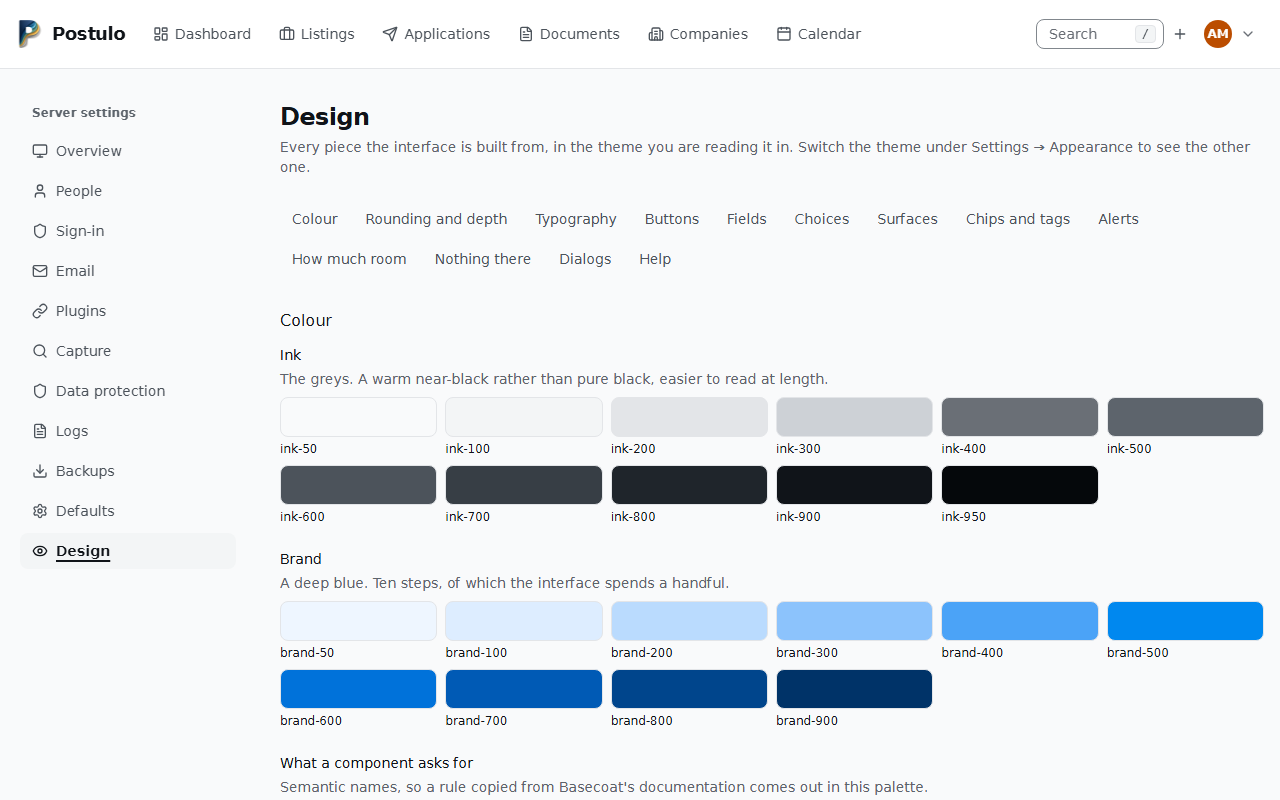
There is a gallery in the application itself: Server settings → Design. It shows every component on one page, in whichever theme you are reading it in, and it is walked by the browser test suite on purpose — a component seen only inside a feature is a component nobody reviews. Look there first; this page says why.
The one rule
Conformance is a floor, not a design. Every page passes axe in both themes, reflows at 320 pixels, survives a text-spacing override, keeps its focus rings under Windows High Contrast and prints as ink on white. None of that makes an interface good to look at, and none of it was ever supposed to. But nothing below may be bought by giving any of it up.
Colour
Two scales and a set of semantic names.
Ink is the greys — a warm near-black rather than pure black, which is easier to read
at length. Eleven steps, ink-50 to ink-950. Most of the interface is these.
Brand is a deep blue, ten steps. Sober enough for something you use while job hunting.
The semantic names are what a component asks for: background, foreground, card,
primary, muted, border, input, ring and the rest. They are Basecoat's
vocabulary, so a rule copied from its documentation compiles here and comes out in this
palette. Prefer them in a component; reach for ink-500 in a page.
The palette is seven colours — grey, blue, amber, violet, teal, green, rose — each tuned to 3:1 against the card in both themes. They exist to tell one kind of thing from another, and they are spent in two places: the tone of a pill and the tone of a figure. An offer is green wherever an offer is drawn, a rejection rose, a conversation in progress the brand. Something that is only a count, or only a fact, has no tone.
Two rules about colour that are not negotiable:
- Colour may never be the only thing saying something. A state marked by colour alone is invisible to somebody who does not tell those two shades apart. Give it a word, a shape or a weight as well.
- A high-contrast theme throws backgrounds and shadows away. It keeps borders, text
decorations and outlines. Anything carrying meaning in a background needs an answer
there, which is why the two
forced-colorsblocks in the stylesheet are deliberately outside every layer.
Rounding
One token, --radius, and every step derived from it by arithmetic: rounded-sm,
rounded-md, rounded-lg, rounded-xl. Change the base and the whole interface moves
together.
Do not write a rounding that is not one of those. Before the token existed, .card chose
one, .btn chose another, a field chose a third and the templates chose four more — not
because anybody decided the corners should disagree, but because there was nothing to
agree with.
Depth
Three planes, and three is enough:
| Plane | What is on it |
|---|---|
| page | The background. Everything else is above it. |
shadow-raised |
A card, a table, the masthead once you have scrolled under it. |
shadow-floating |
A popover, a menu, a dialog — something over the page rather than in it. |
Ask for a plane, never for a blur radius. shadow-lg in a template means somebody wrote
shadow-lg, and a test now refuses it.
Both shadows are soft on purpose, and every raised surface also has a border. A shadow is discarded outright under forced colours, so it may say this is above that and may never be the only thing saying it.
Type
One family, and a handful of sizes used consistently:
- a page title:
<c-page-title>, with the sentence under it in itssubtitleslot - a section heading:
<c-section-title>, likewise; a heading that shares a row with the actions beside it is a bare<h2 class="font-medium"> - ordinary text: the base size
- quieter text — an explanation, an unfilled value:
text-sminink-500 - the smallest label:
text-xs - anything you compare down a column: add
tabular-nums
Density
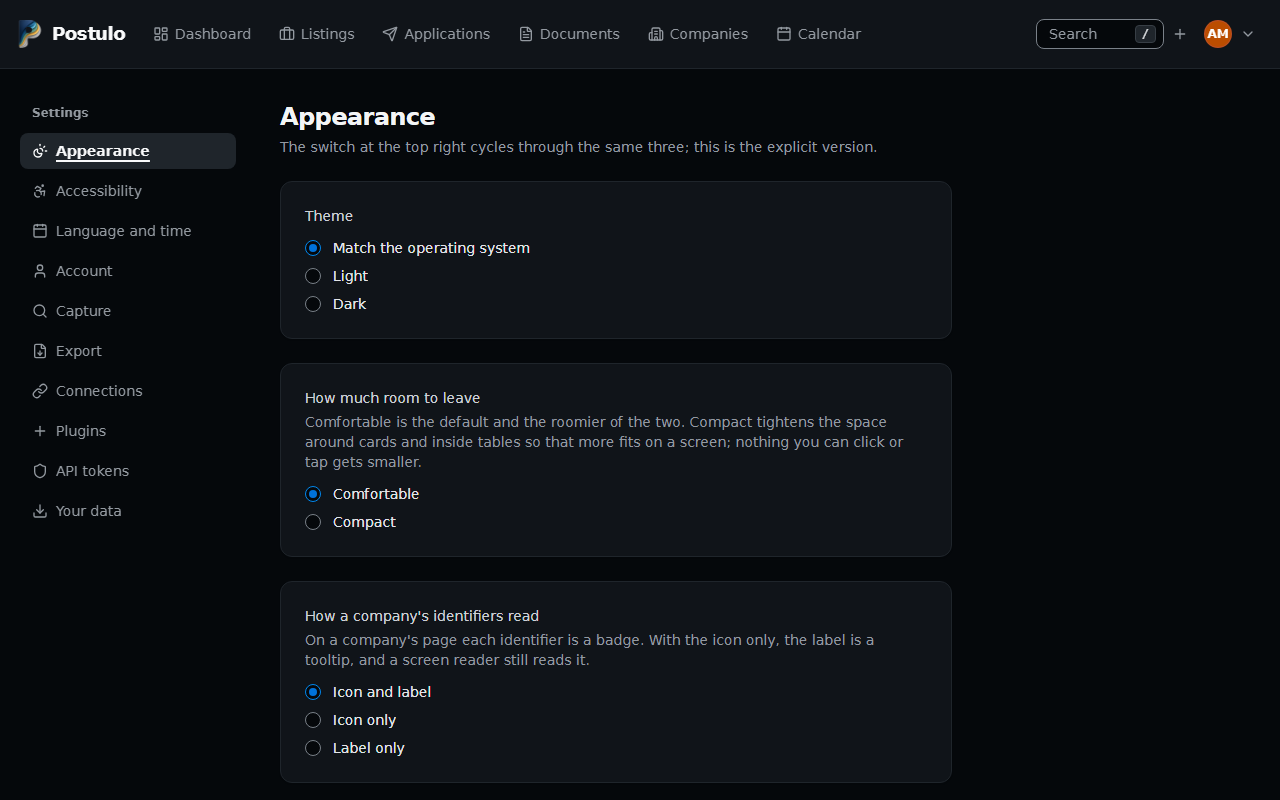
Settings → Appearance offers comfortable and compact. Comfortable is the default and stays it: the roomier interface is the easiest to hit and to read, and it is what the conformance claim rests on. Compact is somebody asking for more rows on a screen.
Compact tightens the room around things — the padding inside a card and inside a table cell — and nothing else. It may not shrink a target below 24×24. The browser suite walks the entire interface a second time with compact on to hold that, because a preference that quietly cost a criterion would be the compromise this exists to avoid.
Buttons with an icon and words
Settings → Appearance → How buttons read chooses, for every button that has both an icon and words
(the company's actions, the new-listing group, the calendar's period buttons, Import and Export), whether it
shows both, only the icons — the words stay as the button's name and become its tooltip — or only the words.
A button with words alone does not change. A group of buttons is icons only on a phone-width screen
whatever is chosen, unless it is words only (#852). The markup is an icon followed by a
<span class="btn-label">.
Forms
A form row is Basecoat's field: a <div class="field"> holding an ordinary <label>
and an ordinary control, with nothing on either carrying a class. The stylesheet keys on
the elements inside the wrapper -- the label's weight, the box, a <p> as the help, a
role="alert" as the errors -- and data-invalid on the row turns the label red with
them. <c-field :field="form.name" /> emits that shape, and it is what the 117 rows a
single field can draw use; a row it cannot draw writes the same three lines out.
A checkbox lies the other way, data-orientation="horizontal": the box first, then a
<section> with the label beside it and the help under the label. <c-field> knows
which shape a field wants. A hand-written checkbox or radio says class="input" to be
drawn by the stylesheet, and a loop over a choice widget asks for the same with
form.theme|widgets_classed:"input". The target that has to reach 24 pixels is the label
that switches them, as it always was. A group of choices (a set of checkboxes or radios) is
not a row with a label: <c-field> draws it as a <fieldset> with a <legend>, the help
and the errors tied to the fieldset, even when it holds no choice yet.
A control with something attached to it -- the flag beside a country chooser -- is an
input-group: the group carries the box and the ring, and the control inside it has
none of its own.
Two controls may share one group. The telephone field is the flag, the country chooser and
the number in one input-group with role="group" and a name; each control inside it has
a name of its own, and the visible label points at the box. It wraps where there is no
room, the box dropping to a line of its own inside the same frame, and the control that has
the focus is outlined inside the group, because the ring round two controls would not say
which. Such a group is not a size container: Basecoat makes a role="group" in a field
one, and this one undoes it. The box is written left to right whatever the page's
direction, and on a right-to-left page its text keeps to the side the page's boxes start
at.
A telephone row is .phone-row: one grid holding the kind, the name and the group. From
768 pixels the group sits beside the kind; in a row that shows its name it takes the line
under the kind and the name. The stylesheet follows the kind's select, as data-if-other
does for the name box, so the arrangement needs no script.
The same group holds an icon where the choice has one: the service of a web link. An
<option> holds words and nothing else, so every icon the choice can draw is in the group,
each in a <span data-service-icon> and all but the chosen one hidden; the server draws
the stored one and app.js shows the one named by the chosen option's data-icon. The row
is right with scripts off, and stops following the select until it is saved. On a row being
added the same script shows the service the address's host suggests and marks the select
data-service-guessed; as the form is sent, a select still carrying that mark is put back
to nothing chosen, so what a script chose is never posted and saving decides, as it does
with scripts off.
A box that only means something for one choice is hidden by the stylesheet and not by a
script: the group is data-if-other and the box data-name-if-other, shown while the
select's other option is chosen or the box already holds something. A web link's row is a
service, that name, the address and its controls, in that order in the source, on one
wrapping line from sm and a column below it.
The control's own box is on the element, not on a class: an <input> in a toolbar and
one on a form are the same box. The four field-* classes that used to say it are gone,
and tests/test_template_lint.py refuses a template that names one.
Fields that share a line and must stay level are an address-line: a grid whose children
are each a field, one under another below 640 pixels and side by side from there up, where
each field is a subgrid of the line's three rows — label, control, what is said about it.
So a label that wraps, or an error under one box, moves every box of the line together; a
flex row can keep the tops level or the bottoms and each is wrong for one of those.
data-narrow gives one column a short width by its place on the line ("1", "2", "3",
10rem), or "menu" for a line that leads with a select, which is then as wide as its
longest option. The postal address rows are the only user today.
A field's help is one of two things (#302). A sentence that says what the field is for
is a tooltip: <c-field :field="form.headline" :tip="tips" />. A format the field
requires, or an instruction -- what to type in a box with nothing to go on yet, which
addresses can be pasted whole, the row a new number is typed into -- stays under the field.
Help, below, says which and why.
Choices
Every <select> is Basecoat's select: a button that shows the choice, and a list that
opens from it in the top layer, over a dialog and outside any box that scrolls. The page
writes an ordinary <select>, which is the whole control with scripts off and stays the
form's control with them on; app.js builds the button beside it, as wide as its longest
option, and the list each time it opens. An option can hold what a native one cannot: a
flag beside every language and country, and an icon beside every kind -- a telephone
number's, an address's, an identifier's, a link's service, an application's status on the
board. The icons are generic, never a brand's mark. Time zones come in groups by continent,
and a list of sixteen choices or more has a box at its head that narrows it to every choice
holding what was typed, whatever the case or the accents.
It works as the ARIA combobox does: the arrows, Home, End and a letter open it and move in
it, Enter and Space choose, Escape closes it having chosen nothing, and Tab chooses the
option somebody moved to and moves on. Nothing is chosen by passing over it, and nothing by
typing alone: what is typed in a long list's box puts the keys on the option it most likely
means — the first that starts with it, then the first with a word that starts with it (a
dialling code in front is not a word), then the first that holds it — and Enter chooses
that, but Tab leaves the choice as it was until an arrow, Home, End, the page keys or the
pointer has moved to one. In the box, Home and End move the caret. A press or a tap outside
an open list closes it and does nothing else; a second press does what the first would
have. A required list with no answer that is the form's first wrong control keeps the focus
and says why under it. A control narrower than its choice shows one line of it and an
ellipsis; the whole of it is in the list. Under a finger the options are 40 pixels tall.
The open list is painted from the same tokens as the box, in both themes, for every select
-- a column filter, a board card's status, the country in an input group -- not only those in
a field; under forced colours it takes the system's pair. The gallery's Choices shows
each kind. data-native keeps a select native, and
tests/test_template_lint.py lists every one with its reason; the list is empty.
Cards and headings
Almost everything sits in a card. It is Basecoat's, with one of Basecoat's choices
undone: a card here is a block and not a flex column, because it holds running content —
a form, three paragraphs, a button after a sentence — and as flex items those would
stretch to the card's width. What is taken from the structure is the <header>, with a
place for an action beside the title, and the <footer> for what is done next.
The heading at the top of a section is <c-section-title>: a <header> holding the
heading and, in its subtitle slot, the sentence under it. As a card's first child it is
the card's header; anywhere else it is the same thing with the same paint. class is for
the distance from what came before (class="mt-8"), and is the one thing a call site may
add. Do not write the margin by hand: it used to stand in for whether a sentence followed,
which is how one heading came to be written eleven ways.
help="…" on <c-section-title> puts the card's question mark at the inline end of the
heading, its middle on the middle of the title's first line. <c-page-title help="…"> draws the same mark beside the H1 and no subtitle (Listings, Documents, Your details). A card that is a <fieldset>
takes <c-help-mark> after its <legend>, and the mark then sits on the card's top border
at the inline end, as the legend does at the start. See Help.
Width
A page takes the screen or keeps a measure, and what decides is where its measure lives
(#188, #210, #320). A table, the board, the dashboard, a list, and a page framed by a
sidebar empty main_width and take the width. A form's parts keep a measure of their own:
max-w-2xl, 672 pixels, on the card or on a wrapper, at the start edge and never
mx-auto, so a text box is 622 pixels on any monitor. Your details and every page of
Settings do this beside their sidebar. The import's mapping is the exception, because it is
two tables of a spreadsheet's own columns.
Under Server settings the frame keeps the measure for the page. server/base.html puts a
measure block on the column beside the sidebar, and a page that is a form fills it in one
line — {% block measure %}max-w-2xl{% endblock %} — so nothing in the page is wrapped or
re-indented. Sign-in, Email, Capture, Defaults, Data protection, the record of processing
and the three pages about one person (username, delete, recovery link) do. A page that
leaves the block empty takes the width, and should be one that wants it: a table (People,
Logs), a grid of cards (Overview, the gallery), or rows that set a description beside its
controls (Plugins, and one person's plugins), where 672 pixels would leave the description
320. A form inside such a page keeps the measure on its own card, as Add a repository and
the upload do on Plugins. tests/test_width.py lists every section under one heading or
the other, so a new one has to say which it is.
A form whose parts are two different things sets them side by side from 2xl (1536
pixels): the company form's details and identifiers, a contact's details and its rows of
numbers and links, and the capture form beside what it does. The row is 2xl:flex and each
column max-w-2xl 2xl:flex-1, so both are 672 at any width from 1536. Source order is the
reading order, and right to left mirrors it without code of its own. The breakpoint follows
one rule: neither column may be narrower than the single column it replaces. A form whose
column is wider than 672, such as the listing form at 768, would need a window of 1592,
which no breakpoint names, so it stays one column.
Pills
A pill is a badge: a tag, a status, a plugin's kind, a count beside a sidebar entry.
data-tone is its colour, from the palette. data-variant="chip" is the token in a
field — a chosen label — a size up and outlined, with a .btn at icon-xs inside to take
it off again, which is the 24 pixels a × in the corner of a pill needs; data-new marks
one that is a name not yet saved.
tag and chip were two names for this one idea, and the idea was written out a third
way nine times. Neither class exists any more.
A caution is amber: set in the environment, not loaded, a warning in the log. A state
said beside a name is a word in a grey pill — Disabled — and a switch's own label names
what it switches, Enabled, while the switch shows whether it is. A pill is never written
out as utilities: rounded-full with px-2 py-0.5 on one element fails
tests/test_template_lint.py.
Alerts
Something the page has to say is an alert with a data-variant of info, success,
warning or error; none at all is info. The tone is never the only thing said: an
alert is a sentence, and one that arrives after the page does carries role="alert" or
role="status".
The region fixed to the foot of the window that reports a failed request is not one of
these. It is page-alert, it is in the document from the first paint and empty until
there is something to report, and it is wired to the script. Leave it alone.
Figures
A number and what it counts is <c-stat>: the figure in the slot, the label an
attribute, card for a tile of its own and href for a tile that leads to the list it
counts. tone is what the figure means, from the palette; a figure that is only a count
has none.
Tables
A data table says <table class="table"> and nothing else: the header, the rows and the
cells are bare, and the stylesheet draws them -- the header's small muted type over a
rule, a lighter rule between rows and none after the last, the cell's padding. A cell
that means something more says so on top (align-top, tabular-nums, text-end), and
nothing repeats what the table already said. table-cards beside it is what a table does
below md: a card per row, each cell introduced by its data-label.
A table that a person can sort, filter and reshape draws its header with <c-table.head>;
a plain one writes its own <thead>. Both are the same table.
In that header a column's name sits at the start of the cell and its sort at the end, so a row of sorts lines up down the columns' end edges; a numeric column's name sits at the end beside its sort, over figures set against that end.
A table that narrows as you type has several controls that each ask the server for it: the
page's filter form, every column's own filter, and the masthead's search box where it
searches the table. They take turns on one element, the filter form
(hx-sync="#…-filters:replace", and this:replace on the form itself), so a new request
replaces the one in flight and the newest question is the one drawn and put in the address.
Each sends the whole form and the box, so no request is half the question. The sort and the
page links take no turn: their address was written with the last answer. The board's
headings, which fold it, do take one: each sends the form and the box with its own status,
so it is never an older question (see The board).
A page that answers an htmx request with its table alone, at the page's own address, takes
PageOrFragmentMixin first among its bases: it chooses the template and says so in Vary,
so that no cache hands the fragment to somebody asking for the page (#646).
A header holds the filters that belong to its column, and that can be more than one: the
column's own first, then any question the table put there (Table.extra_filters), each
drawn by <c-table.filter> from a Control. One that asks something other than the
column's name has its word written above it. A list in a header is never narrower than its
widest choice (min-w-max): it holds its column open and the table scrolls inside its own
box, where a text box may be squeezed. The header cell says its own name (aria-label,
Header.cell_label) — the column's, and that it is filtered while it is — so the controls
in it keep their names and are not the column's. A filter whose column is not showing is
under Narrow, which is then on the page at every width and comes back open while it
narrows.
Narrow is a form of its own, drawn with the table: two copies of a filter never share a
form, so a name is posted once (#622). It is not live; its button loads the page. What is
entered in it and not yet applied outlives a swap: app.js puts back whether it was open,
the fields that were changed and the focus, and leaves to the answer a filter the answer
itself moved. Its word carries the funnel and a count while any of its fields is in force
(Table.narrow_marks), counted at the width it is read at, and it stays folded for a
filter a header holds. Below md the page's own filter form draws nothing
(max-md:hidden), so a phone has one Apply, under the fields it sends. With scripts off
there are two forms and two kinds of button; a <noscript> line under Narrow's says
which applies what, and a header's panel ends in a button of its own wherever no form above
the table is drawn.
A table with nothing matching still draws its header, over no rows: the header holds the sort and the filters, and is where a filter is loosened (#647). The header whose control asked for the table comes back open whatever it holds (#626).
The board
The board's columns fold, and the fold is the address: ?status= means what it means
in the table. The server draws it — the column of each status it names open, every other a
strip — so a plain link folds the board with scripts off, and Back, a reload and a
bookmark agree with what is drawn (#315). Several statuses are one value, comma-separated
(?status=applied,interviewing, #709), so that the hidden field, a heading's hx-vals and
the table's one status list each carry the set; the table narrows to all of it, and its list
offers the set, first, as a choice of its own while the address holds it.
- A column's heading is the control, and says what pressing it draws (
column.action): on the open board, only that column; on a strip of a folded board, that column too, beside the open ones (or alone where none is open, and the open board where it is the last); on one of several open columns, that one folded; on the one column open, all of them. The statuses a heading leaves open are written in the order ofStatus, so one set of columns is one address, and one Postulo does not have is left out. It carriesaria-expandedfor its column,aria-controlsnaming the column's list of cards, anaria-labelthat starts with the status and says what pressing it does (Applied: show only this column, show this column too, fold this column, show all columns), andaria-describedbynaming the count beside it. Where htmx runs,app.jsgives itrole="button"and Space presses it, once however long it is held; without a script it is a link and is announced as one. A click with Ctrl, Meta or Shift is kept from htmx and left to the browser, which opens the link where it was asked to. The<h2>says its own name, the status, in anaria-label: left to its contents it would be called by its control. - Its focus ring is drawn inside it (
-outline-offset-2), and it has the room for it. The board is a box that scrolls sideways, and such a box clips on every side: a ring drawn outside a control at its edge is cut. - A count is a figure and words. The figure is what is seen,
aria-hidden; beside it,sr-only, is the page's own sentence for a count ("3 applications"), which is what the heading's control is described by. - A strip is the column's own
<section>: the heading with the same control, the count, and the column's list of cards, empty andhidden. Its name is written down it ([writing-mode:vertical-rl]on a<span>in the link), so a strip is one line of text wide and as tall as its name is long, and nothing is cut in any language. The link is the strip's width and its::aftercovers the strip, so the whole strip is the target.data-board-sectionis what a dragged card is dropped on, strip or not, and a strip under a held card is tinted itself, since its list is not on the screen. - All columns is an outline button above the board, before the columns in the source,
drawn whenever a status is in the address and never otherwise. It names in
data-focus-afterthe heading the focus goes to once it has gone. Where the fold is all the address asks and a default view is kept, it and the open column's heading lead to the plain board (saved=none), as Clear does: the bare address opens as the default view. - A fold takes its turn like a filter, not like a sort link. With a script the control
asks for the page with the filter form and the masthead's box (
hx-include), on the form's queue (hx-sync="#application-filters:replace"), with its own status in place of the form's (hx-vals) or with the status left out (hx-params="not status"). So it is the question as it stands, and the newest question is the one drawn. - The status in force is a hidden field of the filter form, drawn with the board
(
form="application-filters", inside#applications-table). The form is outside what a swap replaces; the field is inside it, so it is the status the board was last drawn with, and a filter chosen above a folded board keeps it folded. While a fold is on its way,app.jsgives the field the status that fold asks for (made where the board had none, taken away by a fold that opens every column) as htmx sends it, so a filter chosen before the answer lands keeps the fold; a request for the board that fails puts the drawn status back. - Three counts, one rule each. An open column counts its cards. A strip's count is a
COUNTof what the rest of the filters match in that status. The count under the page's title is of what the address asks for, the status included. A drop moves them by one at once, and moves them as the page that comes back will: under gone quiet the card leaves the board and its new column gains nothing, and a card that leaves what the address asks for — dropped on a strip, not on another open column — is one fewer under the title, in a sentence the server wrote for that (data-one-fewer), sinceapp.jshas no words of its own. - A card that is held is not swapped away. While a drag is in progress
app.jsrefuses a request for the board (htmx:confirm) and an answer that lands (htmx:beforeSwap), and asks the filter form again when the card is let go without being moved. If it was moved, the address the card's form goes back to is written again from the filter form, so the refused filter is not lost. - The board scrolls in both directions inside the page (#652).
.board-boxbounds its height to the window under the masthead (max-block-size), so a column with hundreds of cards scrolls in the box and not the page. Each column's heading, and a strip's name, isposition: stickyto the top of the box, so every name stays on screen. The box is a focusablerole=regionnamed Board, Tab leaves it, and the page scrolls on past it. The columns are a grid and not a flex row, because a flex row in a bounded box stretches its columns only to that bound and a short column's heading would have nowhere to stick below. - The board is centred. On the scroll box, a grid with one row (
grid-flow-col
  auto-cols-max
) andjustify-center-safecentre the columns while they fit and start them at its edge when they do not, where centring would put the first column past an edge no scrolling reaches. After a board is drawn,app.jsscrolls the box until the open columns are in its middle — or, where they do not fit, the column whose heading was pressed (a column wider than the box shows where it starts) — at once when the page arrives, and with the columns' motion after a swap (#709). - A fold moves. The board that is replaced is measured as the answer lands (each
column's width, the gap, the box's height and scroll position) and copied; the new one is
held at the old geometry until htmx's settle — which gives an element with an id its old
classes for twenty milliseconds — and then each column that changes width is animated
from the old width to the new (
FOLD_TIME, 240 ms), with the gap, the box's height and its scroll position on the same beat, the scroll timed by the columns' own animation so it never stops short. A column's content is laid out at the width it arrives at through--board-arriveson the<section>(w-(--board-arrives)on its two children), never a style on the list of cards: htmx carries thestyleof an element with an id into the next board, which the CSP refuses. What the column held fades out over what it holds as a copy that isinert,aria-hidden, stripped of ids, names and board markers, and removed once it arrives. Underprefers-reduced-motion: reducenothing animates: the board is drawn at its new widths and the box put where it goes. - A move leaves the board where it was. The card's form loads the page; how far the board was scrolled is kept for that one load in the tab's own storage, with the address the form goes back to, and put back on the page that address draws. A move made on the board says where the card went (Moved to Offer.); the application's own page and the dashboard keep Status updated.
- The open column is brought into the box when the page arrives folded and after a swap that brought a board — not after a swap of anything else on the page, and not on the page a move loads.
Menus
A menu is <c-dropdown-menu>, and there is no other: the masthead's New, the account
menu, More, a row's ⋮ on Server settings → People, a reminder's actions. The trigger is
a <button popovertarget> and the panel a popover, so the browser opens and closes it
with no script, closes it on Escape and on a click anywhere else, and hands focus back to
the trigger. The panel is drawn in the top layer, where no box that scrolls can cut it off,
and tied to its trigger with anchor positioning: below it, its inline end on the trigger's,
turned upwards when there is no room below, and scrolling inside itself only when it fits
on neither side. Where a browser has no anchor positioning, app.js places it by the same
rules; with neither, it sits in the middle of the window, over the page and whole.
Two kinds. kind="menu", the default, is a menu of actions: role="menu", items that are
role="menuitem", and the arrow keys. kind="navigation" is a disclosure of links:
menu-item rows, no role="menu", and Tab. The disclosures that hold a form — the column
chooser, the saved views, the language picker — are not menus, and stay <details>.
Dialogs
A question over the page, answered before anything is done, is <c-dialog>: Basecoat's
alert dialog on the browser's own <dialog>. The heading goes in its title slot and the
sentence in description, and they are its accessible name and description; both are
slots, so a value somebody typed sits in a <bdi>. The buttons that answer go in footer.
The component draws Cancel before them, so the answer that changes nothing is read first,
reached first and holds the focus when the dialog opens. tone="plain" is a dialog that
holds something to do rather than a question.
action makes the body a <form method="post"> to that address, with the token, whose
buttons in footer submit it. A form cannot hold another, so a dialog with an action is
drawn outside the page's form, and the button that opens it can sit inside one: it finds
the dialog by id. live sends that form with htmx and leaves the answer to the page's
script, and gives the dialog an alert of its own for a refusal or a failed request:
class="alert" with data-variant="error" and role="alert", not drawn while it is
empty. The page behind a modal is inert, so the alert at the foot of the window can be
neither seen nor heard.
It opens without a script. The dialog is a popover and its trigger a <button
popovertarget aria-haspopup="dialog">, the baseline the menus took: the browser opens it
in the top layer and closes it on Escape, on Cancel and on a click outside. Opened that
way it is not modal, and the page behind it is not dimmed, because it still works. Where a
script runs, app.js opens the same dialog from the same button with showModal(): the
page behind is inert and dimmed, focus stays inside, a click outside does nothing, and
focus goes back to the button when it closes. So a confirmation has to be true both ways:
its form posts and redirects with a message for the first, and says in a <noscript> what
a reload costs.
A dialog that holds something to do has a page behind it. A confirmation is one button
and survives as a popover; a form with a box to type in does not, and where the browser has
no popover there is no way in at all. So such a dialog is opened by a link to a page that
holds the same form: <a href="…" data-opens-dialog="id">. With no script the link is
followed. With one, app.js opens the dialog the link names in its place — modal, focus
given back to the link when it closes — and says so with aria-haspopup="dialog", which it
adds itself, because without it the link is only a link. A click that asks for a new tab
is left alone. The form is one component drawn in both places, and the dialog posts to the
page's address. Server settings → Plugins does this for the identifier registry.
Three things go with it. The box asks for the focus (autofocus) and stands before
Cancel, so opening the dialog lands in it. A refusal comes back into the open dialog: the
form is live, the <c-dialog> carries hx-target naming the element that holds the
fields, which the form inherits, and the view answers an htmx request with that element
alone and HX-Reswap: outerHTML. Name the target in the markup and not with HX-Retarget:
the element marked aria-busy while a request runs is the target as the request knew it,
and one named only in the answer leaves the form dimmed and announced as loading for ever.
And what was saved goes back to the page behind with HX-Redirect, where the message is.
data-size="wide" on a tone="plain" dialog gives it 48rem in place of 32rem, for a
dialog that holds code; it is still the window less a gutter on a phone.
A box of code is not a box of prose. A textarea in the vocabulary grows with what is
typed into it and never scrolls, which suits a note. data-code on a <textarea> gives it a
height of its own — under half the window, 28rem at most — in one width of letter, with its
lines unbroken, scrolling inside itself both ways; whoever wants it taller drags its corner.
A hundred lines of JSON in a box that grew with them put what refused them two screens below
the window.
What is wrong with it is said above it, and carries the line. The field's errors are
drawn before the box, not after it, in the role="alert" element the box's
aria-describedby names, so after a refusal they are the first thing read and the box they
are about is the next. data-caret-line, and data-caret-column where it is known, on the
box: app.js puts the caret there, scrolls the box — not the page — to that line, and then
brings the sentences into view where the box asked for the focus, which is where something
was refused. Once each time the box is drawn; a box inside a dialog that is shut has no size
to scroll, and is placed when its dialog opens. A textarea has no line numbers, so the
sentence names the line and the caret finds it. Without a script the box has the focus, the
sentences are directly above it, and the box is short enough for both to be in the window.
A sentence that quotes what somebody typed isolates it. In the heading that is the
<bdi>. A sentence that travels as plain text — into a live region, a message, an
attribute — puts the value between U+2068 and U+2069 (removals.quoted()), or a number
reads last group first in a right-to-left language.
The box is painted like a menu's panel, on the floating plane with a border: 32rem wide, or the window less a gutter, scrolling inside itself when a zoomed window is shorter than it. Its words break anywhere, because the heading may quote one word wider than a phone. Two of Basecoat's choices are undone: nothing fades or scales, and the footer is a row that wraps in the order written rather than a reversed stack.
Two controls that go with it on Your details. <c-remove-button :removal="…"> is the
bin: an icon-only button in the destructive tone, 24 pixels, named with what it removes
("Remove +351 912 345 678"). <c-primary-choice> is a radio drawn as a star, filled when
chosen and an outline otherwise, so the two states differ in shape as well as colour and
still do under forced colours; the label is the 24-pixel target and the word Primary is
there for a screen reader.
After the answer, focus moves and then the page speaks. Focus goes to its landing place first, and the polite live region is written once, a moment later, so a screen reader that drops its speech when focus moves does not cut the sentence short.
The gallery has one that asks about nothing. Delete account and the other confirmation pages are still pages.
Help
Help goes where the question is asked (#302), in one of three places. Your details uses all three, and the gallery shows each.
What a field is for is a tooltip. tip on <c-field> or <c-field-feedback> draws the
field's help exactly as before — a paragraph under the control, carrying the id the control
names in aria-describedby — and marks it data-tooltip. With scripts off that is where it
stays. Where a script runs, app.js makes the paragraph a popover and shows it while the
field is hovered or has the focus. It is the control's description either way, so a screen
reader reads it with the field as it always did. It is not Basecoat's data-tooltip="…"
attribute, which draws the text in a ::before: on hover only, hidden on focus, one line cut
short, and not reliably read aloud. What is taken from Basecoat is the look: the page's ink
as the ground and its ground as the ink, small type, a small rounding.
When it shows and when it goes (SC 1.4.13). At once when the focus enters the field; after 300 milliseconds when the pointer rests on it, so that crossing a form does not light every sentence on the way. It stays while the pointer is on the field, on the tooltip, or on the strip between them — a transparent part of the tooltip as wide as the two together — so there is no gap to cross at any speed, and for half a second after the pointer has left all three. It goes when the pointer and the focus have both left, or on Escape. It goes, too, the moment the field's own select list is opened, and none shows for that field while the list is open — the list is what is being read, and it opens where the tooltip would go; once the list has closed and the focus is back on its button, the field's tooltip shows again by the same rule. Escape puts the tooltip away and moves nothing; where it is the focused field's tooltip the key is its alone, so a dialog or a menu that is open stays open and the next Escape is theirs. A tooltip shown only for a resting pointer is put away by the same Escape, which then goes on to whatever has the focus. A touch does not hover; touching a control gives it the focus.
Where it is drawn: only where there is a clear place. A place is clear when the
tooltip, put there and measured, is wholly inside the window that can be seen — under the
floating masthead, above a phone's bar at the foot — and over no part of its own field, nor
over a refusal or an alert, a mark or a note under a row (Not checked, Kept as it was,
a place's note), a card's question mark, a select's list that is open, or the control that
has the focus. The places are tried in order: above the field from its start edge, above
from its end edge, above anywhere along the window, then the same three below; a question
mark's sentence tries the end edge first. Where all that is in the way is a question mark
or a side of the window, the tooltip stops short of it: it keeps its field's edge and
narrows, or moves along the line, never to less than ten rem. Where no place is clear,
the help is not a tooltip: it is the paragraph under its field, as with scripts off,
until the window changes width. A window too short for a field and its tooltip — 400% zoom
— gets the help under each field and no popover at all. A page that has been refused has no
tooltips: the view says so for the whole page (refused, tips), and every card's
sentence is under its title. The rule is app.js's, in one place, and it places every
tooltip itself, in the page's co-ordinates, in every browser: not with CSS anchor
positioning, which moves a box when the browser next draws rather than when it is measured.
Twenty rem at most, or the window less a gutter; the words wrap and nothing has a height,
so it grows with larger text and wider spacing.
What stays in sight. A format the field requires, or an instruction — the files an
upload accepts, which addresses can be pasted whole, what to type into Location while there
is no address to derive it from, the row a new telephone number is typed into — takes no
tip: it has to be there before the mistake (SC 3.3.2). So does the sentence of a tick box,
a radio or a switch; a tap does not give one the focus in every browser. A help text that
says both is split: the format stays with the field and the rest goes to the card.
A card's help is behind a question mark. <c-section-title help="telephone-numbers"
anchor="section-phones">, or <c-help-mark topic="…" anchor="…" /> after the <legend> of
a card that is a <fieldset>. It draws circle-question-mark in the card's top corner at
the inline end, 24 pixels square, named "Help: " and the card's name. Resting on it or
focusing it shows the card's one sentence; pressing it, or Space, opens the card's help in a
drawer. With scripts off the sentence is under the card's title and the question mark is a
link that opens /help/<topic>/ in a new tab, and says so, so that nothing typed on the form
is lost; the page holds the same help and leads back to the card. Where a script takes the
link over it is a button, and the new tab and the words about it go. A card with nothing
more to say than its one sentence gets no question mark; it keeps a subtitle. The mark
is turned round where the page's language is written in the Arabic script, which writes a
question mark the other way: the server says so from core/languages.py, and not in Hebrew.
The drawer is <c-drawer>: Basecoat's drawer on the browser's own <dialog>, at the
inline end — the right in English, the left in Arabic — by a logical inset; inline-end is
a side Basecoat does not have. Twenty-four rem wide, or the window less a gutter; the whole
height of the window; its body scrolls inside it and takes the focus, so the keyboard can
scroll it, and Close never shrinks below its 24 pixels. It is opened only by a link to the
page that holds the same thing (data-opens-dialog), and only where a script runs, with
showModal(): the page behind is inert and dimmed, the focus starts on Close and stays
inside, and Escape, Close and a press outside the panel each close it and hand the focus
back to the link. It is modal because a press outside has to close it, so it could not be
read while typing in the page anyway, and a panel left open over the page would lie over
the fields somebody had tabbed to. Nothing slides and nothing fades. Basecoat's drawer.js
is not used.
The help itself is a template under templates/help/, listed in core/help.py and
translated through the catalogues like every other string. Nothing is fetched from this
wiki and nothing is bundled from it. The drawer and the page draw the same template, and
what the code decides — what a picture may weigh, which registers' addresses can be pasted —
is read from the code. CONTRIBUTING.md says how to add a topic.
The main navigation
One list, drawn once. core/navigation.py holds the items, each with its label, its
address and a Lucide icon; the masthead draws them in the person's order into one <nav>,
and the stylesheet decides its shape by width. From md up it is the row in the masthead,
an icon beside each label. Below md the same element is a bar fixed to the foot of the
window, an icon over each label. There is no second copy of the navigation for the phone —
which is why it has one name and one place in the reading order everywhere.
The row never wraps. It holds the first items in the person's order and the rest go under More. How many it holds is decided by breakpoint, because without a script nothing can measure what fits:
| Width | In the line |
|---|---|
below md (the bar) |
all of them — the bar scrolls sideways instead (#912) |
md, 768 |
2 — the search is a link here, not a box; on Companies, Applications and Listings it is a button that opens the box in a bar under the masthead |
lg, 1024 |
3 |
xl, 1280 |
5 |
2xl, 1536 |
7 — all of them today, and More goes |
The numbers are what fits in Greek and German, the widest of the languages the reflow walk
is taken in, in DejaVu Sans, the widest of the fonts the suite draws in, with the search
box open — and, in English at 1280, under the text-spacing override. Where the box searches
the page's table it has two buttons beside it, and the three take 186 pixels at rest,
inside the 192 the open box takes; they carry no data-align, whose margin was eight
pixels the count did not have. That box grows on focus only where a script has fitted the
row. Where a script runs it measures instead and puts in the line as many as actually fit;
it refines the count and never replaces it, so a script that fails leaves the count as the
whole answer. Adding an item means checking the table still holds, in the browser, in those
two languages.
The bar scrolls (#912). Below md there is no More: every item is in the bar, in the
person's order, on one row. The slots share the width equally where they fit, each held at
its longest word (and never under 44 pixels); where they do not, the bar scrolls sideways
(overflow-x: auto, no flex-wrap). This reverses #299, under which the bar grew a second
row rather than scroll — a rule for five slots that would have made a bar of three rows for
seven. Reflow is unaffected: the bar scrolls in its own box, as a table does, and the page
never does. An end with more past it is faded by a sticky pseudo-element over the items, so
the last one in view is cut part way through; app.js marks those ends as
data-overflow-start / data-overflow-end, scrolls the current item into view as the page
opens, and scrolls a focused link clear of the fades (scroll-padding-inline, SC 2.4.11).
--bottom-bar-height is still measured; with one row it changes only with the longest
label's lines.
More is a disclosure that is navigation: <c-dropdown-menu kind="navigation">, whose
rows are menu-item, never role="menu". It holds a copy of every item and shows the ones
the line does not, so exactly one copy of each is ever drawn. It is the row's alone: below md it is not drawn. When the page you are on is under More, More is set in the weight the current
link has. The script that fits the row measures More in both weights, because the bolder one is
wider, and counts the one it will be drawn in.
The search bar below lg is the masthead's own form drawn as a popover: a bar the
width of the window, fixed under the masthead, in the top layer. It must never lie over the
element that has focus. Where scripts run it closes as focus goes anywhere but into it or
onto its button. Where they do not, the stylesheet makes room while it is open: the root's
scroll-padding-top grows by the bar's height (4.5rem), the skip link moves below it, and
under scripting: none the page moves down by the same amount.
The bar has three neighbours that must know its height: the page's bottom padding,
scroll-padding-bottom, and the failed-request alert, which sits above it. app.js
measures it into --bottom-bar-height the way it measures the header into
--header-height, and 4.5rem is the stylesheet's answer where no script runs. The bar is
fixed to the window from inside the sticky header, so nothing on the header may start a
containing block — no transform, filter, backdrop-filter, contain or
will-change on it — or the bar would ride along at the top of the page.
Its labels wrap between words and never inside one. Five equal slots, none narrower than its longest word or than 44 pixels; where even the longest words cannot sit side by side, More goes to a second row rather than off the edge.
The order is the person's (Settings → Appearance): up and down buttons that post the whole form, like the column chooser's, so they need no script. What is stored is what was placed: an item in neither the order nor the hidden list — one a later release added — is drawn after the placed ones, and the default order is stored as nothing at all.
Nothing there
A list with nothing in it uses <c-empty>: an icon, a title, a sentence, and the thing to
do next. It has three shapes and every "there is nothing here" in Postulo is one of them:
the page's own, centred with room around it; variant="quiet", the note a widget or an
aside leaves where its list would be -- a card with one muted sentence, at the start edge,
because a dashboard tile is not a page; and variant="row", the same sentence inside a
box that already is a card, a list with no rows. A sentence that changes with a condition
goes in the slot, a second button in the footer slot. Nothing writes its own.
The distinction worth keeping is the button's variant. A page with nothing on it yet offers the thing to do next as a primary button. A filter that matched nothing offers Clear as an outline, because clearing is a way back rather than a way on.
There is no skeleton, deliberately. Postulo renders on the server, so there is no moment with nothing in it to fill; and while htmx replaces part of a page, what is on screen is the previous answer and still true. That state is opacity and a cursor, with no movement at all — something moving on every keystroke of a filter is worse than nothing for anybody who asked their system for less of it.
The tile
A person, a company and a plugin are the same tile: a box that holds a
picture, or two letters on a colour the name chose, until a picture
exists. Basecoat's avatar draws it, and the three template tags that
used to write the box out by hand draw through one helper. The size
classes sit on the box and the text size on the letters inside it,
because the component sizes the letters itself and a utility on that
span is what overrides it. A person is the tile cut all the way round;
a company and a plugin cut it less. The one thing the stylesheet adds
is that a picture fits rather than fills the box: a portrait cut to a
square wants the same as a logo wider than it is tall.
Motion
Almost none, and always opted into:
Nothing may move unless somebody's system has said it may.
One thing is moved by a script rather than by the stylesheet: the board scrolls sideways
while a card is dragged near its edge. It asks the same question the other way round —
matchMedia("(prefers-reduced-motion: reduce)") — and does nothing when the answer is yes.
A browser's own scrolling under a drag, in the last few pixels of a box's edge, is the
browser's and is left alone, and the script does not add to it: its own speed is at its
fastest where the browser's band begins and falls to nothing half way into it.
Things you cannot do
These are enforced, and will fail the build rather than a review:
- No
styleattribute and no<style>element. The policy isstyle-src 'self'with nounsafe-inline, enforced in the browser suite. A value that has to reach an element goes through a class or a data attribute — which is how stored column widths and the masthead's scrolled state work. - No physical sides. No
ml-,pl-,text-left,left-*,border-l,rounded-l, in templates or stylesheets. Use the logical ones —ms-,ps-,text-start,start-*,border-s,rounded-s— so right-to-left keeps working. - Every control works with scripts off. Scripts add convenience, never capability. An inert control is worse than a missing one: if something cannot work without a script, the script adds it rather than animating a dead copy of it.
- Rebuild the stylesheet and commit it.
npm run build:css, every time; a test compares the committed file with a fresh build byte for byte. - New strings get an empty slot, and nothing more.
scripts/messages.py extractwrites it; the translation is made in Weblate, which drafts it by machine and sends it back as a pull request. A commit never writes one (scripts/messages.py guard).