Your career record
Cette page n'a pas encore été traduite ; elle est donc affichée en anglais.
Your picture, top right → Your career
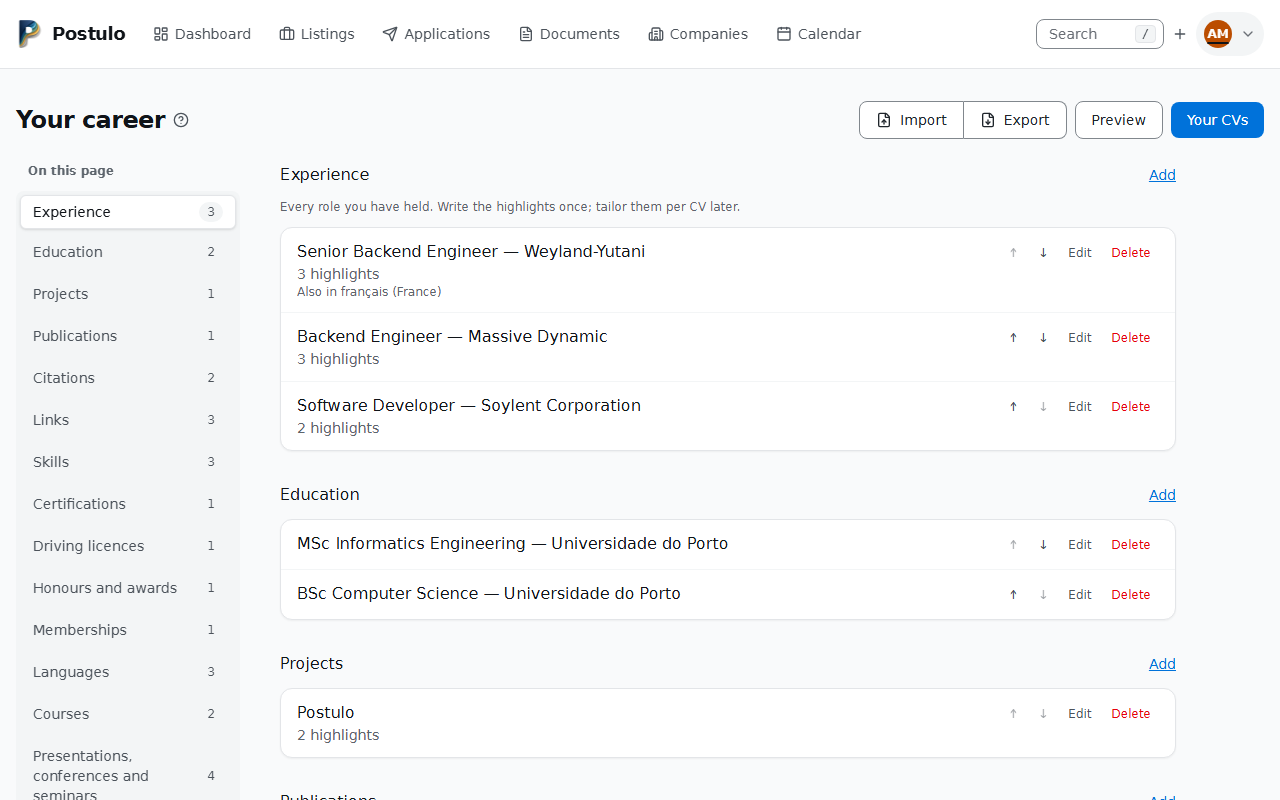
This is the master copy: every role you have held, every qualification, every skill, written down once. CV variants select from it. They never copy it, so correcting a job title here corrects it on every CV you have.
The page takes the whole width of the screen, with the list of its sections on the left; the sections themselves stay in one column of a readable width. Once the heading Your career has scrolled out of sight, the title above the list reads Your career, larger, so you know which page the list belongs to, and the section you are reading stays marked in the list.
What it holds
| Section | Notes |
|---|---|
| Experience | Roles you have held. Leave the end date empty for your current one. |
| Education | Qualifications, finished or in progress. A qualification may state its EQF level, from 1 to 8 — see The EQF level. |
| Projects | Things you built that are worth showing. |
| Publications | Papers, books, chapters, theses, datasets and software, typed like BibTeX entries — see Publications. |
| Citations | How often your work has been cited, as a source counted it on a given day, for all of it or for one publication — see Citations. |
| Skills | Grouped under headings you invent, such as Programming languages or Infrastructure; a skill needs a group. A name that is a skill in the ESCO classification is recognised as that skill — see Skills the classification knows. |
| Certifications | With issuer, dates and a credential link. |
| Driving licences | The categories you hold, as codes — see Driving licences. |
| Presentations, conferences and seminars | A talk, a workshop, a panel, a committee, or an event you took part in, with your role and the type of event: see Presentations, conferences and seminars. |
| Honours and awards | A prize, a scholarship, a distinction — see Honours and awards, and memberships. |
| Memberships | An association, a society, a club — see Honours and awards, and memberships. |
| Languages | Spoken languages, rated on the CEFR scale (A1 to C2, or native). Chosen from a list — see Spoken languages are chosen, not typed. |
| Courses | Learning you took, with a provider, the hours and a link — see Courses. |
| References | The people who will vouch for you, kept as contacts and printed only once they have agreed — see References. |
Every section is listed down the left, with how many entries it holds, so the page can be navigated rather than scrolled through. A section with nothing in it is listed all the same — that is how you find out the page can hold your languages. On a phone the list is a strip above the sections that scrolls sideways.
A skill belongs to a group, and the form will not save one without it: the overview, the preview and a CV all reach a skill through its group. Add a skill under a group opens the form with that group chosen. A skill with no group (saved before this was required, or read from a file that names none) is listed in its own block, Skills without a group, below the groups; open it and give it one, and until you do it appears on no CV.
Deleting an entry deletes it from every CV that used it. The CV rows that pointed at it go with it; nothing is left on a CV to be printed or to be unable to open.
An experience names its organisation as a company. The organisation box keeps your own words, which is what every CV prints, and when you save the entry Postulo links it to the company of that name among yours (capitals do not matter). If you have none, it adds one, marked From your career. The link is a convenience, not a copy: renaming or merging the company never changes a CV, because the entry keeps the name it had when you worked there. The entry's page links to the company, and the company's page lists the entries that name it under Your history here.
A company only your career added is left out of the places you pick a company for new work: the posting, contact and agency pickers, the suggestions on the capture form, the map and the companies table. Filter the table on From your career to see them. The mark goes the moment you attach a posting, a person or an application to the company, or you can clear it by hand on the company's page. Deleting a company keeps every career entry that named it, with its text; it only loses the link. Merging two companies moves the entries to the one you keep, and keeps the mark only if both had it.
Your archive and your own record file carry the link by the company's name. Importing a record file or a Europass CV links an entry only to a company you already have, and never adds one: a file cannot fill your company list.
An education entry names its institution as a company, one in education. It works as an experience does: the institution box keeps your own words, every CV prints them unchanged, and saving links the entry to the company of that name among yours. The box offers your companies with the places of learning first, those with an industry in NACE division 85, Education (universities, schools and non-formal training); every other company follows, and a name you type is never refused. If you have no company of that name, one is added, marked From your career and given the industry Education in your language, and Postulo says so. You can remove the industry on the company's page. A company you already had is never given an industry by this form. When the linked company has no industry in Education, the entry's page says it is not listed as a school or university, with a link to add one; it never stops you saving. Study with no institution, or a course with no school, stays text.
The company's page lists the education entries under Your education here, a merge moves them and the delete dialog counts them. The archive and your record file carry the link by name, and a Europass import links only to a company you already have.
A certification names its issuer as a company. The Issued by box works the same way: your words are what a CV prints, the entry is linked to the company of that name among yours, and one is added, marked From your career, if there is none. Nothing is optional that was not: an entry with no issuer, or one issued by a trainer, is just text. The box offers your companies with the education and testing bodies and the professional membership organisations (NACE divisions 85 and 94) first and every other company below them, because a vendor that certifies its own users is classified by what it sells and is as good an issuer.
A company added this way has no industry: a school can be told from the form it was typed into, a vendor or a professional body cannot. When the issuer has none of its industries from the NACE list, the entry says so in one line and links to the company, where you can pick one. It never stops you saving. A company's page lists the certifications it issued under Certifications it issued, a merge moves them, and deleting the company keeps them with their text. Certifications are still not translated, and the archive and your record file carry the issuer's company by name as an experience's is.
Courses
A short course, a bootcamp, an evening class or an online programme is neither a degree nor a credential somebody can check. The three sections are told apart like this:
- Education is a programme that leads to a qualification in a national or European framework: a degree, a diploma, a vocational qualification.
- Certifications are credentials somebody can check and that may lapse: an exam passed, a licence, a vendor's certificate.
- A course is learning that was taken, with or without a certificate of attendance or completion. If it ended in a checkable credential, the credential is a certification and the course may be mentioned in its summary; if it ended in a degree it is education. A MOOC with a certificate is a course, the certificate being a document; it is a certification only where the body offers a way to check it and you mean it as one.
Postulo moves nothing between them: an entry stays where you put it, and you can retype one.
A course has a title, a provider (as text, as a CV should print it), two optional dates, the hours (a whole number from 1 to 10,000, as the provider states them), a summary and a link to a public page for the course or its certificate. A CV prints title, provider, then the hours ("40 hours", in the CV's language) and the year, or the two years, with the summary under the line; the text and Word files say the same. Only the summary is translated: the title and the provider are the provider's wording. A new course is placed by its end date.
The provider works as an issuer does: the entry is linked to the company of that name among yours, and one is added, marked From your career and with no industry, if there is none. The box offers places of learning first and every other company below. The company's page lists Courses it gave, a merge moves them, and deleting the company keeps them with their text. The archive and your record file carry the company by name, and a file never adds one.
A Europass file has no element for a course, and an education entry in one is read as education, never guessed into a course.
The EQF level
An education entry has an EQF level field: the level of the qualification in the European Qualifications Framework, from 1 to 8, which a diploma or its supplement may state. It is yours to state — Postulo never works it out from the qualification's name, as it does not for a language level — and Not stated is the default. It is a number, so it is the same in every language of a CV. It shows on the career preview, travels in your export and in the candidate file, and an imported level outside 1 to 8 is refused or left out with a line in the report.
A Europass file's EQF code lands here and no longer in the grade, so a file that gives both a final grade and a level keeps both; an ISCED code, which is a different scale, is not read. A CV prints the level only if you tick Print the EQF level of my qualifications on it (see CVs). The grade stays in your record; no theme prints it yet.
Proofs of an entry
An education or certification entry can have proofs: the diploma, its supplement or the certificate you uploaded under Documents → Files and said it proves. A row with any says how many, and the number links to those files. The entry does not need one, and deleting a file leaves the entry alone. Deleting the entry keeps its files and clears what they proved. See Files and what you sent.
A proof can be a European Digital Credential, the file the Europass wallet gives you. Its edit page shows what it states (title, awarding body, date and EQF level) beside the file; it does not add or change an entry here, and its seal is not checked. See Files and what you sent.
Highlights, one per line
Experience, education and projects each have a highlights field. Write one achievement per line — no bullet characters, no markup:
Cut deploy time from 40 minutes to 4.
Mentored three engineers through their first year.
Ran the migration off the legacy billing system.
They render as a bulleted list. Keeping them as plain lines means reordering is editing text, and a CV variant can replace the whole set with a textarea rather than a fiddly set of checkboxes.
Driving licences
For a role with field work, deliveries or a company car, a CV has to say that you can drive. A driving licence entry is a country (optional), the categories you hold, a note for national letters or classes the list lacks (up to 100 characters), and two optional dates: when it was first issued and when it expires. You may hold several, a Portuguese licence and a British one being two entries.
The categories are the fifteen codes of the EU model: AM, A1, A2, A, B1, B, BE, C1, C1E, C, CE, D1, D1E, D and DE, defined by Article 4 of Directive 2006/126/EC. Directive (EU) 2025/2205 repeals it from 26 November 2029 and keeps the same fifteen in its Article 6(1). Each is a checkbox with a one-line explanation beside it, and none implies another: somebody who holds A ticks A, and a CV prints what you ticked, in the order above. A licence from outside the Union may carry letters that are not on the list; write those in the note.
A CV prints one line, "Driving licence: B, A2 (Portugal)", in the CV's language: the codes in order, the note after them, and the country in brackets only if you filled it in (a British or a Brazilian B is not an EU B, and most CVs just say "B"; leave it blank to leave it off). A date is never printed. An entry is on a CV only when you add it, in both themes, the plain text, the Word file and the preview alike.
What Postulo never keeps: the licence number, the photograph, the signature, the residence, or the restriction codes (the "codes" box of the card, which can say that a driver wears glasses, which is data concerning health). The number is the most valuable line in a breach and does nothing for a CV, so there is nowhere to type it. A test asserts the list of columns, so one cannot be added by accident.
Your archive carries them as driving_licences (archive format 51) and your own record file
likewise (record format 13); both refuse a code that is not on the list, and say so. A Europass
CV's licences are not read yet.
Presentations, conferences and seminars
One section holds the three names, because a presentation is a role at an event, not a kind of event: the same talk is given at a conference and again at a seminar, and three sections would be three forms for one afternoon. An entry has:
- the event (required): its name as a CV should print it, "PyCon Portugal 2025";
- your role: speaker, poster presenter, panellist, workshop leader, organiser, committee member or attendee, or Not stated;
- what you presented, if you presented something: a talk, a poster, a workshop;
- the type of event: conference, seminar, workshop or other, or Not stated;
- two optional dates, a place ("Lisbon, Portugal", "Online"), one link (a programme, the slides or a recording) and a summary.
A role or a type of Not stated is accepted and prints nothing: a role is a claim about yourself that somebody will ask about, so Postulo never fills one in, and a file that does not state one leaves it blank. Listing an event you only attended is your call; Postulo offers it and never prompts for it.
When is it an event and when a course? An event is one place on set days that you took part in, spoke at or helped run. A course is learning with a provider, a length and, usually, an outcome: see Courses. A one-day training that issued a certificate is a course. A paper is a publication, whatever conference it was read at: the talk is an event here and the paper is in Publications, and nothing links the two.
A CV prints one line an entry, in the order who, what, where, when: the role, the title in quotation marks where there is one, the event, the place, and the month and year, with the summary under it. The role is written in the CV's language. It is on a CV only when you put it there, in both base themes, the text and the Word file. Only the place and the summary are translated: the event's name and the title of the talk stay as they were. A new entry is placed by its start date.
Your archive carries them as participations (archive format 63) and your record file
likewise (record format 21); a role or a type this version does not list is read as Not
stated from an archive and is a refused row in a record file. The same annual event in two
years is two entries. They are not exported as iCalendar: a talk given last year is a record,
not a date to be reminded of.
A Europass CV's conferences and seminars are read as events, with the title as the event, the dates, the location as the place, the description as the summary and the first link as the address; the role and the type are left as Not stated, because the element does not say them and Postulo does not guess from the prose. Its speaking history is read with the role speaker, which the element itself states. A link past the first is named on the review page as not read.
Honours and awards, and memberships
Two sections for what a CV from the European tradition usually carries and a project's summary was never the place for.
An honour or award is a title, who gave it (optional), the date (optional), a summary and a link. A CV prints "title, awarded by" and the year, as it prints a certification, in both themes, the plain text, the Word file and the preview. Only the year is printed, so the day makes no difference. The link and the summary stay in your record; only the summary can be said in another language, because a prize's name and the body that gave it are theirs.
Which section is it? The form says this too.
- A certification says you met a standard, may lapse, and has an expiry and a credential somebody can check.
- An honour is recognition, with nothing to check and no expiry. A scholarship or a "best paper" is an honour.
- A degree's classification, "first-class honours" or "cum laude", is the grade of the education entry, and is not entered here.
A membership is an organisation, your role in it (optional), a start and an end (both optional), a summary and a link. An empty end with a start means "still": a CV prints "role, organisation" and "since 2015", or "2015–2018", the years only, with the summary under it. The role and the summary can be said in another language; the organisation, like an employer, stays as written. A membership number is never kept: it identifies you at another body and nobody asked for it.
A membership can say something about you that is yours to keep off a CV. A union, a party
or a congregation is the kind of thing the GDPR's Article 9 lists as special, and the form says
once that nothing here asks for one. Like every entry, it is printed only on a CV you put it
on, and it is never in a log or an error message. See Threat model in the repository's
docs/THREAT-MODEL.md.
The giver and the organisation are text first, and a company beside it. As a certification's issuer is, each is linked to the company of that name among yours, added to your companies if there is none (marked as from your career, with no industry, and kept out of the posting and contact pickers until something is attached to it). The boxes offer your awarding bodies, and for a membership your membership organisations (NACE division 94, Activities of membership organisations), first, and hide nothing: an association named for a sport or a trade may sit in another division. A company's page lists what it gave and what you hold with it, a merge moves them, and deleting the company keeps them with their text. A file never adds a company.
Your archive carries them as honours and memberships (archive format 58) and your record
file likewise (record format 18). A new entry is placed by its date, a membership by its start.
A Europass CV's networks and memberships and organisation affiliations are read as
memberships: the title or the name becomes the organisation as written ("Member of the
University's Film-Making Society" is not split into a role and a body, which would be a guess),
and the review page lists them before anything is saved. Nothing is read as an honour: the
format has no element for one.
References
A reference is somebody who will vouch for you, the referee an employer may ring. It is not a letter of reference, which is a file you keep with your documents. It is the one section that holds something about somebody else, and it is built around that.
The person is one of your contacts. Pick them from your own contacts; their name, role, company, email address and telephone numbers are kept on the contact's page, which the form links to. Somebody who is not a contact yet is added there, and the contact's form brings you back to the reference. Each person is one reference at most. The entry itself holds only:
- Relationship: how they know your work, as a CV should say it ("Line manager at Aperture, 2019 to 2022"). Optional.
- Permission: Not asked, Asked or Agreed. It is your own note of how far you have got, in line with Europass's advice not to give out somebody's details without their formal agreement. It is not a consent form, it keeps no date, and it does not discharge anything the person who runs this instance owes the people it holds data about.
- Print their email address and telephone number: off. The entry is the choice, made once.
- Note: yours, never printed.
The career page says in words what would print: the permission, and whether the details go with the name.
A CV prints a reference only when it is Agreed, and then name, role, company and relationship, and the email address and primary number only if the entry says so. A reference that is not agreed is left off every CV, name included, because listing somebody as a referee says they agreed to be one. You can still put it on a CV: the picker says why it will not print, and the CV's page lists the references it leaves out. The plain text, the Word file and both themes print the same lines. A theme from a plugin is handed a read-only value and never the entry or the contact, so it cannot print what the two rules keep back.
Because the person is a contact, everything the instance does for a contact reaches them. What do you hold on me lists their entry (relationship, permission, whether details print and your note); erasing them deletes the entry and its place on your CVs and says how many went; the retention report counts it; merging two contacts moves the entry to the one you keep (or, if both are references, keeps the kept person's and says so). Deleting a company deletes its contacts, and its dialog counts the ones that are references. A CV you already sent keeps the words it was sent with, whoever is erased afterwards: what was sent stays true.
Your archive carries them under resume.references, each with its contact (archive format
62), and a restore skips one whose contact is not in the file and says so. Your own record
file does not: it moves your career, and a file handed to another instance should not hold
other people's addresses. A Europass CV's referees are read, see below.
Spoken languages are chosen, not typed
A language is picked from a list of some six hundred, named in the language you read Postulo in and searchable by typing, with the flag where the language has a single home. Other… is for a language that is not on the list (British Sign Language, say): it asks for the name, which is then printed as you wrote it.
What this buys is the name on a CV. A language you chose carries its code, so a CV in Portuguese prints Inglês and one in French Anglais, where English is the language: you do not type either, and a language with no name in the CV's language prints its own name, then the English one, and is never blank. The names are the Unicode CLDR's, read through the Babel library; Postulo adds none. A capital is written where the language writes one (Inglês, Anglais), and Dutch IJslands and Turkish names are left as they are written. If you have written your own translation of the entry's name under Other languages, it wins over the list, as it does everywhere.
What you already had. An entry whose name is exactly one language (French, Francês,
français) was given its code when this arrived, and its name was not touched, so no CV
changed until it was printed in another language. A name that is more than one language is
left as the text it was: Norwegian is Bokmål or Nynorsk, Chinese is two scripts, and
Portuguese is two countries'. Open the entry and choose. manage.py match_languages
lists what has a code and what has not, and --apply gives a code to what matches now.
A code travels in your archive and in the candidate file. An older archive restores with the names matched in the same way, and two entries are one entry in a candidate file when they have the same code, whatever each is called.
The same entry in another language
An entry can say the same thing in more than one language, so a French CV is a translation rather than a second career. Open an entry, then Other languages, pick a language, and fill in as much or as little as you like.
Every box is optional, and that is the point. A job title is often the only thing worth translating; leave the summary empty and the original prints. Correcting a date, an employer or anything else on the entry corrects it in every language at once — that is the whole reason this is a translation and not a copy.
A skill the classification knows is the one exception. Where you have written nothing, a CV in another of the classification's languages prints the name the classification gives that skill there, rather than your original. The skill's Other languages page says so, language by language, with the name it would print, and whatever you write there wins.
Some things are not translated, on purpose. The organisation you worked for and the institution that taught you keep their own names: Universidade de Lisboa stays that on an English CV, and rendering it as "University of Lisbon" invents an employer who never existed. Linking the organisation to a company changes nothing here: a CV still prints the words in the entry. Certifications have no translations at all, because a credential's name and the body that issued it are that body's wording — an English rendering of it is not the same credential. A course translates its summary and nothing else, for the same reason.
What can be said differently is either your own words — a summary, your highlights, a project you named — or something that genuinely differs between languages: a job title, a city (Lisbon, Lisboa), a qualification, a grade on a scale that does not exist elsewhere.
Tell Postulo which language your record is written in, under Your details on the profile page: it is what stops a CV in that same language reporting every entry as untranslated. Leave it blank and it follows the language you read Postulo in.
A CV variant's own tailored highlights still win over a translation. Somebody who wrote highlights for one CV wrote them for the CV in front of them.
Skills the classification knows
A skill is free text, as it always was: type what you would put on a CV, and a skill that is in no classification is as good as one that is. What Postulo adds is that a name that is a skill in ESCO — the European Commission's classification of skills, competences and occupations, the one EURES and the national employment services speak — is recognised as that skill, and the skill keeps the classification's identifier beside your wording.
As you type, the box offers the classification's names that begin with what you have typed, ten at a time: first in the language you read Postulo in, then in the language your record is written in. Choosing one takes the classification's own wording; typing your own is just as good. With scripts off the box is an ordinary text box, and the name is still recognised when you save.
Recognised means the name is the classification's name for a skill — in the language your record is written in, the one you read Postulo in, or English — whatever the capitals and spacing. Nothing is guessed: Python is not a skill in ESCO, Python (computer programming) is, and the box offers it as you type py. A name two of its skills share in one language is neither of them. The recognition follows the name: rename the skill and it is recognised again, or not at all. Skills you recorded before this existed are recognised the next time you save them.
The skill's page says what the classification calls it, and a CV in another language prints the classification's name for it wherever you have not written your own — see CVs → A note on languages. The classification has to be downloaded once by whoever runs the instance (Installing Postulo); without it nothing is offered and nothing is recognised, and everything else works as before.
Publications
Your picture, top right → Your career → Publications
A paper, a book, a chapter, a thesis, a dataset or a piece of software, kept the way a bibliography keeps it, so that a file for a reference manager can be made from it later. It is a section of the career record like the others, after Projects: a Link of the kind Publication still holds just a title and an address and is left as it is.
The type decides which fields you are offered. The types are BibTeX's — journal article, paper in proceedings, book, part of a book, chapter in a collection, proceedings, PhD and master's thesis, technical report, manual, booklet, unpublished, other — and biblatex's online, dataset and software. Each shows the fields BibTeX asks of it or allows: an article has a journal, a volume, an issue and pages; a thesis has its institution. Choosing another type shows the right ones at once (with scripts off, once you have saved). A field the type does not use is hidden, never refused or emptied: change the type and change it back and nothing you typed is lost.
What BibTeX asks of a type is a hint, not a rule. If an article has no authors or no date the page says what a bibliography usually gives, after saving. You may hold nothing but a title.
- Authors and editors are names as you type them, one per line (“Knuth, Donald E.”).
Postulo does not split a name into first, last and von parts: a wrong guess is worse than
the name as you wrote it, and splitting belongs to whatever reads or writes a
.bibfile. - Date is a year, a year and month, or a whole date (
2024,2024-05,2024-05-17), as ISO 8601 writes them; a forthcoming paper may be in the future. - DOI is checked for its shape (
10.1000/182), stored withouthttps://doi.org/, and linked on a CV ashttps://doi.org/…. Postulo asks doi.org about it only when you press Look up (see Filling a publication in from its DOI or your ORCID). - Citation key is what a bibliography file would call the entry: letters, digits and
- _ : . + /, one of yours at most. Left empty, Postulo makes one from the first author, the year and a word of the title (knuth1974art). It is never printed. - A publication translates nothing: a paper's title is the paper.
On a CV a publication is one neutral line — authors, title, where it appeared, volume and pages, year and the DOI's address — in both base themes, the preview, the plain text and the Word file alike. It is on a CV when you add it; what the CV prints of your details does not apply. No named citation style is offered. A portfolio can pick publications too, which is how a researcher's portfolio leads with them.
The archive carries them as publications (format 49), and your own record as a file
(format 11) reads them back through the same form you type them into: a DOI, a date, a type or
a language that form would refuse makes that row a refused row, and the file's own citation
keys are not read, since a key is yours to hold once. Two publications are the same when the
DOI agrees, or the title and the year do.
Filling a publication in from its DOI or your ORCID
Typing a paper's authors, journal, volume and pages by hand is the part nobody wants to do, and two public services already know them. Postulo asks either only when you press a button: never when a page opens, while you type, on an import or on a schedule.
Look up, beside the DOI on a publication's form. Type or paste the DOI and press it. Postulo sends the DOI to doi.org, which passes it to whoever registered it — Crossref for most journal articles, DataCite for most datasets and software, or mEDRA — and gets one record back. The form comes back with only the empty boxes filled: the type (on a new entry you have not changed it on), title, authors, where it appeared, publisher, date, volume, issue, pages and language. Anything you typed stays as you typed it, even where the record says otherwise. A line at the top says which boxes were filled and by which service. Nothing is kept until you press Save: the form is where you check it. It works with scripts switched off.
- Up to 100 authors are kept, then a line saying and others — a physics paper can list five thousand.
- Titles arrive with markup (italics, formulas); it is taken out and the plain text kept.
- The record's abstract, references, funders and links are never read into your entry, and the address it gives is ignored: a CV links the DOI.
- The record is what the publisher deposited, and it can be wrong: check it before saving.
Suggest from my ORCID record, at the top of Publications on Your career. It is there only once you have added your ORCID under Identifiers on Your details, and it always asks about that ORCID, never another one. Postulo asks ORCID for the list of your works and shows them on a page of their own: each one's title, type, journal, year and DOI, marked You already have this one where you hold the same DOI, or the same title and year. Nothing is ticked; tick the ones to add, at most 20 at a time, and press Add the ticked works. At most the first 100 works are listed. ORCID's list has no authors, so a work arrives with its authors empty: open it and press Look up beside its DOI for the rest. ORCID only lists works you have made public there.
What is sent, and what is not. One request per press. doi.org (and Crossref, DataCite or mEDRA after it) is sent the DOI; ORCID is sent your ORCID. Nothing else about you — not your name, not your email address, not your account — and no email address of the instance's either. Each service sees that this instance's address asked, and Crossref keeps that for 90 days. Nothing is stored on the instance until you save or add.
How often. Each press of either button counts against one allowance, 20 an hour by default, whether or not the service answered; a refusal or a timeout is said once and not tried again. If you meet it, wait for the hour to turn.
If the buttons are not there, your administrator has switched off Publication lookups under Server settings → Plugins, or (for the ORCID button) you have no ORCID on Your details.
Citations
Your picture, top right → Your career → Citations
A citation count says how often your published work has been cited: who counted, how many, and on what day. It is what a researcher's CV prints as "Cited 1,240 times (Scopus, September 2026)". It is a count and not a list of the works that cite yours, which would copy a whole publication per citing paper and be stale the day it was typed.
- Source is whoever counted, as you would name them: Google Scholar, Scopus, Web of Science, Crossref, OpenCitations, or any other. The box suggests those and the sources you have used before, and keeps whatever you type.
- Times cited is a whole number from 1 to 10,000,000. Nought is refused: nobody lists "cited 0 times".
- Counted on is required, and the form proposes today. A count changes; a count with no date cannot age, and on a CV it would quietly mislead.
- Publication is optional. Left empty, the count is for your work as a whole, as a profile page counts it; chosen, it is the count of that one publication. Only your own publications are offered. Deleting a publication deletes its counts, and takes them off any CV they were on.
- Link is the page you read the count on; a CV does not print it. Summary is a line of your own, such as "excluding self-citations", and is the only part that can be said in another language: a source is somebody's name and a count is a number.
Nothing is counted for you. Postulo asks no bibliographic service anything: you type the count from wherever you read it. It does not build a profile address from your ORCID, ResearcherID or Scopus Author ID either; the link is the one you typed.
On a CV an entry is one line in the CV's language, with the number grouped and the plural as that language has them and the month and year of the count: "Cited 1,240 times (Scopus, September 2026)", or, for one publication, its title first: "On portals: cited 37 times (Scopus, September 2026)". The summary prints under it. Both base themes, the preview, the plain text and the Word file print the same words, and a portfolio can carry them too. As always, a count is on a CV only when you put it there. A new count is placed by its date, the latest first.
The archive carries them as citations (archive format 76), each naming the publication it
counts by its number in the file; a count whose publication is not in the archive comes back as
a count for your whole body of work, and the import report says so. Your own record as a
file (record format 23) reads them back through the same form you type them into, so a count
of nought or a missing date makes that row a refused row. Two counts are the same when the
source, the publication and the day agree; a later count from the same source is a new entry,
and the review says you have one like it with other dates. A Europass file has no place for a
count, so nothing is read as one.
Links: portfolios, profiles, videos
Your picture, top right → Your career → Links
Some of your work already lives somewhere: a portfolio, a personal site, the code you have published, a paper, or a video of you talking for two minutes. That is an address, not a file, so Postulo keeps it as one. A link has a title, the address, a kind — portfolio, personal site, code, design, publication, video, other — and one line of description for whoever is reading. These are not the social profiles, code repositories and websites on Your details: those say how to reach you and are each on a service (Tracking applications), drawn with the service's own mark where Postulo has it (Mastodon, Bluesky, Facebook, Instagram, YouTube, GitHub, Codeberg, Forgejo, SourceHut) and a plain icon where it does not; these are work to be looked at.
Links go on a CV like any other entry, as a Links section, and can be sent with an application alongside your CV and letters; the timeline records which ones you pointed them at.
Video CVs belong here too, as a link of the video kind: an unlisted upload on YouTube, Vimeo, a PeerTube instance or your own share. That is what almost everyone actually does, and it costs you nothing here. Postulo does not host video itself.
Check it answers. A portfolio address that returns "not found" on the day a recruiter clicks it is the worst outcome this record exists to prevent, and Postulo cannot see it from the inside because it never visits your links. So there is a button: Check it answers on one link, Check them all on the section. One request each, when you press it, and the result is kept beside the link. Nothing is ever checked on a schedule.
The check only ever visits public addresses. A link pointing at something on your own
network — 192.168.…, localhost, a name that resolves to either — is reported as broken
without a request being made, and so is a public address that redirects to one. That is
true even on an instance where POSTULO_CONNECTIONS_ALLOW_PRIVATE is on for plugins: a
portfolio address is something a recruiter clicks from the open internet, so an answer from
inside your house would not tell you anything you wanted to know.
Messaging handles on Your details
Your details has a Messaging block beside the telephone numbers, and every contact has one too: how somebody is reached on Matrix, XMPP, Signal, Telegram, Threema, or anywhere else, as many as are worth keeping, with one marked primary by its star.
A handle is not a web address, so it is not one of the links above: it is the identifier a
service gave somebody, and Postulo keeps it as text. Choose the service and type the
handle the way the service writes it. Postulo tidies it as that service does (a leading
@ is dropped, the case is folded where the service folds it, a typed xmpp: or a
/resource is taken off) and checks it is the shape the service allows: a Matrix ID
is @name:example.org, an XMPP address name@example.org, a Signal username name.42, a
Telegram name five to thirty-two letters, digits and underscores, a Threema ID eight
upper-case letters and digits. One that is not is refused with an example of what one looks
like. The check is of shape only; nothing is looked up, so Postulo never asks Signal or
anybody else whether a handle exists, and it never turns a handle into a link or opens one.
Other takes any text up to 255 characters on one line, with a name you give the service (up to 60), and is what a handle with no service is. No service is ever guessed from the shape of a handle. A service nobody offers any more, because the plugin that added it was removed, is shown as Other and keeps its key, and comes back when the plugin does.
It is not a way back into your account. A telephone number is kept once across the instance and can be verified; a handle is neither. Each holder keeps a handle once per service (the same Signal name twice on one contact is refused, the same on two contacts is fine), and nothing is ever said about anybody else's. At most fifty a holder.
A CV prints none unless you choose one; see What a CV prints about you. The bin asks first like every other row on this page (see below).
Messaging contacts is a plugin, and it ships switched on. Switched off, Postulo offers no handle anywhere and the page says how many are being kept; nothing is deleted, and an export carries every one either way.
They travel. Your own record as a file and the full archive carry your handles and each contact's, with their services; a service this instance does not offer is read back as Other, as a link's is, and a handle already held is not added twice. Merging two contacts moves the handles the kept one does not already list under the same service. The document that erases or exports one contact (the data-protection feature), and its dry run, count them.
Identifiers
In Postulo itself: the question mark on the Identifiers card of Your details opens the short of this, in the language you read Postulo in — or, with scripts off, the page
/help/identifiers/on your instance, in a new tab.
A name is not an identity. Two researchers share one, one researcher publishes under three, and a marriage or a transliteration turns one into another. An ORCID says which researcher you are regardless, and in academia it is what an application form asks for by name — so Your details takes one, along with a ResearcherID, a Scopus Author ID, an ISNI, your Wikidata item, your LinkedIn profile, or anything else under Other with a name you give it.
A scheme knows what it identifies. Some identify people, some identify organisations, and three — ISNI, Wikidata and LinkedIn — identify both, which is why they now appear on your details as well as on a company. What identifies only a company is not offered here and is refused if something tries: an LEI is not a person, and a company register number is not one either.
Your instance may add kinds of its own. An administrator can define more — a staff number, a membership number — and those are offered here after Postulo's, checked against the shape the administrator gave them. If one is later taken away, what you recorded under it stays, shown under its short key with no link, until it is defined again. If its shape is changed so that what you recorded no longer fits, that stays too: the row is marked Kept as it was, with what the kind expects now, the page still saves, and the identifier is checked the next time you change it.
Paste the whole address if that is what you have; Postulo keeps the identifier. An ORCID's last character is a checksum, so a mistyped one is refused with the reason. Nothing is ever looked up: Postulo asks orcid.org nothing, and the checksum catches what a lookup would.
One of each kind, except Other. Nobody has two ORCIDs, so a kind you have already recorded is greyed out when you choose the kind of a new row, and each row offers only the kinds the other rows do not hold. Other can be chosen as often as you need, with a name for each. Removing a row gives its kind back at once, so you can remove one and add its replacement without leaving the page; if two rows still end up with the same kind, saving refuses the second and says which kind it is.
Identifiers appear in a CV's contact block beside your website, on the variants where you have asked for contact details. Each CV prints all of them, the ones you tick for it, or none — see What a CV prints about you.
Choosing which identifiers are shown and in what order
Settings → Appearance → Show in the lists of identifiers lists every identifier scheme this instance knows, as the navigation's list above does: a tick for each, and an up and a down arrow that work with scripts off. Back to the usual order undoes the arranging.
The order applies wherever identifiers are listed: on a company's page, on Your details and its form, in the column chooser of the companies table, and in a CV's choice of which identifiers to print and in the order it prints them. One order serves people and companies; a scheme that identifies only one of them is simply not there to be placed on the other.
Switching a scheme off hides it from a company's summary and from nothing else. The company's page counts what is hidden (2 hidden) and the count links to the form, where every identifier is, so a value you hid is never out of reach. It stays on Your details, in every form, in the export, in the API and on any CV you chose to print it on; it is neither deleted nor refused. A scheme an administrator or a plugin adds later is shown for everybody who has not decided about it, because what is stored is what you switched off and what you placed, and the usual order is stored as nothing at all. The two lists are in your archive and are read back through the schemes the instance has, so one it does not know is passed over.
Postal addresses on Your details
Your details keeps as many postal addresses as are worth keeping — home, work, wherever post reaches you — with one of them marked as the primary. A form or a formal letter carries that one; a CV's header shows its town and country and never the street.
A row says what the address is, then the address. First its Type — Home, Work, Postal, Other. Name appears beside it only while the kind is Other, with scripts on or off, and is where you say what the address is. The star that marks the primary and the bin that removes the row are at the end of that first line, at the top right; then the address.
The address is drawn the way its own country writes it. Each part is called what that country calls it, in the language you read Postulo in — State and ZIP code for an address in the United States, District for one in Portugal, Prefecture for one in Japan — and the parts are in that country's order: the postcode before the town in Lisbon, after the state in Washington, first of all in Tokyo. The names and the order follow the country on the row as the page is drawn, so after choosing another country they change when the page is saved.
An address is checked against its country before it is kept. Postulo has rules for 37 countries: every member of the European Union but Cyprus, with Iceland, Norway, Switzerland, the United Kingdom, Turkey and Ukraine, and the United States, Canada, Australia, Brazil and Japan. For those, two things are refused, each with a sentence beside the part it is about, saying what the country expects:
- a postcode in a form the country never uses —
1000for Portugal, whose postcodes are written like1000-001. This is checked whenever a postcode is typed. Malta is the exception: personal postcodes are in use there and follow no form, so none is refused for its form. - on an address that has a street or a postcode, a part every address there has, left empty — the town, everywhere but the United Kingdom; the postcode, everywhere but Ireland (nobody is asked for an Eircode) and Turkey; and the state or province in the United States, Canada, Australia and Brazil.
A street is never required. A PO box, a rural route, poste restante, a village with no street names: whatever post is delivered to goes in the Address box, and the box may be left empty. An empty one is remarked on and never refused.
A town and a country are enough. A row with no street and no postcode is a place and not an address — Lisboa and Portugal, which is all a CV shows. It is kept as it is, in every country, and nothing is asked of it. Under the row Postulo says, quietly, what a whole address in that country also has, in case you meant to write one. It is never marked Kept as it was.
A new row you have not written in is not saved. Choosing a country or a kind on the empty row at the end, and typing nothing in its boxes, adds no address and brings no error.
A postcode's spelling is forgiven. Capitals, spaces, hyphens and full stops are put
right as you save: 1000100, 1000 100 and 1000-100 are all kept as 1000-100,
1234ab as 1234 AB, sw1a1aa as SW1A 1AA. The country's own code in front is taken
off, since the country is a part of its own: its present code (PT-1000-100, DE-10115)
and the older code post from abroad used to carry (D-10115, F-75001, A-1010, and
likewise B, E, FIN, H, I, N, P and S), each only under its own country. Lithuania, Latvia
and Luxembourg write theirs with LT-, LV- and L-, which is added where it is missing.
The postal mark before a Japanese postcode (〒100-8111) is taken off too. What is not a
postcode of the country is never turned into one: Dublin 4 in the Eircode box is refused
as it stands, and the box may be left empty.
Forces addresses, the overseas territories and Åland. Under the United Kingdom, a
forces address is written with BFPO and its number where the postcode goes (BFPO 61),
and needs no post town. The overseas territories that have one postcode each — ASCN 1ZZ,
STHL 1ZZ, TDCU 1ZZ, PCRN 1ZZ, SIQQ 1ZZ, BIQQ 1ZZ, BBND 1ZZ, FIQQ 1ZZ, TKCA
1ZZ — are accepted there as well. Under Finland, an Åland postcode may be written with its
AX- (AX-22100) and is kept with it.
Nothing checks that an address exists, or that the town goes with the postcode. That would take a database of every country's addresses, and Postulo is not going to post anything. What is only usually part of an address — a street everywhere, a postcode in Turkey, a post town in the United Kingdom, a prefecture in Japan — is said as a note and never refused. A country Postulo has no rules for is free-form, and so is an address with no country chosen.
An address you already had stays as it is. One that would now be refused — kept before addresses were checked, or brought by an import — is marked Kept as it was, with what its country expects. Saving the page does not touch it, and neither does changing its kind or moving the star. It is checked the next time you change the address itself.
If Postulo refuses an address that is real, its table is wrong about that country, and the project wants to hear of it. Until it is corrected, an administrator can switch Address rules by country off for you, or for everybody, under Server settings → Plugins: every address is then free-form with neutral names, nothing is refused and nothing is marked.
The same address cannot be listed twice by one account, and one a contact of yours already holds counts. Two people on one instance may hold the same address: people share a home.
The rules ship with Postulo and nothing is fetched. Each country's are written from the Universal Postal Union's addressing guide for that country, which the table cites with its date.
The date of birth, and the menu of sections
The date of birth on Your details is three boxes, day, month and year, and a calendar button beside them, shown when scripts run, that fills them from the browser's own date input. The boxes remain: a year alone cannot be picked, and they are the whole form without a script (#863). The sections menu of Your details and Your career has the look of vertical tabs, and is still a list of links to sections of one page (#870). Import and Export sit beside the heading of both pages, and of the Calendar: one way is a link, several open a list, and a plugin can add a format (#862).
Removing a row from Your details
Every saved row on Your details — a telephone number, a messaging handle, a social profile, a code repository, a website, a postal address, an identifier — ends in a bin. Pressing it asks first, in a dialog that names the row: Remove +351 912 345 678? A link you gave a name is called by that name; one you did not is called by its address — codeberg.org/alex/dotfiles — so two on the same site can be told apart. Cancel, or Escape, leaves the row alone.
Confirming removes it there and then. Not when you press Save, and it cannot be put back: to have it again, add it again. Nothing else on the page is saved or lost by it. Whatever you have typed elsewhere is still there, still unsaved, and Postulo still asks before you leave the page with it.
A messaging handle has its bin too, on Your details and on a contact's page, and the dialog asks the same question.
A CV that had chosen the row prints none of that kind afterwards. Not the next row, and not the primary: a CV prints only what you chose for it. The CV's page says so, and its Settings is where you choose again. A CV that follows the primary — which is every CV you have not chosen otherwise on — simply prints whichever row is primary now. Nothing you have already sent changes.
The primary is a star. In a telephone, messaging, link or website row it comes first on the line, before the type, and the bin comes last; on a phone the row wraps, and both stay on its first line. The filled star is the row your documents print, unless a CV has chosen another row for itself; choose another by pressing its outline, and save. Removing the primary row hands the star to the next one in the list, by the rule saving has always followed, and the dialog says so before you confirm. Removing the only row leaves none.
The number that gets you back in cannot be removed. The dialog refuses and says why. Choose another number to get you back in, save, and then remove it.
By keyboard. The bin is a button and the star is a radio button, so Tab reaches both and the arrow keys move between the stars of a block. The dialog opens with focus on Cancel. Once the row has gone, focus is on the next row's first field, or on the block's heading when no saved row follows, and then the block says what was removed.
With scripts off the dialog still opens and still asks; the page behind it is not dimmed and still works, and a click on it closes the dialog. Confirming draws the page again at the same block with a message, so anything else you had changed and not saved is lost; the dialog says that before you confirm. A refusal draws the page again at its top, where the reason is.
If the page is open twice. A row removed in one tab is still drawn in the other, and in the page the Back button brings back. Pressing its bin there takes it off that copy too, and the block says it had already been removed. Saving such a copy saves everything else on it; the row that went stays gone. With scripts off, that bin leads to a page saying there is no such row: go back to Your details and it is drawn as it now is.
A contact's numbers and links, and a company's identifiers, still have a Remove box that takes effect when their form is saved.
A number or a link removed from one row and typed into another is saved in one go: the row being removed no longer counts as holding it. Two rows cannot exchange their values in one save, and a row cannot take a value another row is only now changing away from: each such row is told the value is already listed, and nothing is saved. Change one, save, then the other. A number already on another of the same person's rows is said to be already listed; that is not the answer about somebody else's records, and it does not count towards that answer's limit.
Importing a Europass CV
Your picture, top right → Your career → Import
If you have applied to an EU institution, or through a national employment service, you already have a Europass CV. Typing that career record in a second time is exactly the work Postulo exists to remove, so it will read the file instead.
Which file to choose
The PDF you download from europass.europa.eu, exactly as it came. Open your CV in the Europass editor and download it. The site gives you a PDF, and that PDF carries your CV inside it as an attached file: the Europass XML the platform has written since 2020. Postulo reads that attachment, not the pages you see, so the PDF has to be the one Europass gave you.
- Do not print it to PDF, save it again from a PDF viewer or a word processor, or merge it with other documents. Each of those makes a new PDF without the attachment, and Postulo will say that the PDF has nothing attached to it. Download it again instead.
- A PDF you have password-protected cannot be read either.
Older Europass files read too:
- the XML or the PDF the Europass CV editor made before 2020, in the format called SkillsPassport. It does not matter which namespace the file carries: Europass has been through several over the years, and all of them read;
- the JSON of that same older format, as Europass's web service wrote it until 2020;
- the XML on its own, if you have taken it out of the PDF yourself.
A CV written in Word or LibreOffice is not a Europass file, even on the Europass template. There is nothing inside it for Postulo to read, and Postulo says so.
Reading a file is a plugin, and Europass import is the one that ships in the box, so the page offers whatever this instance can read rather than Europass by name. Nothing else reads career files yet; the point is that the next format need not wait for a new release of Postulo.
On the plugins page and in the Import menu the importer is called Europass import. The Europass layout in a CV's theme picker is something else: a theme from Postulo Templates that sets a CV out as the Europass CV is. Switching one off leaves the other alone.
You do not have to know which one you have. There is one file box; Postulo works out which format it was handed and tells you on the review page — read from the Europass XML attached to the PDF, for instance.
It happens in two steps
- Choose the file. Postulo reads it and shows you what it found: how many positions, qualifications, languages, skills and projects, and which personal details are in it.
- Press the button. Nothing reaches your career record until you have seen the list and confirmed it.
Between the two steps Postulo holds the parsed record, not your file. There is no reason to keep somebody's CV on a server for longer than it takes to read it.
What it will and will not do
An import only ever adds. Nothing already in your career record is changed or removed. If you import the same file twice you will have everything twice, and deleting the copies is a minute's work; losing something you had written is not.
Blank fields on Your details are filled in: headline, telephone, your postal address, your website, and your name if you have not given one. A field that already says something is left exactly as it is. Your own words about yourself beat a form you filled in years ago.
A telephone number is read the way the page reads one. A file that writes the national
form after the dialling code — +44 and then 07911 123456 — is kept as the number that
can be dialled, +447911123456, and Italy's zero stays where Italy puts it. A number its
country's numbering plan calls impossible does not stop the import, and neither does one
with words or an extension beside it (+33 6 12 34 56 78 (mobile)): it is kept exactly as
the file has it, never read as more digits, and Your details marks it until you change
it.
The address is written as the file gives it. If its country would refuse it on Your details — a postcode in another form, no town — it is still imported, and marked Kept as it was there until you change it. A file is never refused for an address.
The location is left blank on purpose when the file brings an address or you already have one: a blank location prints the town and country of your primary address, and follows it when you make another address primary. Only a file that names a place and carries no address fills the box.
A skill heading you already have (Digital, say) is used rather than repeated, so you do not end up with the same heading twice.
Entries land where an entry typed by hand would. Into a section that is empty they keep the order of the file; into one that has entries, each is placed by its date, newest first, and one with no date goes last. Yours move down to make room and keep their relative order.
A link or an address you already hold is skipped, and the page says so. A link is kept once per address whatever its kind, and an address once per account whatever it belongs to, so a website the file repeats as your social profile, or an address you already have for a contact, is left out and named in the message after the import, rather than failing the import.
Referees are read from the newer Europass file, and always as Not asked. Each
EmploymentReferences/Referee becomes one of your contacts (a contact with the same name and
email address is reused, never duplicated) and a reference with its role as the relationship.
The review page lists each person before anything is written, because they are other people.
Nothing imported prints on a CV until you open the reference and say they agreed: an import
that invented an agreement would be claiming something for you. At most 20 are read. The
type, the years known, the comment and the link are not read, and the page says so. A
telephone number is held to the same rule as one you type on a contact, so a file is not a way
of asking which numbers the instance holds: one that is refused is left out, and the message
names the person without saying why.
Formatting is stripped. The text the older SkillsPassport XML and JSON files carry as markup is read as plain lines, as the newer file's is, so a CV made from it prints no tags and a skill list arrives as one skill per line.
If one of the websites in the file is an ORCID address, it is lifted out and kept as an identifier rather than as another link, because that is what an academic application form asks for by name. Its checksum decides: a mistyped one is dropped rather than saved, and orcid.org is asked nothing. An ORCID you already have is left as it is.
A file that is only half right
An export can be missing pieces, or carry a section in a shape Postulo does not recognise. That is not a reason to refuse the lot. The half that reads is imported, and the review page lists what could not be read before you confirm, so nothing goes missing quietly. After the import, anything that was read but not written (a job with no start date, which there is nothing to order by) is named in a message rather than dropped.
A section with nowhere to go is named, not dropped. A Europass CV can hold more than a career record in Postulo can: driving licences, an About me, and sections Europass has added since it published its format. When a file holds something like that, the review page says so under What could not be read ("Some sections of the file have nowhere to go in Postulo yet and were not read: …"), so you know to add it by hand. If one file holds the same career in two languages, the first is read and the page says so.
A date is treated the same way. A month or a day that is simply absent becomes the first of the period, because people write "2019" and mean it. A month that is present and unreadable produces no date at all. Turning nonsense into January could misdate a job by eleven months, and being told is better than being wrong.
Languages lose four levels of five
Europass records listening, reading, conversation, speaking and writing separately, and almost nobody is the same at all five. Postulo keeps one level per language, so it takes the lowest. Claiming the best of five on a CV is the kind of thing that gets found out in an interview. The review page shows you all five before you confirm, so you can correct it afterwards knowing exactly what was set aside.
A file that states no level at all leaves the language without one. The review page says so, the language is imported with its level Not stated, and a CV prints its name with nothing after it. A level is a claim about yourself that somebody will test in an interview, so it is yours to make rather than Postulo's to guess. Set it on the entry when you know what you would claim.
Today's Europass file names a language by a code rather than by its name, so Postulo names it for you in the language the CV is written in: a CV in Portuguese gets Inglês, not English. The language is kept as a code, so a CV you print in another language names it there too (Spoken languages are chosen, not typed). A code Postulo has no name for (some sign languages, for instance) is kept as the name the file gave it, for you to rename. The older formats write the name and no code; Postulo finds the language when the name is exactly one.
The language the file was written in
Every Europass export names the language it is written in, and Postulo takes it. If the language of your career record on Your details is still blank, the import fills it in. That is the setting that decides which entries Postulo reports as not yet translated, so without it a career typed in Portuguese was reported as falling back on every line of a Portuguese CV. If you have already chosen one, it is left exactly as it is, like every other field an import touches.
What is refused
The file came from somewhere else, so it is read carefully:
- There is a 5 MB cap.
- Any XML carrying a document type declaration is refused outright, without being parsed. That is where entity expansion lives: the "billion laughs" attack and external entity fetches both need one, and a genuine Europass export has no use for it.
- JSON that nests more than forty levels deep is refused, because a career record is not that deep.
- Nothing is fetched while reading: no schema is resolved and no network request is made.
A PDF is opened only as far as the file attached to it. Postulo finds the attachment and unpacks it under the same 5 MB cap; a few kilobytes can unpack to gigabytes, so the unpacking stops at the first byte over. Then it reads what came out as if you had uploaded it, with every check above applied to it again. A PDF is refused with the reason, and with what to upload instead, when:
- it is encrypted;
- its attachment is packed in a way Postulo does not read;
- its attachment is damaged;
- it has nothing attached;
- none of its attachments is a Europass CV.
A file that is none of these formats, or that does not parse, is refused with the reason rather than half-imported.
From the command line
An operator with a shell can do the same thing:
Any of the formats works, and the file decides which: the command says which one it read.
--dry-run says what it found and writes nothing. Without it, the import runs and reports
what it added.
Not yet checked against a CV made for this
What Postulo reads was worked out from the European Commission's published schema for the Europass CV (version 4.0.1, 2020), its own sample file and published accounts of downloads, and has since been tried on real files:
- a Candidate XML written by the europass.europa.eu editor, inside a PDF that another program made, is read by Postulo's tests;
- a PDF downloaded from europass.europa.eu in May 2026 reads, through the file attached inside it.
Postulo finds the attached CV however the PDF stores it: compressed or not, marked as an attached file or not, and wherever the PDF lists it.
What is still open is a CV made on purpose to cover every section, with invented details, and downloaded today. That check is postulo/postulo#318. Until then, two things are unconfirmed:
- which sections a CV downloaded today holds that the published schema does not define. Postulo lists any section it does not read on the review page rather than guessing at it;
- how the PDFs the site makes today pack their attachment. Accounts from October 2026 describe a form that Postulo's tests build and read, but no such file has been tried.
If your Europass PDF is refused, or the review page lists a section you expected to be imported, say so on postulo/postulo#318 with the structure of the file (the names of its sections), never its contents.
Your own record as a file
Your picture, top right → Your career → Export, and also at the foot of Your details and on Settings → Your data.
The archive under Settings → Your data is everything or nothing: your career comes out with every application you ever made beside it. This is the part that is you rather than one job search, on its own, as one JSON file you can open in a text editor, keep in a repository, hand to a script — or hand to another Postulo, which will read it back.
What is in it, and what is not
| In the file | Left out |
|---|---|
| Your name, form of address and pronouns, date and place of birth, nationalities, gender, headline, location and the language of your career record | Your picture |
| Your telephone numbers, postal addresses, links, messaging handles and identifiers | Your username and the address you sign in with |
| Experience, education, projects, publications, links, skill groups, skills, certifications and languages | The theme, the dashboard, the time zone: how Postulo behaves for you |
| What those entries say in other languages | Companies, listings, applications, captures and documents |
The picture is left out on purpose, and the page says so before you download anything. A JSON file cannot carry one, and turning the file into a zip to make room would stop it being something a person can read. The archive under Settings → Your data still carries it.
The file is the same shape as the matching parts of the archive's postulo.json —
account.profile, account.identifiers and resume are written by the same code — so
anything that reads one reads the other. What tells them apart is the header: a candidate
file says "candidate_format": 8 where the archive carries a "format" of its own. Files
of format 7, written before messaging handles, of format 6, written before gender, of format 5, written before nationalities, of format 4, written before the date and place of birth, of format 3, written before a link said which service it is on, of format 2, written before
the form of address and the pronouns, and of format 1, written before skills carried their
ESCO identifier, are read the same way. The location is written as you typed it: a blank
stays blank, and means your primary address's town and country wherever the file is read
back.
Putting one back happens in two steps
- Choose the file and press Read the file. Postulo reads it and shows you every part of it, row by row, with what adding the file would do beside each row.
- Press Add what is new. Nothing reaches your record until you have seen the list and said so. Start again forgets the file.
Between the two steps Postulo holds what it read, not your file, and works out what would happen against your record as it stands when the page is drawn — and again when you press the button. Press it twice, or in a second tab, and the second time adds nothing.
It merges, and it never replaces
What you already have is left exactly as it is. An entry the file holds that you hold too is reported as Already in your record and is not added again, so importing the same file twice adds nothing the second time. Everything else is added beside what was there. Nothing of yours is changed and nothing is removed; the only thing that may move is an entry's place in its list, exactly as when you add one by hand.
Every row says one of five things:
| The page says | What it means |
|---|---|
| Will be added | You do not have it, and the button adds it |
| Already in your record | You have it. Where the file words it differently, the page says so, and yours stays |
| Yours is kept | You have another answer to the same question — a name, a headline, a translation, an ORCID — and yours stays |
| In the file twice | The file says it twice. It is added once |
| Cannot be added | Something about it is not right, and the reason is written under it |
An identifier of a kind this instance does not have is added as Other. A file may
come from another instance, whose administrator defined kinds of identifier this one has
not got, or gave the same kind another shape. Such a row is not refused: it is added as
Other, named by the kind's key, and the row says so before you press the button — the
same answer an archive gets. That includes a value the kind here does not accept, an ORCID
with a mistyped check digit among them: it is added as Other, named orcid, and the note
under the row says that it is not a value ORCID accepts.
What makes two entries the same entry
What they say, never the numbers in the file. The ids in a file are local to it: they
let a skill name its group and a translation name its entry, and they are never looked up
in your record. Capitals, spacing and the way an accented letter is composed make no
difference.
| Type | Is the same when these agree |
|---|---|
| Experience | organisation, role, and both dates |
| Education | institution, qualification, and both dates |
| Project | name, and both dates |
| Certification | name, issuer, and both dates |
| Course | title, provider, and both dates |
| Publication | its DOI, or its title and its year |
| Link (on your career) | its address — with or without https://, www. or a trailing slash |
| Skill group | name |
| Skill | name, under the same group |
| Driving licence | its country and its categories, in whatever order the file lists them |
| Honour or award | title, who gave it, and the date |
| Membership | organisation, role, and both dates |
| Language | name |
| Telephone number | the number, in its international form |
| Postal address | its parts, as Your details compares them |
| Link (on your details) | its address |
| Identifier | its kind and its value |
| Translation | the entry, the language and the field |
The same post with other dates is another entry: it may be one job with a date corrected, or a second stint at the same place, and only you know which. It is added, and the page tells you that you have one like it, so you can delete whichever is wrong.
Your details
A blank is filled and an answer is kept, as with the Europass import: your name, your form of address, your pronouns, your date and place of birth, your nationalities, your gender, your headline, your location and the language of your career record are written only where yours is empty. A date of birth that is not a real date (a 30 February, a year in the future, one before 1900) is a refused row on the review page, and nothing of it is stored. Nationalities are read one country at a time: each code is a row of its own on the review page, added or already there, a code this instance's list does not have is a refused row, and what you already hold is never replaced.
Which number or address is the primary one is yours, not the file's. If you already have a primary number, it stays the primary whatever the file says; if you have none, the one the file marks — or failing that the first — becomes it.
An address is never a reason to refuse a file. One its country would refuse if you typed it on Your details is added as the file holds it; the review says so beside it, and Your details marks it Kept as it was until you change it. Nothing in a file's address is put right on the way in: a postcode arrives as it was written.
A number arrives unconfirmed. That a number was confirmed, or that it is the way back into an account, is a fact about the instance that checked it. The file may say so; this instance did not check, so it is not read.
A number is never the reason a file is refused. One its country's numbering plan calls impossible, or one with words or an extension beside it, is added as the file has it; the review page says what is wrong with it beside the row, and Your details marks it afterwards. A number the account already holds is recognised under either spelling — as it is stored, and as the plan would write it — so a file read back into the account that wrote it offers nothing twice. An archive restores its numbers exactly as it holds them, on the same terms.
A link's service is a claim, like the rest of the file. It is kept where this instance offers that service and the address is one of its addresses, and the link is Other where the file says anything else — a service only the other instance knew, or one the address is not on. A file that says nothing about a link's service has it worked out from the address. No link is refused over its service. The same address may arrive under two kinds, and is two links.
A messaging handle's service is a claim too, on the same terms: kept where this instance offers the service and the handle is one of its handles, Other (named by the service the file gave) where not, so no handle is refused over its service. A handle already held under the same service is recognised under either spelling, and the one the file marks primary becomes so only where you have none. A row with no handle in it is a refused row on the review page.
A telephone number somebody else on this instance already holds as their own cannot be
added, because a person's own numbers are unique across an instance, and the page says so in
the words Your details uses. How often one account may be told that is limited, as it is on the form
(POSTULO_NUMBER_RATE): once the allowance is spent, every further number in the file is
refused in the same words, whether or not anybody holds it, and you are told when to try
again.
When your file is only half right
An oddity costs the entry, not the file. A date that is not a date, a title longer than a title may be, an address that is not an address, a skill whose group is missing, a translation of an entry that is not there: each is listed as Cannot be added with the reason, in the words the entry's own form would have used, and the rest of the file is read. Nothing is cut to fit — a title that lost its end would be a title you did not write.
What is odd about the file as a whole is said once, at the top of the review: that it holds something this page does not read, that a part of it is not written the way this page reads it, that it was written by a newer Postulo, or that a part has more rows than are read.
A link on your career arrives unchecked. What another instance found when it asked whether the address still answered is not something this one knows; Check is yours to press.
A skill's ESCO identifier is written and never read back. The file carries esco_uri
beside each skill's name for whoever reads it. Putting the file back works the identifier
out again from the name, against this instance's classification, so a file cannot tell a
skill what it is.
What the page refuses
The file came from somewhere else, so it is read as a stranger's.
- 1 MB, checked before anything is parsed.
- 200 rows of each kind of career entry, 2 000 translations and 20 each of numbers, addresses, links and identifiers. The review says when a part was longer.
- A file that is not JSON, that does not parse, or that has no
candidate_formatin its header is refused with a sentence saying what this page reads. The archive of a whole account is refused by name, because it is the likeliest wrong file: putting an archive back is still the command under Backups and your data. - Every value goes through the form you would have typed it into, so an import accepts what the pages accept and nothing else, with one exception: a postal address its country would refuse is added and marked, as above. An address that is a script is refused wherever in the file it is put.
- Nothing in the file decides whose a row is. Everything is added to the account of whoever is signed in.
Not built
There is no command for this yet: the file is taken out and put back through the page. And nothing reads the whole archive back through the interface; that importer is wanted, and will follow what this one settled about matching, merging and confirming.
Ordering
The order of each section is yours. The arrows on the overview move an entry past its neighbour: up swaps it with the one above, down with the one below, and at either end the arrow is greyed out. That is the whole control, and it works with the keyboard and with scripts off.
A new entry of a dated section lands where its date would put it, newest first, and the date that counts depends on the section:
| Section | Placed by | At the top |
|---|---|---|
| Experience, membership, participation | the start date | the one that started latest — a role you |
| still hold is placed by when it began, not first | ||
| Education, course | the end date | one still in progress (no end date) |
| Certification | the issue date | one with no issue date |
| Honour | the date awarded | one with no date |
So adding a part-time role you have held since 2015, with a finished 2018–2020 job already there, puts it below the 2018 job. After that the arrows own the order, and a date you edit later moves nothing. A new project, skill, language or link goes at the end of its section.
If you cannot use the arrows, or would rather type a number, switch on Show the order number on each career entry under Settings → Accessibility. Each entry's form then shows its place as a number, lower first, and the number you type is kept exactly. This is an accessibility choice, which is why it lives beside the theme and the navigation rather than on the career page.
Previewing
Preview shows everything you have written, in one page, as continuous prose. It is not a CV — it has no selection and no theme. It is there so you can read what you have and spot the gaps.