Accessibility
Esta página ainda não foi traduzida, por isso é mostrada em inglês.
Postulo is meant to be usable by everyone, at its fullest, including people with disabilities. That is one of the project's stated commitments, not a feature; this page says what it means in practice, what is checked, what is known not to be, and how to tell us about a barrier.
What you can expect
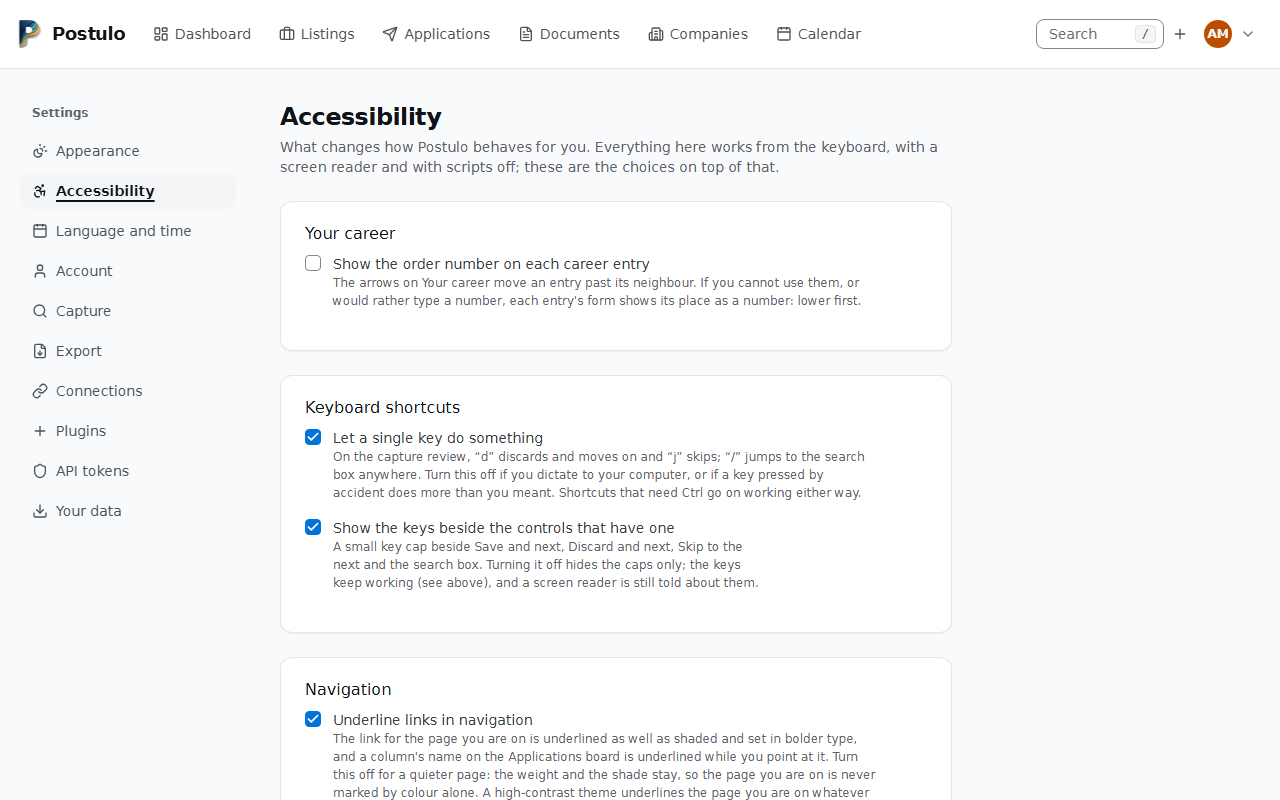
- The choices that change how Postulo behaves for you have an address. Settings → Accessibility holds them: the order number on a career entry for somebody who cannot use the arrows, the switch that turns the single-key shortcuts off, and Underline links in navigation: the link for the page you are on, and a column's name on the Applications board while you point at it. Off leaves the page you are on shaded and in bolder type, so it is never marked by colour alone, and a high-contrast theme underlines it whatever you chose; a card's title on the board keeps its underline, being a link in the content. Reduced motion, more contrast and Windows High Contrast are read from your operating system, which is the setting you already made once for everything, so they are not repeated there. These choices, with density, travel in your export, and a restore brings back a switch you set off (archive format 30). The page also says what Postulo is checked against and links here, so it is where to start when something does not work for you.
- Everything works from the keyboard. Every control can be reached in a sensible order and operated with Enter, Space and the arrow keys; a Skip to content link is the first thing Tab reaches; menus open and close with Enter and Escape; focus is always visible. Sorting a table, turning a page and switching the theme leave focus on the control you pressed, rather than dropping it back to the top of the page. The search bar a narrow screen opens on Companies, Applications and Listings closes as focus leaves it, so it is never left lying over what you have tabbed to; with scripts off, where nothing can close it for you, the page moves down under it and scrolls clear of it instead.
- Focus is visible in a high-contrast theme too. Windows High Contrast and the equivalent elsewhere throw away the colours a page chose, which took the border and the ring that Postulo's fields used to show focus with and left nothing. Every field now draws an outline in your own system's highlight colour.
- Everything works without scripts. The pages are server-rendered HTML. Scripts add convenience — the table narrowing as you type, the password meter, the theme applying before the server confirms it — and every one of them has a plain button that does the same thing.
- Each language names itself, and says so. The language menu lists every language under its own name, and each entry is marked with the language it is in, so a screen reader pronounces it properly rather than reading Greek with English rules. How well translated each one is appears as a heading over the group rather than inside the entry.
- Screen readers are told what changes. Counts that update, the password meter's word, a search result summary and the messages after an action are live regions. Icons that stand alone have names; icons beside words are marked decorative. Tables have headers, sortable ones say which way they are sorted.
- Colour never carries a meaning on its own. A status has its label; the strength meter has its word; a quiet application says so in text. A switch's knob sits at the end its state puts it at in either reading direction, so the position says on or off in a right-to-left language too.
- A group of choices is announced with its question. A set of checkboxes or radios is a fieldset with a legend, and the help and errors are read with it. With scripts off the Tags list is a labelled control, not a bare box.
- Answering Stay leaves the page working. When Postulo asks whether to leave unsaved work and you stay, the button you had pressed (Discard this capture, Sign out) works again. The first mouse click afterwards only wakes it; a key press, or a second click, does it.
- The page follows the direction of the language it is in. In a right-to-left language the whole interface flips — headings, action buttons, the board's columns, the timeline's rule, the menus, the skip link. See Right to left below.
- Text and contrast. Both themes are checked for contrast at the AA level. Text resizes with the browser; nothing is locked to a pixel size.
- Motion. The little animation there is respects prefers-reduced-motion.
- Things you click are big enough to hit. Every button, link and switch is at least 24 by 24 pixels, or else has that much clear space around it. This matters most on a phone, with a tremor, or with any pointer that is not a mouse on a desk.
- Nothing scrolls sideways, in any language. At 320 pixels — the width a normal window has at 400% zoom — every page reads in one column, top to bottom, in Greek and German as well as in English, and no sentence is squeezed into a strip beside a button. Only a data table scrolls across, in its own box, because a table needs its two dimensions to mean anything.
- The navigation is one list, in your order, at every width. It is the same element on a phone and on a monitor, so a keyboard and a screen reader meet it in the same place — after the wordmark, before the search — and it is always named Main. On a wide screen it is a row that never wraps: what does not fit goes under More, a disclosure that opens and closes with Enter and Escape and with scripts off. Below 768 pixels it is a bar at the foot of the window that holds every item, whose targets are at least 44 pixels, with labels that wrap between their words and never inside one. Where the items do not fit, the bar keeps one row and scrolls sideways in its own box — the page itself never does — and an end with more past it fades the items out, so the last one in view is cut part way through rather than marked by a colour alone. A link you reach with Tab is scrolled into view clear of that fade, and the page you are on is in view as the page opens. The page you are on is marked by weight and an underline as well as a shade, and, on a wide screen, More is marked too when that page is under it. Nothing is ever behind the bar: the page scrolls clear of it, a link you tab to near the foot of the window is scrolled above it, and the alert about a failed request sits on top of it. You choose the order under Settings → Appearance, with buttons rather than dragging.
- A rejected form says why, to a screen reader too. When a field is refused, the control is marked invalid and points at the message explaining it, so the reason is read out with the field rather than sitting in red where only eyes can find it.
- A single key does nothing you cannot switch off. Postulo has three one-character
shortcuts —
dandjon the capture review,/for the search box — and they are switched off in one place, Settings → Accessibility → Keyboard shortcuts. This matters most if you dictate to your computer, because speech recognition presses every letter of every sentence andddiscards a listing. Shortcuts that needCtrlare not affected. Keys pressed while an input method is composing a character belong to the character. Where the window is too narrow for the search box in the masthead,/goes to the search page and its own box — or, on Companies, Applications and Listings, opens the masthead's box, which searches that page's table. - The key caps are a switch of their own. Beside Save and next, Discard and next,
Skip to the next and the search box, a small key cap says the control has a key. Settings →
Accessibility → Show the keys beside the controls that have one hides the caps and nothing
else: the keys keep working, and each control still names its key to a screen reader
(
aria-keyshortcuts) whether the cap is drawn or not; the caps themselves are hidden from assistive technology so that they never become part of a button's name. With the single-key shortcuts switched off, nod,jor/cap is drawn, because a hint for a dead key is a lie; theCtrl+Entercap follows this switch alone. On a Mac or an iPhone the cap says the Command key, which is what does the job there, and that is the one thing a script does for it: with scripts off it saysCtrl. - Every page is named by its own heading. The first heading on a page is that page's name, not the name of the area it sits in, so jumping heading by heading tells you where you are; the headings below it step down one level at a time.
- Help is beside what it explains, and never on hover alone. On Your details the sentence that says what a field is for is shown when the field has the focus as well as when the pointer rests on it, so the keyboard and a touch screen get it by going to the field. It stays while you point at it, at any speed — there is no gap between it and its field — and it is shown only where it lies over nothing that matters: never over the field it describes, a refusal, a mark under a row, a card's question mark or the control you are in, and never out of the window. Where there is no such place, as at 400% zoom, the sentence is simply under its field. Escape puts it away without moving you, and a screen reader reads it with the field exactly as it did when it was printed under it (WCAG 2.2 Content on Hover or Focus, 1.4.13). What a field requires — the files an upload accepts, what to type where there is nothing to go on yet — stays in sight under the field, because an instruction has to be there before the mistake (Labels or Instructions, 3.3.2), and so does the sentence beside a tick box. A page that has been refused shows all of its help.
- Each card's help is one press away, in your language. The question mark in a card's corner is named for its card — "Help: Telephone numbers" — and Enter or Space opens the card's help in a panel at the side, which Escape, Close and a press outside all close, handing the focus back. With scripts off the same question mark opens a page holding the same help in a new tab, and says so, so that nothing you have typed is lost; the help of every field is then on the page, under the field.
- On Your details nothing is explained under a heading. A question mark follows the page's heading and one sits at the top right of every section, each with one sentence as its tooltip and the whole help in the drawer. What to type into the links and identifiers is the second half of that sentence. While something on the page is refused, every sentence is shown under its heading.
A breadcrumb under the navigation bar
Settings → Accessibility → Navigation can show a breadcrumb under the navigation bar — Companies, then this company — sticky with the bar, with a link back to each step (#831). It is off by default, a page that has no place in a hierarchy draws none, and it is never drawn on a phone-width screen so the header does not grow. The company page and form, the listing and the application fill it so far.
A second switch, shown once the breadcrumb is on, makes it a thin line that opens while the pointer is on it or the keyboard focus is in it, over the page rather than pushing it, and Escape closes it again (#832). The line is a real border, so forced colours still show it; the animation is a short fade, and none under a reduced-motion preference. A touch screen has no hover, so there the breadcrumb is drawn whole whatever the setting. The links stay in the tab order — taking them out would leave the keyboard no way to open it.
Saving a setting as you change it
By default a setting is saved when you press Save, and is the thing you say last. For a person for whom a button at the foot of a page is far away, a switch on Settings → Accessibility, Save a change as soon as I make it, saves a field as it is changed instead. It is off until you turn it on, and turning it on is itself saved with Save and a reload, because it changes how the page behaves.
What saves on its own is the fields of two pages only: on Appearance, the theme, the density, the number of days before an application is called quiet and the number of days for Closing soon; on Accessibility, the career order number, the keyboard shortcuts, the key caps and the underline of the navigation (and not the switch itself). Nothing else does. The list of navigation items and the list of identifier schemes are changed row by row and saved whole, by Save, as is every other page of Settings and every other form in Postulo. Where the setting is anything else, nothing about the page changes.
It saves when you finish, not as you type. A box or a choice saves at once; a number saves when you leave it; a choice made with the keyboard saves when you press Enter or leave it, not at every arrow press, so that moving through a list does not save each stop on the way. Beside the heading, in a live region a screen reader announces, the page says Saving…, Saved at 14:03 or Not saved, and a refusal is under its field in the words the form uses, marked invalid and pointed at by the field. A change that was refused is not undone for you: change it back. If the settings were changed elsewhere in the meantime (another tab, the API), the field is put back as it now is, with the same sentence a table cell gives, and nothing is overwritten.
Save stays on the page for when you want to say when, and the warning before you leave a page with unsaved work follows what was saved: a field that saved is not unsaved, one that failed is. With scripts off none of this exists, and the form is the form it always was.
What is checked, and how
Every page the browser test suite visits is run through axe-core against WCAG 2.2 at
levels A and AA on every push; a violation fails the build and names the element and the
rule. That covers what a machine can check. Using the pages with a keyboard alone, and
with NVDA and VoiceOver, is done by hand and is the part most likely to find what axe
cannot; findings become bugs with the accessibility label.
Every page a person can reach is on that list, and that is now enforced rather than remembered: a separate test walks the application's own URL table and fails unless each one is either visited by the browser suite or named with a reason it is not a page — a file download, a form submission, a redirect. Adding a page without deciding about it breaks the build.
Size is measured rather than read. axe-core does not enforce Target Size (Minimum) — it reports the rule as needing review rather than as a violation — so the suite above was returning a clean result on pages carrying sixty-two buttons that were 22 pixels square. A second browser test now asks every clickable thing on every one of those pages for its box and holds it to 24 by 24, allowing the criterion's own exceptions: a small target with 24 pixels of clear space around it, a checkbox measured by the label that switches it, and a link inside a sentence, whose height belongs to the prose it sits in. What it cannot judge is whether some other control does the same job at full size; that needs a person, and anything relying on it has to be written down.
References are resolved, which is a third thing a machine can check and axe does not. Every
aria-describedby on every page is looked up against the document, and any that names an
element which is not there fails the build. That was the state of every form Postulo drew
itself: Django marks a refused field aria-invalid and points it at its error, correctly,
and the template drew that error without the id the field was pointing at. The control
announced that it was invalid and that two elements described it, and neither existed. The
forms are also submitted empty on purpose, because a page that has never been refused has no
errors to point at and the half of the bug that matters would never be reached.
Width is measured too, and by the same method: at 320 CSS pixels a third browser test asks each page to scroll sideways and fails if it moves. That is the criterion's own question — Reflow, level AA — and it is not one axe can answer, because it is about layout at a width rather than about a document. Nothing had ever looked at these pages narrow, and every one of them scrolled, by an identical 331 pixels: a single row of navigation links that did not care how wide the window was. The failure names the element rather than the page, because that is the difference between a fix and a search.
The navigation has a test of its own for what it promises and axe cannot see: at every width from 768 up, in English, Greek and German, with scripts and without, the masthead stays on one line; on a phone every slot of the bar is a thumb's size and keeps its words whole under the text-spacing override; the end of a page, a focused link and the alert all clear the bar; and axe reads the bar itself at a phone's width in both themes, which the rest of the walk, at 1280, never draws. On the three table pages the masthead also keeps to one line in English at 1280 under the text-spacing override with scripts off; the open search bar is walked with the keyboard, with scripts on and off, and never lies over the element that has focus.
The walk is taken in three languages: English, Greek and German. A page is made of translated words, and a word that cannot break is as wide as its language makes it. While the walk was English only, the dashboard's arrange page fitted with seven pixels to spare on one machine and was eight over on another, and in Greek it was 64 over on every machine. Greek and German are there because they drew widest of the European catalogues where they were measured.
It also asks a second question, of every box that holds words: do they fit inside it? A row of words beside buttons that will not give way does not scroll when it fails — it hands the words whatever width is left over. On the arrange page that was a column one word wide, with the longest written across the arrows; each built-in plugin's description got six pixels. The page was exactly as wide as the screen, and half of it could not be read.
It is worth being plain about the limit of the automated half. The sign-in page passed every one of those checks, in both themes, while being rendered with no styling at all: the markup was correct, the labels were associated, black on white has ample contrast, and the button was a button. What it did not have was any visual signal that a failed sign-in was an error, any weight on its headings, or anything to make a control look like one. A machine cannot see that, so a separate test now checks that Postulo's own stylesheet reaches those pages at all, and looking at them remains the other half of the job.
The tooltip and the help drawer have tests of their own, because axe sees neither at rest. The browser suite asks one rule of the page at every stop — every tooltip showing is wholly in the window under the masthead, over neither its own field nor a refusal, a mark under a row, a question mark or the focused control, and its words are whole; where none shows, the help is under its field — written in the test and not taken from the script. It walks Your details with Tab and with Shift+Tab in the window 400% zoom leaves, with and without the text-spacing override, and tabs down it at 320 and 1280 pixels in English, German and Greek, where a tooltip is also never over the next stop. It refuses a telephone row and a name and looks for nothing over the refusal, puts a Not checked mark under a row, scrolls a focused field up to the masthead, moves a slow pointer onto a tooltip straight and on a diagonal, crosses a field without stopping, and presses Escape with a menu open and with the focus in the search. It reads a tooltip under forced colours, runs axe in both themes with a tooltip showing and with the drawer open, and does it again with a finger, right to left, and with scripts off.
Right to left
Arabic, Hebrew, Persian and Urdu are read right to left, and a page in one of them has to be laid out that way — not merely have its text reversed inside a left-to-right shell.
What flips. Everything that names an edge: the action buttons at the end of a heading row, the timeline rule beside the event log, the menus that hang from a corner, the skip link, table alignment, and the board's columns, so the earliest status is the one nearest where you start reading. Icons that point sideways are mirrored; ones that point up or down are not, because they mean the same thing either way.
What does not flip. Text that is not in your language. A company called Aperture Science stays Latin and stays left-to-right inside an Arabic line, and so do email addresses, web addresses, version numbers, package names and checksums. They are isolated so the punctuation around them stays where it belongs — without that, a separator jumps to the wrong end of the line and the row reads as nonsense.
A document has its own direction. A CV or a cover letter is laid out for the language it is written in, not for the language you read Postulo in. Somebody using Postulo in Arabic who writes an English CV gets an English, left-to-right PDF; the reverse holds too. That is what the language field on a CV and a letter decides, along with hyphenation and how a screen reader pronounces it.
How it is checked. The browser suite visits the application in a right-to-left language, in both themes, and runs axe over it; it also measures that the action buttons, the board and the skip link actually moved rather than merely being labelled as though they had. A separate lint refuses any stylesheet class that names a left or a right, which is what stops this drifting back one heading row at a time.
No right-to-left language is offered yet. The layout work is done and tested first, so that the language can be added as a catalogue and nothing else.
The documents Postulo renders
They are tagged. A CV, a portfolio, a cover letter and a report all come out as PDF/UA: they carry a tag tree, so the headings are headings, a screen reader can move between them, and whatever reads the file back — a recruiter's software as much as a person's — gets the text in the order it is meant to be read in rather than the order it happened to be drawn in. The language field on the document reaches a reader through that tree, which is what makes it worth declaring. The fallback renderer, headless Chromium, is asked for the same thing and for an outline besides.
Each document names its author in the file's properties, taken from the contact block: your name alone, even on a CV that prints a form of address or pronouns beside it. A CV with its contact details switched off names nobody there either: leaving your name off a CV on purpose does not mean leaving it on in the metadata.
Deliberately not PDF/A. PDF/A is tagged too, and archival besides, but it is a promise that the file will still render identically in decades — kept by embedding an output colour profile and every font the document uses. A theme a plugin ships names fonts that are whatever the server happens to have, so Postulo cannot make that promise for every document it renders, and a conformance claim it cannot honour would be worse than one it never made.
Known gaps
- Colour contrast in the brand accent on dark backgrounds is checked by tooling only; if it reads badly to you, say so.
Telling us
A feature somebody cannot use is a bug. Open an issue on the repository with the page, what you were trying to do, and the assistive technology you use, or write to the maintainer if you would rather not open a public issue. It will be treated as a bug, not a request.