Capturing postings
Esta página ainda não foi traduzida, por isso é mostrada em inglês.
Rather than retyping an advert, paste its address and let Postulo read the page.
Capture a posting, on the dashboard.
What happens
- Postulo fetches the one page you pasted.
- It reads what it can — usually from the structured data the site publishes about itself for search engines.
- It shows you the result in the posting form, for you to correct.
- Nothing is recorded until you save it — and what you save is a listing, something noticed and not yet decided about. Tick I have already applied to this one and it becomes an application straight away.
That fourth step is not a formality. A parser reading markup it has never seen gets things wrong, and a job title invented by a computer is exactly the sort of error you would not spot six weeks later. Everything captured waits at the top of the Listings page until you have looked at it.
What it can read
Structured data. Most large job boards embed a machine-readable description of the
posting for search engines. Postulo reads that. When a site provides it you get the
title, company, location, working arrangement, employment type, salary range, posting
date and closing date, all filled in.
A posting inside a page-level item (a WebPage, or the page's mainEntity) is found in
JSON-LD, microdata and RDFa alike. Where a page holds several postings, the one whose address
is the page's is chosen, and an identifier is compared only when no address names the page.
Whatever else the page says about itself. With no structured data, Postulo reads what the page declares for a link to show (its title, and its OpenGraph and Twitter card properties) and its readable text. A title line such as Senior Plumber at Black Mesa – Lisbon | Jobs Portal is split into its parts, and a part is used only when something vouches for it:
- the page's one heading names the job;
- "at" after the job names the employer;
- a place counts as one when Postulo's offline table of cities knows it, and only when the line names just one;
- the board's own name is taken out.
A salary and a closing date are read where the page writes them just after the words its
own language uses for them (Salary:, Remuneração, Date limite de candidature), with
the currency beside the figure and the date written in full. English is always read. French
and Portuguese are in so far, and any other language is read in English until somebody
translates its word lists on the translation platform. A date that can be read two ways, a
bare $ on a page that does not say which country it is for, and two salaries that
disagree are all left empty.
Where a field cannot be determined it is left empty rather than guessed. A blank box invites you to type; a confidently wrong value has to be noticed before it can be corrected.
What it will not do
- It does not crawl. One page is fetched: the one you pasted. Postulo never follows links looking for more.
- It honours
robots.txt. If a site asks automated clients not to fetch a page, Postulo does not. Copy the text in by hand instead. - It refuses private addresses. Anything resolving to a loopback, private or link-local address is declined — and so is an IPv6 address carrying one inside it, the way a NAT64 address carries an IPv4 one — and every redirect is rechecked. Postulo usually runs on a network with a router and a NAS on it, and a box that fetches any address you type is a way to go looking at them.
- It gives up quickly. Ten seconds for any one wait and thirty for the whole page — its headers, its redirects and every byte — two megabytes, three redirects. A page larger than that is abandoned as it arrives rather than after it has all been read. Only gzip and deflate compression is unpacked; a page sent in any other content encoding is refused, and the message names it.
When the site refuses
Large employers frequently sit behind bot protection that turns away anything which is not a browser. You will see something like:
The site refused the request (403). Large sites often sit behind bot protection that turns away anything that is not a browser, even when the page is perfectly visible to you. Paste the page source in below instead.
The advert is on your screen and unreachable from your server at the same time, and that is not a contradiction: the block is aimed at automated clients in general, not at you.
Postulo does not pretend to be a browser to get around it. Disguising the request would
be dishonest, and it would also break robots.txt handling, which matches on the name a
client gives — so the polite thing and the correct thing happen to agree.
Paste the page source instead. On the capture page, open The site refuses Postulo, or the posting needs a login:
- Open the posting in your browser.
- View the page source (Ctrl+U in most browsers) and select all of it.
- Paste it into the box, along with the address.
Postulo reads what you paste and fetches nothing. Your browser was already allowed to see the page, so there is nothing to refuse.
The same route works for postings behind a login, and for pages built entirely by JavaScript — in the second case, use your browser's developer tools to copy the rendered HTML rather than the original source, since the source will not contain the advert.
This is exactly what the browser extension automates — see The capture API.
When nothing can be read at all
If a page carries no structured data and no usable title, use Add a listing on the Listings page and type it in — or Record an application if you have already applied. Same forms, without the pre-filling.
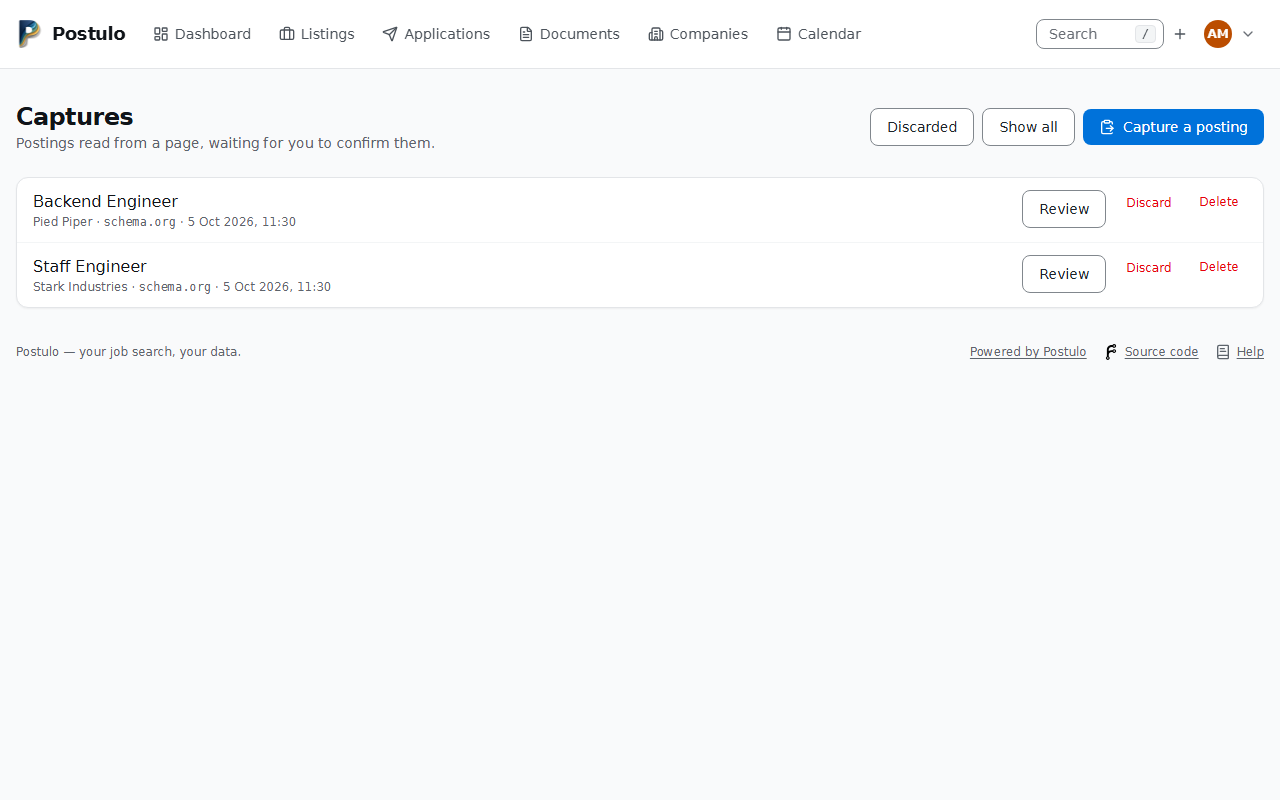
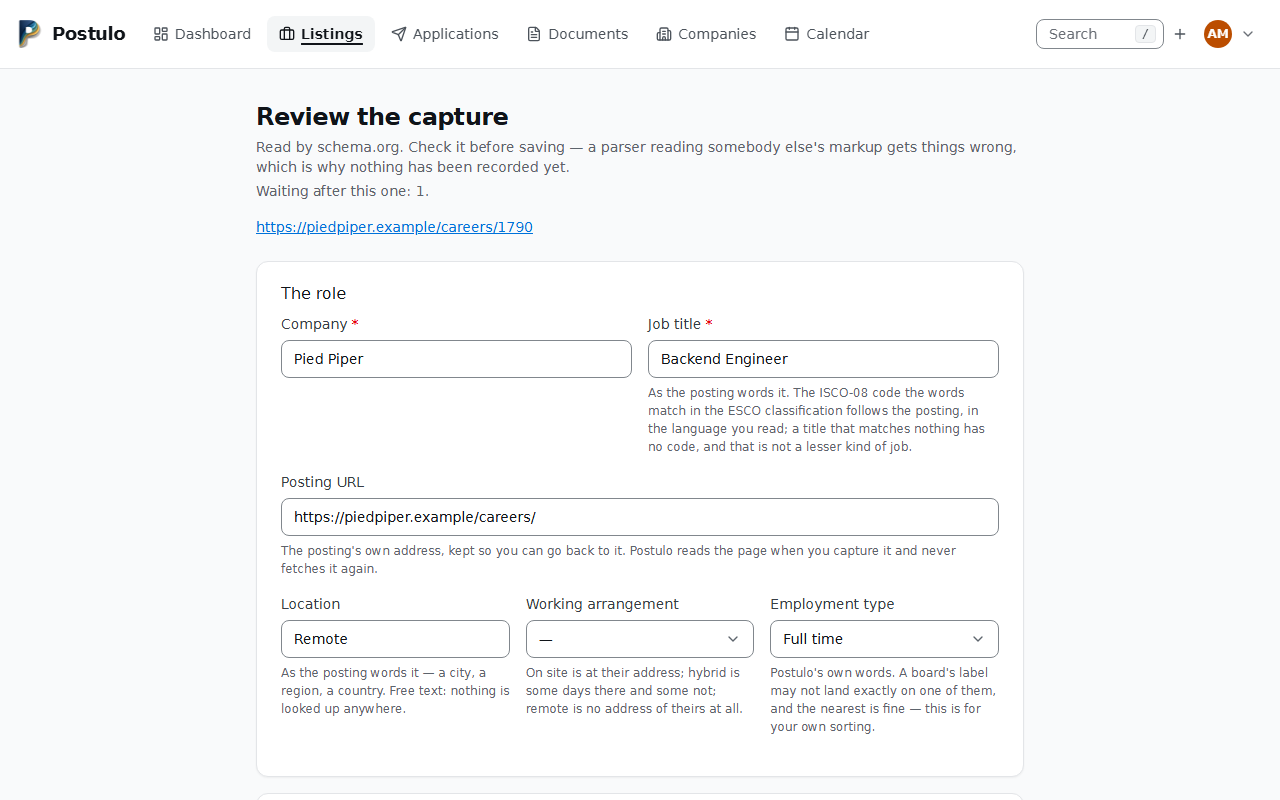
Captures waiting for you
At the top of the Listings page, and counted on the dashboard.
Each capture can be reviewed — which opens the pre-filled form — or discarded. Saving one creates the listing and links the two, so the record shows where it came from. A capture is decided once: a form sent twice, or an old review link, makes no second listing, and the review page of a capture already saved or discarded says what it became and offers no form.
The heading counts the captures waiting and links to the full list. That list can also
show the discarded captures (?show=discarded), each with Put it back, which makes it
waiting again; a saved capture links to its listing.
Triage is built for forty at a time. Tick the ones a glance at the title rules out and
press Discard the ticked ones; open the rest. The review page says how many are still
waiting and moves on by itself: Save and next and Discard and next beside the
plain buttons, and Skip to the next for one you cannot decide yet — a skipped capture
comes round again at the end. Three keys do what those buttons do, while nothing is being
typed: d discards and moves on, j skips, Ctrl+Enter saves and moves on.
d and j are single keys, and a single key is not always welcome — dictating to your
computer presses every letter of every sentence, and d discards a capture without asking.
So they can be switched off, under Settings → Accessibility → Keyboard shortcuts, together
with the / that jumps to the search box. Ctrl+Enter is not a single key and is never
switched off. The line under the buttons says which keys you actually have, so a page never
offers you one you have turned off. A small key cap beside each of those buttons says its key too, and Settings → Accessibility has a separate switch for the caps alone.
A currency or salary period the page never stated is marked as a default beside the box. Boards write a currency into every advert with no amount behind it, and Postulo does not repeat that as a reading.
A field read where your own corrections on that site showed it before is marked as well; see Sites you capture from often.
Sites you capture from often
When you correct a field on the review screen and the value you typed is on the page, Postulo remembers where it was, for that site and for you alone. The next capture from the same site is read there first: below what the site states in structured data, and above what the page says about itself.
- Only what you changed teaches. A field you left alone is not taken as proof that it was right.
- Where, not what. A place is an element's id, a microdata property, a
data-attribute, the label beside the value, a class name, or a heading's position in the page's main area. It is never a path through the page, so a cookie banner or a new column does not break it. A place that has gone, or that now names two things, finds nothing, and the field is read as if nothing had been remembered. - It says so. A field filled from a remembered place is marked in words, and a line above the form names them. Treat them as a better guess, not a fact.
- It forgets on its own. A place that is wrong twice in a row is dropped: you changed what it found, or you typed a value it could not find. A place that found nothing where the advert had nothing (no salary, say) is not held against it.
- You can forget it yourself. Settings → Capture → Places remembered from your corrections lists each site and its fields, with Forget.
Nothing is shared. There is no list of sites anywhere except your own account, and the places are in your export and go with your account. Corrections sent by the browser extension teach the same way. To learn after the tab is closed, Postulo reads the page again from its kept source where you keep sources. Where you do not, a waiting capture keeps short fingerprints of what was where on the page (not its words) until you save or discard it.
Keeping the page
A capture reads a page, keeps what it understood, and throws the page away — unless you ask for the page to be kept too. It is worth asking for, because the reading is a guess and the page is the evidence: when the advert disappears, the listing is all you have left, and what the page actually said is the thing you would want to check it against.
Two things can be kept beside a capture, each on its own:
- The source — the page exactly as it was read: what Postulo fetched, what you pasted, or what the browser extension sent. With it, a capture can be checked against the page, and read again by a better parser one day.
- A rendering — a picture of the whole page, or a PDF. One sent by the browser extension shows the page as you were seeing it. Where there is none, one can be drawn from the kept source: the words of the page, laid out with scripts, the network and every outside picture and stylesheet switched off.
Both are off until two people say yes. An administrator allows each under Server settings → Capture; then you switch each on for your own captures under Settings → Capture. What the administrator has switched off is off for everybody, and is shown to you locked, with the reason. Switching it on applies to the captures made from then on.
Think about what a page holds before you switch it on. The source carries whatever the page addressed to you — your name if you were signed in, the tracking in its links. A picture taken in your browser shows the page as you saw it, signed in or not.
Where it is. The review screen says when a page was kept and links to it; so does the
listing a capture became, under Original posting. That page shows the rendering, and the
source as text — it is somebody else's markup, so Postulo never draws it as a page.
Download it as text saves it as a .txt file; Draw it from the source makes a PDF
where there is no rendering yet (an instance that cannot draw safely says so and keeps the
source only). Each can be deleted from there; the capture itself stays as it is.
How long. The page of a capture that never became a listing — one discarded, or still
waiting — is deleted 30 days after it was captured, unless your instance says otherwise. A
capture you saved keeps its page for as long as the listing it became exists, and goes with
that listing: deleting a listing deletes the captures that became it (or were added to its
history), with what they kept of the page, and the confirmation says how many. A capture you
have not saved can be deleted at once from its review screen or from the list, page and all;
a saved one cannot, because what it kept is the listing's. Captures saved before this
rule, whose listing was already deleted, are named by manage.py prune_captures and removed
with --remove. Each account has a ceiling on what its kept pages weigh
together, shown under Settings → Capture; past it, captures are still made and nothing
more is kept until you delete something.
Kept pages are in your export, and go with your account when it is deleted.
Capturing from elsewhere
An instance can accept captures from outside: a script, a keyboard shortcut, or the browser extension. See The capture API.
Teaching Postulo about a particular site
If a board you use often is read badly, a plugin can be written for it and installed without changing Postulo or waiting for anyone. See Writing a plugin.
The capture page lists which sources are installed.